Usage — Lifeguard Job | Quasar Store | Quasar Store
Documentation
Usage
Using Lifeguard Job: the station panel, land and water patrols, all 16 rescue call-outs and the CPR minigame, co-op shark and surfer rescues, vehicles, levels, statistics and the settings panel.
Three stations stand on Vespucci Beach — North, Central and South — each with a captain under a floating blue marker. Talking to one cuts the camera to the captain, with their name and a greeting on the left, and opens the panel on the right. The header shows the station, your level and how much experience is left to the next one. Read top to bottom, the panel is the shift being set up:
Section
What is there
Patrol Systems
Two cards, flipped with the arrows: Land (sand, promenade and car parks) and Water (everything past the shoreline). Each shows the level it opens at, how many vehicles and patrol points it has, and its best pay bonus.
Vehicles
The rides of the patrol on show, each with its picture and pay multiplier. A locked one says the level it needs.
Job Details
A short briefing of how the job works.
Button
What it does
Statistics
Your totals, the leaderboard and a podium per call-out.
Guide
How the job works in six steps, a few tips, and every call-out with its tier, level, pay and experience — locked ones marked.
End Shift
Only while on duty. Takes the uniform off, stores the vehicle and ends the shift.
Store Vehicle
Only while you have one out. Puts it away and stops the patrol; you stay on duty.
Start Mission
Lit once an unlocked vehicle is selected. Starts the shift and the patrol.
Pick a patrol, pick a vehicle and press Start Mission. In one go:
You go on duty and, with Config.Clothing on, into the uniform.
The screen fades and you are put in the driver's seat. An ATV appears on that station's land spot (anything parked on it is cleared first); a jetski appears offshore, scattered within 20 m of the station's water spot so two lifeguards never land on each other.
Your lock script hands you the keys, and the tank is filled if Config.Fuel is on.
The patrol of that system starts, and the first checkpoint goes on your map with a route.
To trade up once a better vehicle unlocks, come back to any station and start again with the new one: the old vehicle is removed and the patrol restarts. Vehicles cannot be swapped or stored in the middle of a call-out.
The land route has eleven checkpoints along the sand and the water route five out at sea. They are visited in a shuffled order, one at a time; when the last one is reached the route reshuffles and starts over. Getting within 12 m of the marked checkpoint counts as arriving, and every arrival asks the server whether something happens there:
Level
Chance of a call-out
Simple
Moderate
Complex
Rare
1
40%
100
—
—
—
2
50%
80
20
—
—
3
60%
60
30
10
—
4
70%
40
34
22
4
5
80%
28
32
30
10
6+
90%
28
32
30
10
When the chance lands, a tier is drawn with the weights of your level, and then a call-out of that tier which your level has unlocked and which happens on the route you are riding — land call-outs on the land route, water call-outs at sea. Levels above the last row use the last row. All of it is Config.CheckpointIncidentChance, Config.DefaultCheckpointIncidentChance and Config.IncidentTierWeights in config/incidents.lua.
When a call-out turns up, the checkpoint blip is replaced by the call's own blips and a help panel says what to do. The patrol waits for you and the next checkpoint comes back the moment the call ends. A checkpoint where nothing happens just says Zone patrolled. Head to the next zone.
Sixteen call-outs ship with the job. The money is multiplied by the vehicle you are out in; the experience is not. Every value below is a field of that call-out in config/incidents.lua.
Call-out
Tier
Level
Route
Pays
XP
Time limit
Jellyfish Sting
Simple
1
Land
$20
20
3 min
Swimmer in Danger
Simple
1
Land
$20
25
3 min
Fallen Warning Flag
Simple
1
Land
$25
25
6 min
Illegal Campfire
Simple
1
Land
$20
20
3 min
Disruptive Bather
Simple
1
Land
$25
30
3 min
Exhausted Swimmer
Moderate
2
Water
$50
60
6 min
Stranded Boat
Moderate
2
Water
$50
65
8 min
Medical Supplies
Moderate
2
Land
$45
50
6 min
Missing Runner
Moderate
2
Land
$50
55
5 min
Rip Current
Complex
3
Water
$70
90
8 min
Drifting Boat
Complex
3
Water
$80
100
10 min
Heatwave Victims
Complex
3
Land
$70
85
8 min
Lost Pet
Complex
3
Land
$100
110
12 min
Emergency Flags
Rare
4
Land
$100
120
8 min
Shark Alert
Rare
4
Water
$120
160
10 min
Drowned Bather
Rare
4
Land
$150
90
5 min
Every interaction is the same key: walk up and press E on the prompt, or use the third-eye option with Config.Target = true. People and objects you need are marked with a floating arrow and a blip; most treatments play a short progress bar with a cinematic camera. What each call-out asks of you:
Jellyfish Sting
A beachgoer sits on the sand a few metres from the checkpoint. Use Apply First Aid and kneel through a 4-second treatment. Some stings are severe — the help panel says so — and take 12 seconds instead.
Swimmer in Danger
A swimmer is in a restricted stretch of shallow water. Use Warn Swimmer; they argue back and ignore you. Use Insist, point them out of the area, and they leave.
Fallen Warning Flag
A warning flag lies on the sand by its post. Use Pick Up Flag and carry it in your hand to the marked Installation Point a few metres away, then Install Flag — a 3-second bar plants it back in the sand.
Illegal Campfire
Follow the route to a campfire with four to eight people drinking and smoking around it. Use Extinguish Fire (4 seconds — the flames cannot hurt you while you do). The group curses you out and scatters.
Disruptive Bather
A drunk bather staggers around the beach shouting. Catch up with them and use Assist Bather from close range. They resist two to four times — each time they shake you off and wander away again, so you have to chase them down — until they finally sit down and wait for help.
Exhausted Swimmer
A swimmer is calling for help 20–40 m out. Ride up on your jetski — you must be on a vehicle — and use Rescue Swimmer from within 5 m. They climb on behind you; follow the route to the nearest Safe Zone on the shore and they get off there.
Stranded Boat
A dinghy has stalled offshore with two passengers in the water beside it. Use Help to Shore on each and they start swimming in. Passengers can panic and stop halfway — use the same option again to get them going. Once both are ashore the dinghy's engine starts: climb in and drive it to the Marina. The screen fades, the boat is handed in, and you are put back on your own vehicle.
Medical Supplies
Follow the route to the Supply Pickup and use Pick Up Supplies (3 seconds — a backpack goes on your back). Take it to the Delivery Point further down the beach and use Deliver Supplies.
Missing Runner
A jogger has collapsed somewhere inside the Search Area circled on the map — with no marker on them. Search on foot or on the ATV; getting within about 12 m reveals them. If you have not found them after 45 seconds you hear a faint sound and are told which direction it came from. Then Apply First Aid.
Rip Current
Two or three swimmers are caught in a current offshore. Some of them are panicking and have to be calmed first (Calm Down, 4 seconds); then use Assist Swimmer on each one. The help panel counts how many are left.
Drifting Boat
An empty dinghy drifts 40–70 m out. Get alongside and use Secure Boat (5 seconds). Its engine starts: take the helm and drive it to the Marina, where it is handed in and you are put back on your own vehicle.
Heatwave Victims
Two or three people have collapsed with heatstroke in the same stretch of sand, each blipped. Treat every one of them with Apply First Aid; the help panel counts how many are left.
Lost Pet
The longest call-out on the beach, in five stages:
A worried owner walks up. Use Receive Report — and stay within 80 m of them from here on, or the call fails.
Walk up to the first clue in the search area: paw prints. The area narrows.
Walk up to the second clue: a ball. The dog is close.
The dog bolts when it sees you, then stops. Approach calmly and use Calm Pet from a few metres away — rushing right up to it can scare it off again.
The dog follows you. Walk it back to its owner.
Emergency Flags
Dangerous conditions: three Flag Post blips appear along the beach at once, in whatever order you choose to visit them. Use Raise Warning Flag at each (2.5 seconds) until all three are up.
Shark Alert
Three to six swimmers are spread out offshore and a tiger shark — red blip, red marker — starts closing in on the nearest one after a 15-second head start. Clear every swimmer from the water, two ways:
Warn Swimmer on any swimmer — they swim away at once.
Ride up and hold your position within about 8 m of the shark for 4 seconds — it is redirected and the swimmer it was hunting evacuates.
You are warned when the shark gets within 10 m of a swimmer. If it reaches one, or time runs out with swimmers still in the water, the call fails.
Drowned Bather
Someone has been pulled from the water and a crowd of ten is shouting around them. Use Perform CPR: you kneel beside the victim and the cardiac monitor opens — see The CPR minigame below. Bring them back and they get up to the crowd's cheers. The clock is the call's own five minutes, and it started when the call did.
A marker sweeps back and forth across a bar, about once every 1.8 seconds. Press E as it crosses the middle. Each press is graded, and the goal is to fill the progress bar to 100%:
Grade
Where
Effect
PERFECT
The green centre
+15–25%
GOOD
The amber band around it
+5–10%
MISS
Anywhere else
−10–20%
After a good or perfect press the next one is locked for a moment — one compression at a time — so mashing the key only racks up misses. The monitor shows the pulse and breathing, a spike for every compression and the time left, which turns amber and then flashes red; the help panel shouts Hurry! and then CRITICAL as it runs out. The gains, the penalty and the warning points are the cpr block of drowned_bather in the config, and the key is Config.InteractKey.
Finished — the pay and the experience arrive straight away, and the patrol carries on.
Out of time — Incident abandoned. Nothing is paid, and the next call-out can take up to a minute to turn up.
Shift ended or job changed — the call is abandoned and pays nothing.
The server only pays a lifeguard who still holds the job, is still around the beach, and finished within the time limit — so the pay cannot be farmed from somewhere else in the city.
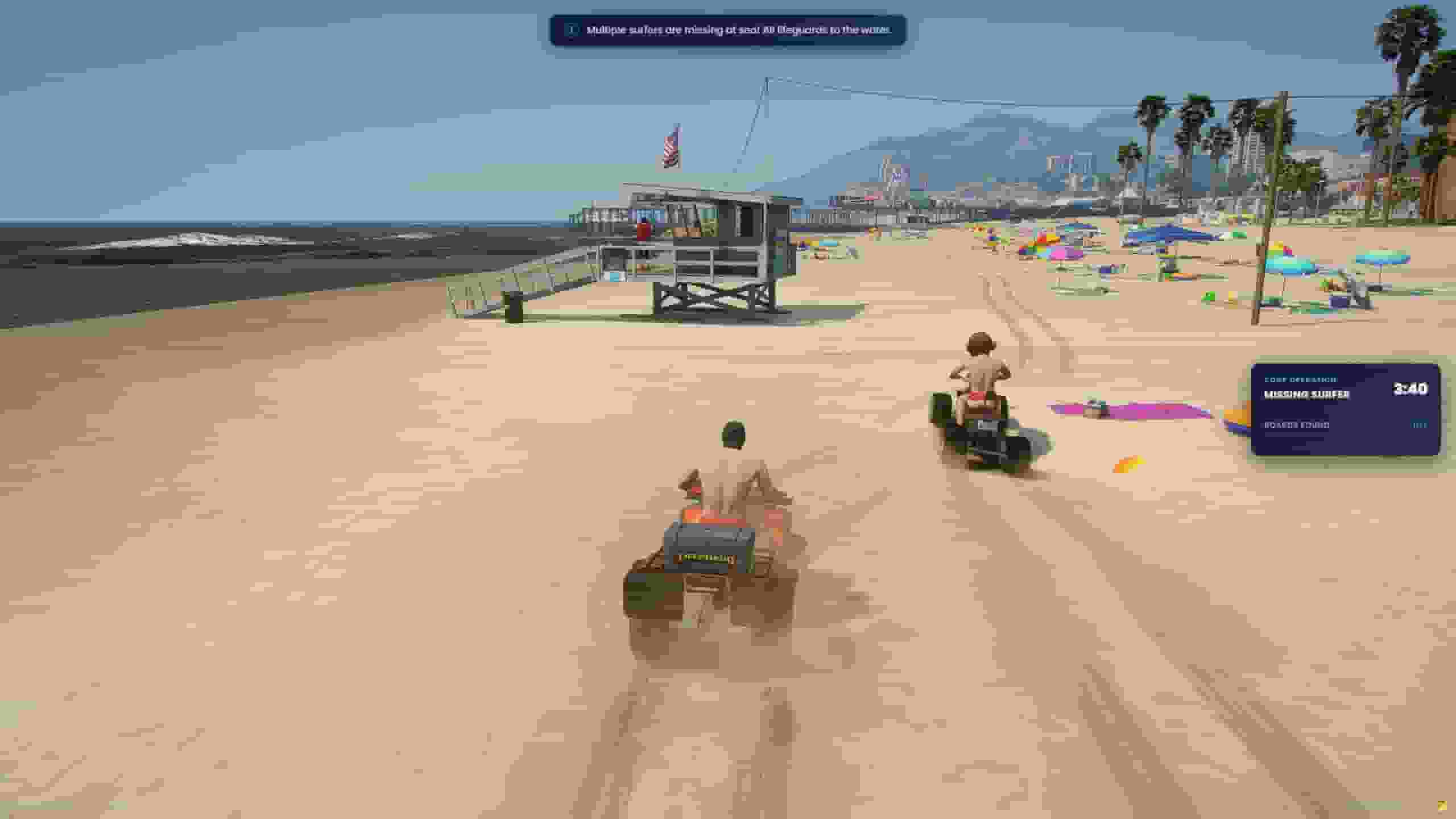
When two or more lifeguards are on shift, any checkpoint arrival also has a 30% chance of starting a shared emergency. Only one runs at a time, and after one ends the beach rests for 10 minutes (5 after a failure). Every lifeguard on shift is called in, wherever they are, and anybody who starts a shift while it is running joins late. Solo call-outs pause until it is over, and a panel on screen shows the operation, the time left and the progress.
Rescue
Scales with the crew
Pays each lifeguard
Missing Surfer
One board and one surfer per lifeguard; two minutes per lifeguard on the clock.
$50 / 10 XP per board found, $100 / 30 XP per surfer delivered, +$50 / 20 XP completion bonus.
Sinking Vessel
Five to ten passengers per lifeguard; ten seconds per passenger plus two minutes.
$100 / 30 XP per passenger rescued, +$50 / 20 XP completion bonus.
Shark Alert
One shark for every two lifeguards, four swimmers per shark; one minute to get ready, then eight minutes.
$30 / 10 XP per swimmer still alive, +$50 / 20 XP completion bonus.
Pay is per lifeguard and for their own work: only someone who found a board, delivered a surfer, rescued a passenger or drove off a shark is paid, and the money is multiplied by the vehicle they are out in. Stepping off shift during a rescue keeps what you had earned on it if you come back to the same one; changing job forfeits it.
Missing Surfer
Surfboards are adrift at sea, one per lifeguard on the call, each a yellow blip. Spread out and ride within a few metres of each to find it — anybody can find any board.
When the last board is found, the surfers appear. Ride up on a jetski and use Rescue Surfer — you need a vehicle, and each lifeguard carries one surfer at a time.
Follow the route to the Shore Dropoff to deliver them.
It ends when every surfer is ashore, or when the clock runs out — in which case it pays for what the crew did manage.
Sinking Vessel
A tug is going down at sea. Get to it and use Grab Life Vest from aboard.
Passengers abandon ship one every ten seconds and appear in the water around it, each with a red blip.
Swim to each one and use Rescue Passenger — you need the vest, and you have to be in the water rather than on a jetski. They get a life ring and swim for shore.
It ends when every passenger is safe, or when the clock runs out with a partial payout.
Shark Alert
Swimmers are already in the water when the call goes out, and the crew has a one-minute preparation phase to get into position. Then the sharks arrive from 100 m out and hunt the nearest swimmers.
Get within about 15 m of a shark and it backs off and veers away. Staying close keeps driving it off.
Too close — within 3 m — and it bites you for 10–30 damage. By default a bite cannot kill.
Keep as many swimmers alive as you can until the eight minutes run out.
Surviving the clock completes the rescue; losing every swimmer fails it and pays nothing. Only lifeguards who actually rode out and drove off a shark are paid.
Every vehicle multiplies what each call-out pays while you are out in it — the reason to come back and trade up. Experience is never multiplied.
Vehicle
Model
Patrol
Unlocks at
Pay
Blazer ATV
blazer4
Land
Level 1
×1.00
Seashark
seashark
Water
Level 2
×1.05
Blazer
blazer
Land
Level 3
×1.10
Seashark 2
seashark2
Water
Level 4
×1.15
Blazer 2
blazer2
Land
Level 5
×1.20
Seashark 3
seashark3
Water
Level 6
×1.25
Vehicles are a list per patrol in Config.VehicleTypes: add a row with a spawn name, a level, a picture and a multiplier and it appears on the panel. For a picture of your own, put a full https:// address in img; with no picture the card shows an icon instead.
Levels have no cap. Each one costs GrowthFactor times the one before it (Config.LevelExperience):
Level
1 → 2
2 → 3
3 → 4
4 → 5
5 → 6
Experience
3,500
3,850
4,235
4,658
5,124
lua
Config.LevelExperience = {
    BaseExperience = 3500,  -- what level 1 → 2 costs
    GrowthFactor   = 1.1,   -- raise to stretch the curve, lower to flatten it
}
A level-up is announced on screen with the experience earned. Levels are stored per character.
Come back to any station and press End Shift: the uniform comes off, the vehicle is put away and you go off duty. A call-out still open is abandoned and pays nothing. A shift also ends on its own, the same way, when the player:
takes another job — the stations and blips disappear for them too;
Guide walks a new lifeguard through the job in six steps and four tips, then lists every call-out with its tier, the level it needs, what it pays and its experience — the locked ones marked, so it doubles as a preview of what the next level opens. The walkthrough comes from the GUIDE_ lines of the locale file; delete one and the step disappears.
Statistics shows:
your total call-outs, experience and money earned, with a breakdown per call-out;
the global leaderboard — the ten lifeguards with the most call-outs;
a top three for every call-out, and how often each has been cleared across the server.
Only solo call-outs are counted, and the board is saved to data/stats.json. The name shown follows Config.PlayerNameSource: 'character' for the character's name, 'cfx' for the FiveM name, or 'both'.
/lifeguardadmin opens every setting in config.lua and incidents.lua, grouped into pages, each setting carrying the help text from the comment above it in the file:
Page
What it holds
Shared calls
Start a cooperative rescue now, stop the one running, and how often they turn up on their own.
Job & stations
Who may work, the uniform, the three stations, the captain, blips, the marker, target or prompts, and the name on the statistics board.
Vehicles
The two patrol systems, every ride and its pay, spawn spacing, the marina and fuel.
Patrol
Both routes, the arrival radius, the chance per level and the tier weights.
Call-outs
Every call-out — pay, experience, level, time limit, places — and the beachgoer models.
Levels
The experience curve.
Setup
Language, notifications, currency, Discord logs, the panel itself and debug.
Other
Anything you added to the config that belongs to none of the above.
The search box at the top looks through every setting. Coordinates come with Use my position (and your heading, where the setting has one), Go there to check a spot, and Waypoint. Lists — checkpoints, call-outs, vehicles — have Add and Remove, and settings with a fixed set of answers, like the language, offer the list rather than a text box.
Edits collect until you press Apply, which asks before writing them to the database (Discard drops them). A setting changed from the panel is marked as such, with an arrow that puts it back to the file's value; Reset everything does that for all of them.
The first page shows how many lifeguards are on shift against how many a shared call needs, lists the three cooperative rescues with a Start button each, and shows the one running — its time left and how many are on it — with Stop. Starting one skips the 30% roll and the cooldown, but still needs the switch on and the minimum crew on shift.
A saved setting takes effect on the next restart, not now. Swapping the config out from under lifeguards halfway through a call-out would be a different job mid-rescue, so the panel saves, shows a banner — Saved settings are waiting for a restart — and the change goes live with restart qs-lifeguard or the next server start. Starting and stopping a shared call is immediate.