Usage — Vending Machine Creator | Quasar Store | Quasar Store
Documentation
Usage
Using Vending Machine Creator: map machines, placing your own with the creator, machine types, ownable machines with stock and earnings, robberies and the VendGo phone app.
Vending Machine Creator has three windows, each for a different person. Buying a product is not one of them: [E] on a machine opens a plain menu of its products, their prices and — on owned machines — the stock left.
Window
Opened with
What it is for
The creator
/vendingcreator
Admins and the jobs in Config.CreatorJobs: placing, editing, teleporting to and deleting machines.
The purchase panel
[E] on a machine for sale
Any player: the machine's price, the account it is paid from, and the button that buys it.
The owner's panel
[E] on a machine you own
The owner: earnings, stock, prices, and selling the machine back.
Prompts appear within two metres of a machine. While a panel is open or a robbery is running, the machines behind it stay quiet, so one key press never triggers two things.
The GTA map is full of vending machines, and every one whose model is listed in Config.MachineTypesworks out of the box: walk up, press [E], pick a product. Nothing to place and nothing stored in the database.
Machine type
Model
Sells
Drink Machine
prop_vend_soda_01
Water, Cola, Orange Soda, Energy Drink
Drink Fridge
prop_vend_fridge01
Cola, Water, Beer
Sprunk Machine
prop_vend_soda_02
Sprunk, Lime Soda, Energy Drink
Snack Machine
prop_vend_snak_01
Chips, Chocolate, Nuts, Candy
Snack Machine 2
prop_vend_snak_01_tu
Cookies, Donut, Cupcake
Coffee Machine
prop_vend_coffe_01
Coffee, Espresso, Cappuccino
Water Dispenser
prop_watercooler
Water Bottle
Map machines sell at the config's prices, charge the config's account and never run out. They have no owner and cannot be robbed — for that, place a machine of your own.
/vendingcreator opens the creator. The left column lists every placed machine with a search box, its product count, its payment account and a blip badge; the pin button teleports you to it and + starts a new one. Selecting a machine opens it on the right.
The name, the model, the payment account, and Apply Template, which fills all of them plus the products from a machine type in one click. Below them, the For sale switch with its purchase price, and Can be robbed.
Placement
Where the machine stands. Select puts you in placement mode.
Products
One row per slot: the item, picked from your inventory's own list with its picture, the label shown in the menu, and the price.
Blip Settings
An optional map blip: its name, a sprite and a colour from searchable lists with previews, its scale, and its position — typed, or picked by aiming.
Access Control
Jobs and grades attached to the machine. They are saved with it, but in this version they do not limit who can buy from it.
The model list holds the props of Config.MachineTypes, and the account list is Config.CreatorMoneyTypes — both are covered below.
Select closes the window and puts a see-through copy of the machine wherever you aim, sitting on the ground. Instructional buttons at the bottom of the screen show the keys:
Key
Does
Aim
Moves the machine.
Mouse wheel
Turns it 15° per notch.
Z / X (hold)
Turns it slowly, for a precise angle.
Left click
Places it.
BACKSPACE
Cancels, keeping the position it had.
The creator reopens with the position filled in. Moving a machine again starts from the rotation it already had.
If a placement is ever left running, opening the creator cancels it — you can never be stuck in placement mode.
Create Machine needs a name, a model, a position and at least one product — the error says which is missing. The machine appears for every player at once. A machine flagged For sale may be created without products, but its owner can only restock and reprice what it already sells, so give it a product list first.
Save on an existing machine never touches what players did with it: the owner and the uncollected earnings stay, and stock is carried over product by product, matched by item name. A product you add starts at zero stock; a product you remove takes its stock with it.
Config.MachineTypes does three jobs at once: it is the list of templates in the creator, the list of models a machine can use, and the product list of every map machine with that model.
lua
Config.MachineTypes = {
    drinks = {
        label = 'Drink Machine',        -- shown in the creator and the prompt
        prop = 'prop_vend_soda_01',     -- the world model
        account = 'money',              -- money · bank · black_money
        items = {
            { item = 'water_bottle', label = 'Water', price = 5,  prop = 'prop_ld_can_01' },
            { item = 'cola',         label = 'Cola',  price = 10, prop = 'prop_ecola_can' },
        },
    },
}
item is the inventory name, label and price are what the menu shows and charges, and prop is the object the character holds during the buying animation. Products added in the creator hold a can.
To sell your server's own items, change the item names to them. To offer another model, add an entry with that prop: it appears in the creator's model list, and every copy of it on the map starts selling its products.
Placed machines keep their own product list in the database. Editing Config.MachineTypes changes the map machines and the templates, never a machine you already placed — edit that one in the creator.
[E] - Use <machine> opens the product menu. Picking a product checks the money and — on ESX — whether the character can carry it, before anything moves. Then the character walks up to the front of the machine, plays the vending animation with the product in hand, and the item lands in the inventory.
The server reads the price from the machine itself; the player's game never sends one. A refusal — not enough money, a full inventory, a product out of stock — is shown as a notification.
Turn on For sale in the creator and set the purchase price. Until somebody buys it, the machine sells nothing: nearby players see [E] - Buy machine ($price), which opens the purchase panel. The price is charged to Config.Ownable.purchaseAccount, the buyer becomes the owner, and for them the prompt turns into [E] - Manage <machine> straight away.
Ownership belongs to the character: on QBCore and QBox it is the citizen id, on ESX the character's identifier.
What the machine has made since the last collection. Collect pays it into Config.Ownable.payoutAccount.
Your share · Total stock
The percentage of every sale that is yours, and the units inside across all products.
Products & Stock
Per product: its price with Save, what you earn per sale, the stock, and Restock — which moves units from your own inventory into the machine and shows how many you carry.
Sell machine
Hands the machine back for resaleRatio of its price, plus any earnings not yet collected. Hidden when resaleRatio is 0.
An owned machine sells real stock: every unit was put in by its owner, other players see the stock beside each price, and a product at zero is greyed out in the menu. A slot holds up to maxStockPerItem units, and a price can be set to anything from 1 up. Which products the machine sells is decided in the creator; the owner restocks and reprices them.
The customer always pays the full price. ownerShare percent of it builds up as the owner's earnings and the rest is removed from the economy as tax — and since the owner pays for stock with their own items, a machine is a business, not a money printer.
lua
Config.Ownable = {
    enabled = true,             -- machines can be bought by players
    purchaseAccount = 'bank',   -- account charged when buying a machine
    payoutAccount = 'bank',     -- account credited with earnings and resale
    ownerShare = 80,            -- % of each sale the owner keeps, 0-100
    maxStockPerItem = 200,      -- units one product slot can hold
    resaleRatio = 0.5,          -- refund when selling back; 0 disables it
}
Machines with Can be robbed on show [G] - Force machine to anyone carrying Config.Robbery.item. No lockpick, no prompt — and an owner never sees it on their own machine.
Force the lock
A progress bar runs for duration seconds with the character working the lock. Backing out here costs nothing: no lockpick at risk and no cooldown.
Beat the skill check
An ox_lib skill check, one round per entry in skillCheck.difficulty, on the keys in skillCheck.inputs.
Take the loot
From an owned machine, stealPercent of every stocked product — at least one unit, at most maxPerItem — and the owner is told how many units went. From a machine nobody owns, a random unownedLoot number of units from its product list. Whatever the thief cannot carry stays inside.
Outcome
What happens
Success
Loot handed over, the lockpick breaks breakChance% of the time, and the machine is shut for cooldown seconds.
Failed skill check
Nothing taken, the lockpick breaks breakChanceFail% of the time, and the machine is shut for cooldownFailed seconds.
Empty owned machine
"This machine is empty" — before the lock is touched.
The lockpick is only used up when it breaks. The police alert goes out when a robbery starts, alert.chance% of the time, to every online player whose job is in alert.jobs: a notification and a flashing blip with an 80-metre area that fades after blipTime seconds.
lua
Config.Robbery = {
    enabled = true,
    item = 'lockpick',            -- no item, no prompt
    key = 47,                     -- G
    useItem = false,              -- also start it by using the item
    allowSelfRobbery = false,     -- testing only: rob your own machine
    duration = 6,                 -- seconds forcing the lock
    skillCheck = {
        difficulty = { 'easy', 'medium', 'medium' },  -- one round each
        inputs = { 'w', 'a', 's', 'd' },
    },
    breakChance = 15,             -- % the lockpick breaks after succeeding
    breakChanceFail = 50,         -- ...and after failing
    stealPercent = 50,            -- % of each stocked product taken
    maxPerItem = 10,              -- most units of one product per robbery
    unownedLoot = { min = 1, max = 4 },
    cooldown = 1800,              -- seconds shut after a successful robbery
    cooldownFailed = 60,          -- ...after a failed attempt
    alert = {
        enabled = true,
        chance = 70,              -- % the alert goes out
        jobs = { 'police', 'sheriff' },
        blipTime = 60,            -- seconds the blip stays
    },
}
Cooldowns are kept in memory: players who join late still see a forced machine as shut, but a restart of the resource clears them all.
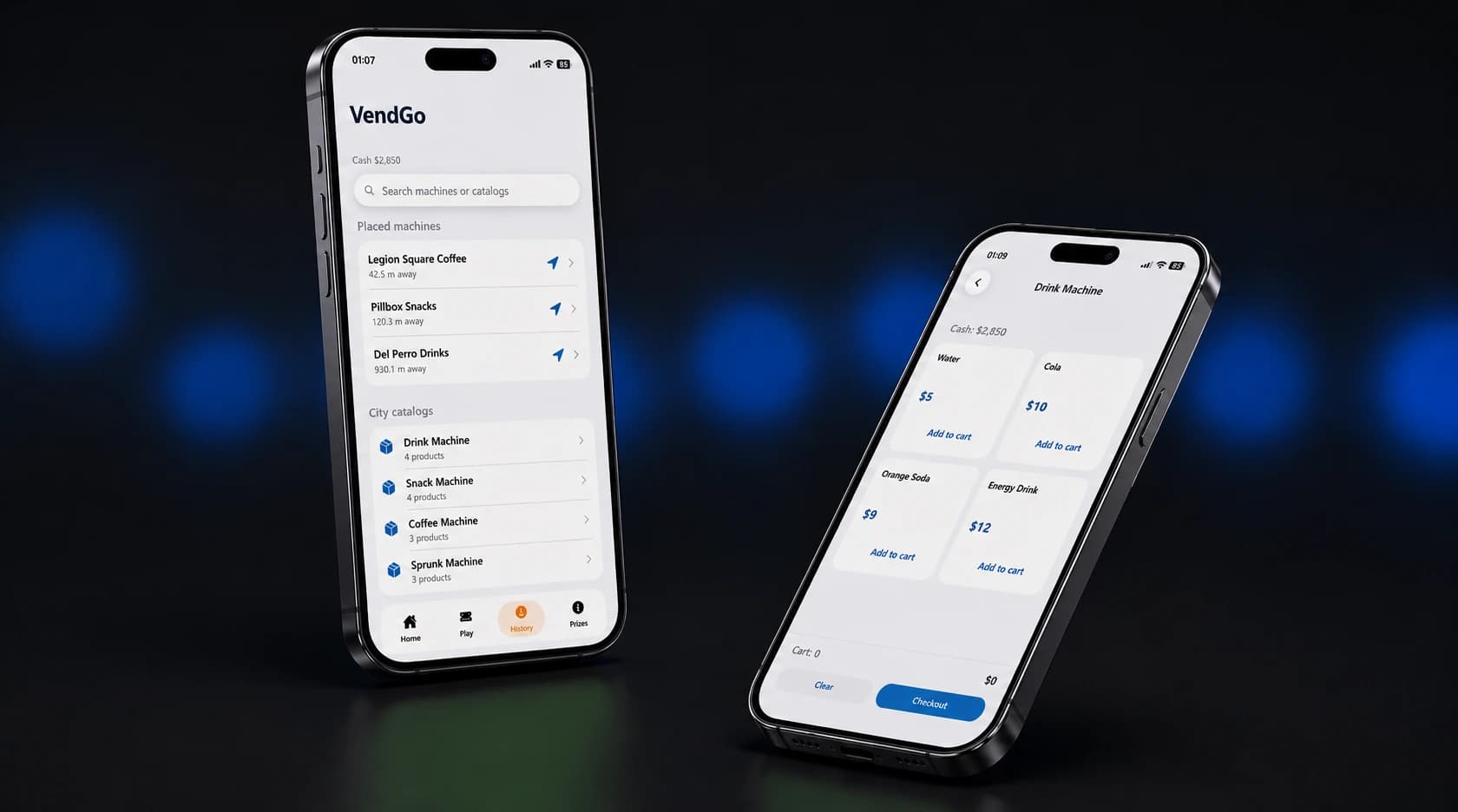
With Quasar Smartphone and its phone-vendingmachine addon running, players install VendGo from the phone's App Store. It shows:
Placed machines, nearest first, with their distance, their products and a button that sets a GPS waypoint.
City catalogs — every machine type in Config.MachineTypes with its products.
A cart for several products from one machine in a single payment, and the player's cash balance.
The VendGo vending machine app on Quasar Smartphone
lua
Config.Phone = {
    enabled = true,              -- the app can read machines at all
    allowRemotePurchase = true,  -- buy from the phone, anywhere on the map
}
A purchase from the phone is delivered straight to the inventory and charged from the machine's own account. On an owned machine it takes stock and pays the owner exactly as if the customer stood in front of it. Set allowRemotePurchase = false to keep VendGo as a finder: players browse and set a waypoint, and buy in person.