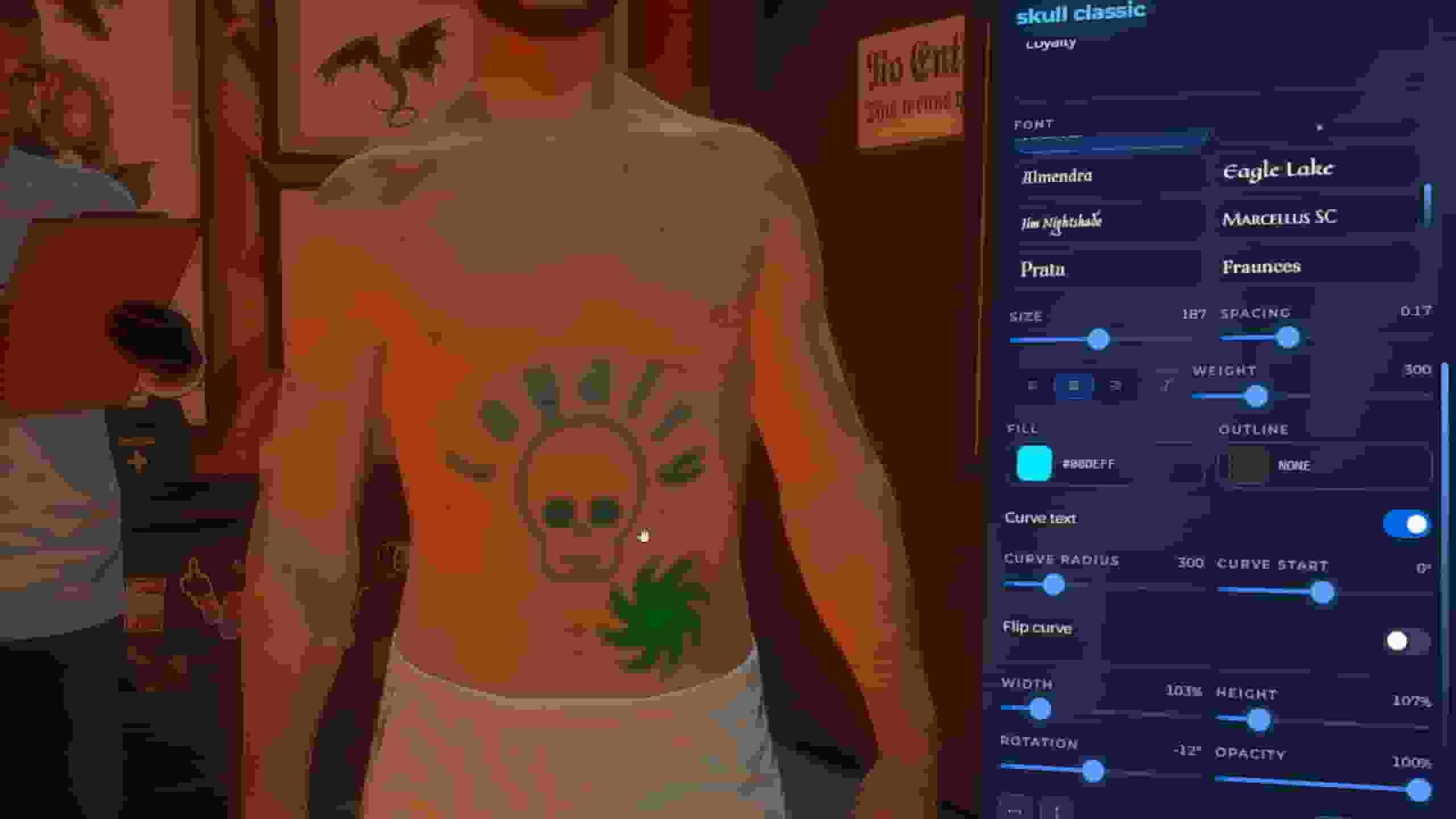
Getting StartedThe whole resource revolves around the studio. A player walks up to a shop, the studio opens, and their own character is the canvas — they drag t
The whole resource revolves around the studio. A player walks up to a shop, the studio opens, and their own character is the canvas — they drag the design onto their body and watch it land live.
There is nothing to configure in files to use any of it. Everything below is in game.
One screen, three parts: Library (left) · your character (middle) · your body (right).
Library
Source
What it is
Gallery
90+ tintable flash designs
Lettering
Presets with 20 fonts
Freehand pen
Draw by hand, with mirror mode for symmetrical designs
Your own words
With live font previews
Image URLs
From a host allow-list
AI
Optional — see below
Saved designs
Everything you kept
One click puts the pick on the body part you are looking at.
History keeps everything you ever put on the body — drawings, words, gallery, AI — on this machine, even if you never paid for it. One click brings it back.
Your Body
The top bar lists the six body parts with a count of what is on each. Click one to work on it and the camera frames it — or just click the body part on your character.
The right panel shows that part's tattoos as tiles, plus the controls for the selected one. A one-line coach always says what to do next.
Placing
It happens on the character itself. There is nothing else to learn.
Control
What it does
Drag anywhere
Move the selected tattoo
Scroll
Resize
Shift + scroll
Rotate
Arrow keys
Nudge — Shift bigger steps, Alt finer
Right-drag
Turn the camera
The live preview is the very texture that gets inked — so what you see is what you pay for.
The Place / Look / Layers tabs hold the precise knobs: size chips, turn, mirror, nudge, ink colour, words, finish, style, and the full layer editor with filters.
A studio is a business: an owner, a staff list, ranks with 13 permissions, a till, supplies and upgrades.
No framework job and no society account. Being an artist means being on a studio's staff list with canTattoo — nothing else.
The Area Is The Studio
It is required, and nothing exists outside it. The NPC, the chair and the management points are created on enter and destroyed on exit of the studio's zone.
That is the point: fifty studios cost you the one the player is standing in.
One Chair, And It Is Mandatory
The creator's placer spawns both peds with their real animations — the customer sitting, the artist leaning over them — and tunes the artist's spot live:
Control
What it does
Z / X
Turn the chair
Left click
Drop it — then the artist follows your raycast
Left click again
Drop the artist, then Z/X turns them
R
Reset
Enter
Save
The placer and the live session share one file, so they cannot drift apart — what you set up is exactly what plays.
Company Is A Switch
Setting
What you get
On
An owner, staff, a till and a management menu
Off
A plain NPC shop that places its own NPC and lets customers serve themselves
The artist starts every session. They clock in, walk to a free chair, and invite the nearest player.
The customer watches themselves. Their own character fills the screen and the artist's canvas is mirrored onto it stroke by stroke, with the running bill priced by the server.
There is nothing to confirm at the end. They agreed when they accepted the invitation — so Finish inks the tattoo and settles the bill in one go.
Where The Money Goes
Who
Gets
The artist
Their commission — per studio, capped by MaxCommission
The till
The rest
The till
The full amount on a walk-in at the NPC
Wages come out of the till on a timer for whoever is clocked in.
There is no map and nothing to calibrate for normal use.
Every body part — torso, head, each arm, each leg — is one texture the game stretches over the skin. The studio streams that texture live onto the player's character while they drag, so the player places the design by looking at their own body. When they pay, the same texture is baked.
Fine-Tuning It
/tattoo_calibrate is the placement panel. The cyan ring on the map is where a design lands right now, from where you are standing.
Click the map, or press use its spot after dragging a real design into place.
Both the spot and the angle it was measured at are stored together, so the panel and the studio can never drift apart.
Flip a drag axis if it feels inverted, and adjust the drag speed.
Changes apply to the admin immediately. Save writes custom/placement.lua — loaded over the defaults, survives updates, safe to delete.
The Texture Map
Right panel → Texture map (advanced) shows the exact PNG the game stretches over the body part. Dragging tattoos on it is pixel-precise placement.
Its projector button paints the same labelled test card on the map and on the character, so a cell on one is the same cell on the other.
Admins can turn any design into a standalone tattoo that other scripts can list and apply.
Select it in the studio, give it a name, press Export (right panel → Tattoo catalog).
Entries stay editable. Rename them in place, or select a design and press replace to bake a new version over an existing entry — the name other scripts reference never changes.
The design is baked with the exact position and size it has on the body, published as a normal GTA tattoo.
illenium-appearance picks it up automatically. The catalog is maintained as a marked block inside its own file and the resource is bounced once when the list changed.
Nothing to install, nothing to edit, nothing to restart by hand — and the restart can never loop: the block is remembered in memory, the write is read back before anything is bounced, and a cooldown caps it at one restart per change.
A framework-agnostic copy for wiring other scripts lands in qs-tattoo-data/integrations/.
qs-appearance, illenium-appearance, fivem-appearance, qb-clothing, rcore_clothing and esx_skin / skinchanger are auto-detected. With two installed at once, Config.AppearancePin decides.
Our decorations are re-applied on top of whatever the appearance script applies — and the script tells us when:
qs-appearance fires its event after every clear it makes — menu opened, hair or tattoo changed inside it, skin applied.
With illenium-appearance, set Config.RCoreTattoosCompatibility = true in illenium's own config so it fires the same way. Without that signal, a hair change inside its menu is only caught by the watchdog a few seconds later.
A plain reloadskin is always followed by a cleared rebuild of ours.
Your own ped is never rebuilt on a timer, so the appearance menu neither blinks nor loses the tattoo you just picked in it.
It is all in game. Open /tattoocreator → Settings: every tunable this resource has is there, grouped and searchable, with a line under each one explaining what it costs you.
That covers prices, the studio camera, the chair, shops and payroll, the ink budget, texture sizes, re-apply, images, AI, moderation, commands and the language.
Changes apply the moment you save — to the server and to every player online. The handful that genuinely cannot work that way are marked needs a restart in the panel.
Everything is stored in qs_tattoo_settings, one row per value you actually changed, so an update never overwrites your tuning — and Reset puts a section back to what the resource ships with.