


Where Items Live#
Items are Lua tables, not database rows. Add, change or remove them in the file your framework reads, then restart the inventory:
Framework | Items | Weapons |
|---|---|---|
ESX · Qbox |
|
|
QBCore |
|

Documentation
Define items for Quasar Advanced Inventory: every field of items.lua, images, rarity, decay, consumables, combining, job and level limits, the metadata panel, weapons, ammo, durability, repair, attachments and URL tints.
Items are Lua tables, not database rows. Add, change or remove them in the file your framework reads, then restart the inventory:
Framework | Items | Weapons |
|---|---|---|
ESX · Qbox |
|
|
QBCore |
|
|
The field names are the same in both places. Coming from another inventory? The QS Inventory Item Converter turns qb-inventory, ox_inventory and esx_inventory lists into this format.
['water_bottle'] = {
    ['name'] = 'water_bottle',          -- unique id, same as the key
    ['label'] = 'Bottle of Water',      -- name shown to players
    ['weight'] = 500,                   -- grams
    ['type'] = 'item',                  -- 'item' or 'weapon'
    ['image'] = 'water_bottle.png',     -- file in web/dist/images/
    ['unique'] = false,                 -- true = never stacks
    ['useable'] = true,                 -- can be used
    ['shouldClose'] = true,             -- closes the inventory when used
    ['description'] = 'For all the thirsty out there',
},
Field | Description |
|---|---|
| Unique id. Must match the table key. |
| The name players see. Players can rename their own copy. |
| Weight in grams. |
|
|
| PNG file name in |
|
|
| Whether the item can be used. |
| Closes the inventory on use. |
| Text in the information panel. |
|
|
| Prop used when the item is dropped, thrown or placed. |
|
|
|
|
| Durability over time, and whether the item disappears when broken. |
| Combining two items into a third. |
| List of jobs allowed to use the item. |
|
|
| Minimum player level to use the item. |
| Built-in use behaviour: status, animation, prop, duration, an export. |
| Weapons only: the GTA ammo type. |
Images are PNG files in qs-inventory/web/dist/images/, named exactly as the image field — water_bottle.png for image = 'water_bottle.png'. Drop the PNG into that folder and restart the resource. Square PNGs with a transparent background match the shipped icons. Only .png is read: if image has no extension, .png is added.
The clothing system needs one item per clothing slot, with exactly these names. If any of them is missing from your item list, that piece of clothing cannot become an item and its slot stays empty.
Slot | Item name | Image | Ped component |
|---|---|---|---|
Helmet / hat |
|
| Prop 0 |
Mask |
|
| Drawable 1 |
Glasses |
|
| Prop 1 |
Torso / jacket |
|
| Drawable 11 |
Undershirt |
|
| Drawable 8 |
Legs |
|
| Drawable 4 |
Arms / gloves |
|
| Drawable 3 |
Shoes |
|
| Drawable 6 |
Ears |
|
| Prop 2 |
Bag |
|
| Drawable 5 |
Watch |
|
| Prop 6 |
Bracelets |
|
| Prop 7 |
Chain |
|
| Drawable 7 |
Vest |
|
| Drawable 9 |
Copy and paste the whole block:
['helmet'] = {
    ['name'] = 'helmet',
    ['label'] = 'Helmet',
    ['weight'] = 0,
    ['type'] = 'item',
    ['image'] = 'helmet.png',
    ['unique'] = true,
    ['useable'] = true,
    ['shouldClose'] = true,
    ['description'] = 'A nice piece of clothing'
},
['mask'] = {
    ['name'] = 'mask',
    ['label'] = 'Mask',
    ['weight'] = 0,
    ['type'] = 'item',
    ['image'] = 'mask.png',
    ['unique'] = true,
    ['useable'] = true,
    ['shouldClose'] = true,
    ['description'] = 'A nice piece of clothing'
},
['glasses'] = {
    ['name'] = 'glasses',
    ['label'] = 'Glasses',
    ['weight'] = 0,
    ['type'] = 'item',
    ['image'] = 'glasses.png',
    ['unique'] = true,
    ['useable'] = true,
    ['shouldClose'] = true,
    ['description'] = 'A nice piece of clothing'
},
['torso'] = {
    ['name'] = 'torso',
    ['label'] = 'Torso',
    ['weight'] = 0,
    ['type'] = 'item',
    ['image'] = 'torso.png',
    ['unique'] = true,
    ['useable'] = true,
    ['shouldClose'] = true,
    ['description'] = 'A nice piece of clothing'
},
['tshirt'] = {
    ['name'] = 'tshirt',
    ['label'] = 'T-shirt',
    ['weight'] = 0,
    ['type'] = 'item',
    ['image'] = 'tshirt.png',
    ['unique'] = true,
    ['useable'] = true,
    ['shouldClose'] = true,
    ['description'] = 'A nice piece of clothing'
},
['jeans'] = {
    ['name'] = 'jeans',
    ['label'] = 'Jeans',
    ['weight'] = 0,
    ['type'] = 'item',
    ['image'] = 'jeans.png',
    ['unique'] = true,
    ['useable'] = true,
    ['shouldClose'] = true,
    ['description'] = 'A nice piece of clothing'
},
['arms'] = {
    ['name'] = 'arms',
    ['label'] = 'Arms',
    ['weight'] = 0,
    ['type'] = 'item',
    ['image'] = 'arms.png',
    ['unique'] = true,
    ['useable'] = true,
    ['shouldClose'] = true,
    ['description'] = 'A nice piece of clothing'
},
['shoes'] = {
    ['name'] = 'shoes',
    ['label'] = 'Shoes',
    ['weight'] = 0,
    ['type'] = 'item',
    ['image'] = 'shoes.png',
    ['unique'] = true,
    ['useable'] = true,
    ['shouldClose'] = true,
    ['description'] = 'A nice piece of clothing'
},
['ears'] = {
    ['name'] = 'ears',
    ['label'] = 'Ears',
    ['weight'] = 0,
    ['type'] = 'item',
    ['image'] = 'ears.png',
    ['unique'] = true,
    ['useable'] = true,
    ['shouldClose'] = true,
    ['description'] = 'A nice piece of clothing'
},
['bag'] = {
    ['name'] = 'bag',
    ['label'] = 'Bag',
    ['weight'] = 0,
    ['type'] = 'item',
    ['image'] = 'bag.png',
    ['unique'] = true,
    ['useable'] = true,
    ['shouldClose'] = true,
    ['description'] = 'A nice piece of clothing'
},
['watch'] = {
    ['name'] = 'watch',
    ['label'] = 'Watch',
    ['weight'] = 100,
    ['type'] = 'item',
    ['image'] = 'rolex.png',
    ['unique'] = false,
    ['useable'] = false,
    ['shouldClose'] = false,
    ['rare'] = 'epic',
    ['description'] = 'It is very fragile, watch out'
},
['bracelets'] = {
    ['name'] = 'bracelets',
    ['label'] = 'Bracelets',
    ['weight'] = 100,
    ['type'] = 'item',
    ['image'] = 'bracelets.png',
    ['unique'] = true,
    ['useable'] = true,
    ['shouldClose'] = false,
    ['rare'] = 'epic',
    ['description'] = 'It is very fragile, watch out'
},
['chain'] = {
    ['name'] = 'chain',
    ['label'] = 'Chain',
    ['weight'] = 100,
    ['type'] = 'item',
    ['image'] = 'goldchain.png',
    ['unique'] = true,
    ['useable'] = true,
    ['shouldClose'] = false,
    ['rare'] = 'epic',
    ['description'] = 'It is very fragile, watch out'
},
['vest'] = {
    ['name'] = 'vest',
    ['label'] = 'Vest',
    ['weight'] = 100,
    ['type'] = 'item',
    ['image'] = 'vest.png',
    ['unique'] = true,
    ['useable'] = true,
    ['shouldClose'] = false,
    ['rare'] = 'epic',
    ['description'] = 'Body Armor'
},
The images ship with the inventory, so nothing else is needed. You can change the label, weight, rare and description freely, but keep the item names exactly as they are.
['gold_chain'] = {
    ['name'] = 'gold_chain',
    ['label'] = 'Gold Chain',
    ['weight'] = 300,
    ['type'] = 'item',
    ['image'] = 'goldchain.png',
    ['unique'] = true,
    ['useable'] = false,
    ['rare'] = 'epic',
    ['description'] = 'A valuable gold chain.'
},
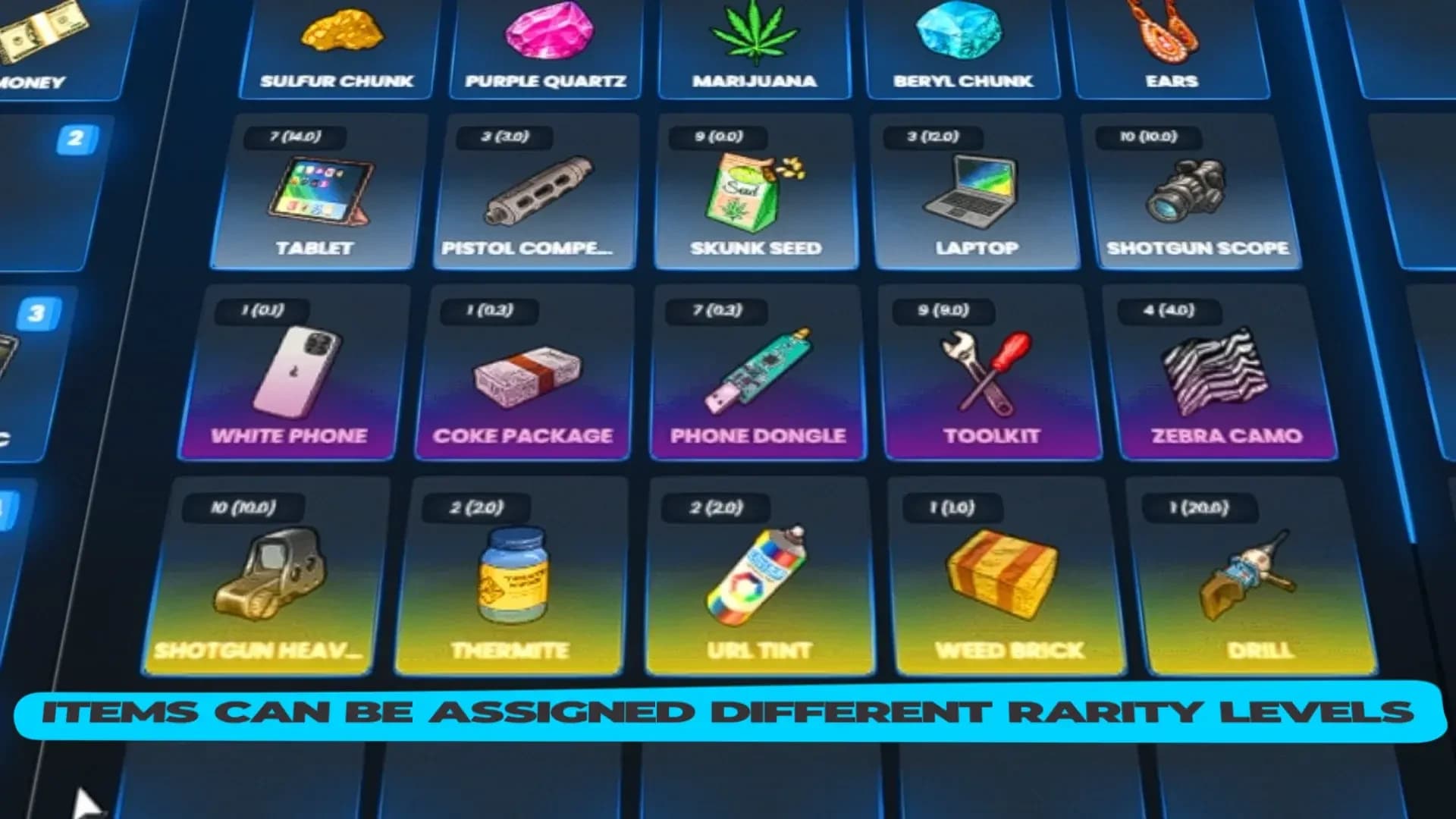
rare only changes the colour of the slot. The gradients are defined in Config.ItemRarities, so you can restyle them or add your own tiers. Using an epic or legendary item also completes the rarity quests in Missions and Skills.
['lockpick'] = {
    ['name'] = 'lockpick',
    ['label'] = 'Lockpick',
    ['weight'] = 150,
    ['type'] = 'item',
    ['image'] = 'lockpick.png',
    ['unique'] = true,
    ['useable'] = true,
    ['decay'] = 10,      -- days to go from 100% to 0%
    ['delete'] = true,   -- removed when it reaches 0%
    ['description'] = 'A lockpick used for opening locked doors or vehicles.'
},
decay is the number of days an item takes to wear from 100 % to 0 %, counted from the moment it was created: 1 is one day, 0.07 is about an hour and forty minutes. Quality is recalculated every time an inventory is opened. At 0 %, an item with delete = true is removed when used; otherwise it reports that it has expired and cannot be used. Items with decay never stack, because each copy has its own age.
The client block makes an item usable without writing any script: it plays an animation with a prop, shows a progress bar, changes hunger, thirst or stress, and can remove itself.
['tosti'] = {
    ['name'] = 'tosti',
    ['label'] = 'Grilled Cheese Sandwich',
    ['weight'] = 200,
    ['type'] = 'item',
    ['image'] = 'tosti.png',
    ['unique'] = false,
    ['useable'] = true,
    ['shouldClose'] = true,
    ['description'] = 'Nice to eat',
    ['decay'] = 0.07,
    ['delete'] = false,
    ['object'] = 'prop_sandwich_01',
    ['client'] = {
        status = { hunger = 200000 },   -- also thirst and stress
        usetime = 2500,                 -- milliseconds
        anim = { dict = 'mp_player_inteat@burger', clip = 'mp_player_int_eat_burger_fp' },
        prop = {
            model = 'prop_cs_burger_01',
            pos = vec3(0.02, 0.02, -0.02),
            rot = vec3(0.0, 0.0, 0.0),
        },
        disable = { move = true, car = true, mouse = false, combat = true },
        removeAfterUse = true,
    }
},
prop also accepts a list of props for actions that need more than one object. Hunger and thirst use the framework's scale (200000 is a fifth of the bar on ESX); stress uses 0 – 100, with negative values relieving it.
client.export calls an export of any resource when the item is used, with the item and its metadata:
['security_card_02'] = {
    ['name'] = 'security_card_02',
    ['label'] = 'Security Card B',
    ['weight'] = 5,
    ['type'] = 'item',
    ['image'] = 'security_card_02.png',
    ['unique'] = true,
    ['useable'] = true,
    ['description'] = 'A security card... I wonder what it goes to',
    ['client'] = { export = 'my-heist.useCard' },
},-- in my-heist (client)
exports('useCard', function(item, data)
print(data.name, data.slot, json.encode(data.metadata))
end)For server logic, register the item with CreateUsableItem instead — see Commands and Exports.
Drag one item onto another to combine them into a third:
['lockpick'] = {
    -- ...
    ['combinable'] = {
        accept = { 'screwdriverset' },
        reward = 'advancedlockpick',
        anim = {
            ['dict'] = 'anim@amb@business@weed@weed_inspecting_high_dry@',
            ['lib'] = 'weed_inspecting_high_base_inspector',
            ['text'] = 'Crafting lockpick',
            ['timeOut'] = 7500,
        }
    },
},['radar_gun'] = {
-- ...
['job'] = { 'police' }, -- only these jobs can use it
},['phone'] = {
-- ...
['useableIn'] = 'hotbar', -- 'hotbar', 'inventory' or 'wallet'
},['weapon_advancedrifle'] = {
-- ...
['level'] = 20, -- player level required (quests page on)
},['brick'] = {
-- ...
['object'] = 'prop_brick_01',
['objectRotation'] = vec3(80.0, 60.0, 0.0),
['disableThrow'] = true,
},config/metadata.lua decides what the hover panel shows for an item, reading values from its metadata (info). Config.ItemMetadata is keyed by item name, and Config.ItemMetadataByType is the fallback by type.
Config.ItemMetadata = {
    id_card = {
        fields = {
            { label = 'CSN',         value = 'citizenid',   fallback = 'No information' },
            { label = 'First Name',  value = 'firstname' },
            { label = 'Last Name',   value = 'lastname' },
            { label = 'Birth Date',  value = 'birthdate' },
            { label = 'Gender',      value = 'gender',      fallback = 'No information' },
            { label = 'Nationality', value = 'nationality', fallback = 'No information' },
        },
    },
    harness  = { description = '{uses} uses left.' },
    moneybag = { fields = { { label = 'Amount of cash', value = 'cash', prefix = '$' } } },
    visa = { fields = {
        { label = 'Card Owner',  value = 'ownerName' },
        { label = 'Card Number', value = 'cardNumber', mask = true },
    } },
}

Config.ItemMetadataByType = {
    weapon = {
        fields = {
            { label = 'Serial Number', value = 'serie' },
            { label = 'Munition',      value = 'ammo',        fallback = '0' },
            { label = 'Attachments',   value = 'attachments', join = 'label' },
        },
    },
}
Field option | Effect |
|---|---|
| Path into the metadata, with dots for nesting: |
| Bold text before the value. |
| Shown when the value is missing. Without it the row is hidden. |
| Text around the value, such as |
| Joins a list by one of its fields. |
| Shows how many entries a list has. |
| Hides everything but the last four characters. |
| Cuts the value to that many characters. |
|
|
An entry can also be a description template ('Motel Key: {motel}'), use title to name the panel after a value, or use cases to pick a set of fields from a metadata value — the shipped evidence bag shows different rows for casings, blood, fingerprints and DNA.
When an item is given with /giveitem or the GiveItemToPlayer export, the inventory fills its metadata:
Item | Metadata |
|---|---|
| Citizen id, first and last name, birth date, gender and nationality. |
| Name and birth date; the driver licence type. |
| A container id, weight and slots. |
| 20 uses. |
| A random worth between 5,000 and 10,000. |
| A generated plate. |
Weapons | Serial number, 100 % quality and ammo. |
Items with | 100 % quality. |
With um-idcard running, ID cards and licences are created through it. Using an id_card or driver_license shows it to players within 3 metres.
Weapons are items with type = 'weapon'. Using one equips it and using it again holsters it. Each copy carries its serial number, quality, ammo, attachments and tint in its metadata.
['weapon_pistol'] = {
    ['name'] = 'weapon_pistol',
    ['label'] = 'Walther P99',
    ['weight'] = 1000,
    ['type'] = 'weapon',
    ['ammotype'] = 'AMMO_PISTOL',
    ['image'] = 'weapon_pistol.png',
    ['unique'] = true,
    ['useable'] = false,
    ['rare'] = 'common',
    ['description'] = 'A small firearm designed to be held in one hand'
},
On ESX and Qbox the weapon also needs its entry in shared/weapons.lua, keyed by hash:
[`weapon_pistol`] = {
    ['name'] = 'weapon_pistol',
    ['label'] = 'Pistol',
    ['weapontype'] = 'Pistol',
    ['ammotype'] = 'AMMO_PISTOL',
    ['damagereason'] = 'Pistoled / Blasted / Plugged / Bust a cap in'
},
weapontype decides the repair price group. On QBCore, weapons come from qb-core/shared/weapons.lua.
Ammo items are linked to GTA ammo types in config/weapons.lua. Use the item, or press R with the weapon in hand, to reload.
Config.AmmoItems = {
    { item = 'pistol_ammo',  type = 'AMMO_PISTOL' },
    { item = 'rifle_ammo',   type = 'AMMO_RIFLE' },
    { item = 'smg_ammo',     type = 'AMMO_SMG' },
    { item = 'shotgun_ammo', type = 'AMMO_SHOTGUN' },
    { item = 'snp_ammo',     type = 'AMMO_SNIPER' },
    { item = 'master_ammo',  isForEveryWeapon = true }, -- fits every weapon
}
Option | Default | Description |
|---|---|---|
|
| A weapon holds one magazine. Reloading tops it up to exactly one magazine; |
|
| Each ammo item is one round: a reload loads as many as fit and takes one item per round. |
Every shot lowers the weapon's quality by its value in Config.DurabilityMultiplier (0.15 by default). At 0 % the weapon is unequipped and cannot fire until repaired.
Option | Default | Description |
|---|---|---|
| stun gun, nightstick, flashlight, unarmed | Weapons that never wear out. |
| one bench at | Benches where |
| pistol 1000 · smg 3000 · mg 4000 · rifle 5000 · shotgun 6000 · sniper 7000 | Fee per weapon group. |
|
| Quality restored by each use of |
|
| When a weapon is stolen from a player, it may break into parts. |
|
| Chance, in percent, of getting the weapon intact. |
|
| The parts a broken weapon gives. |
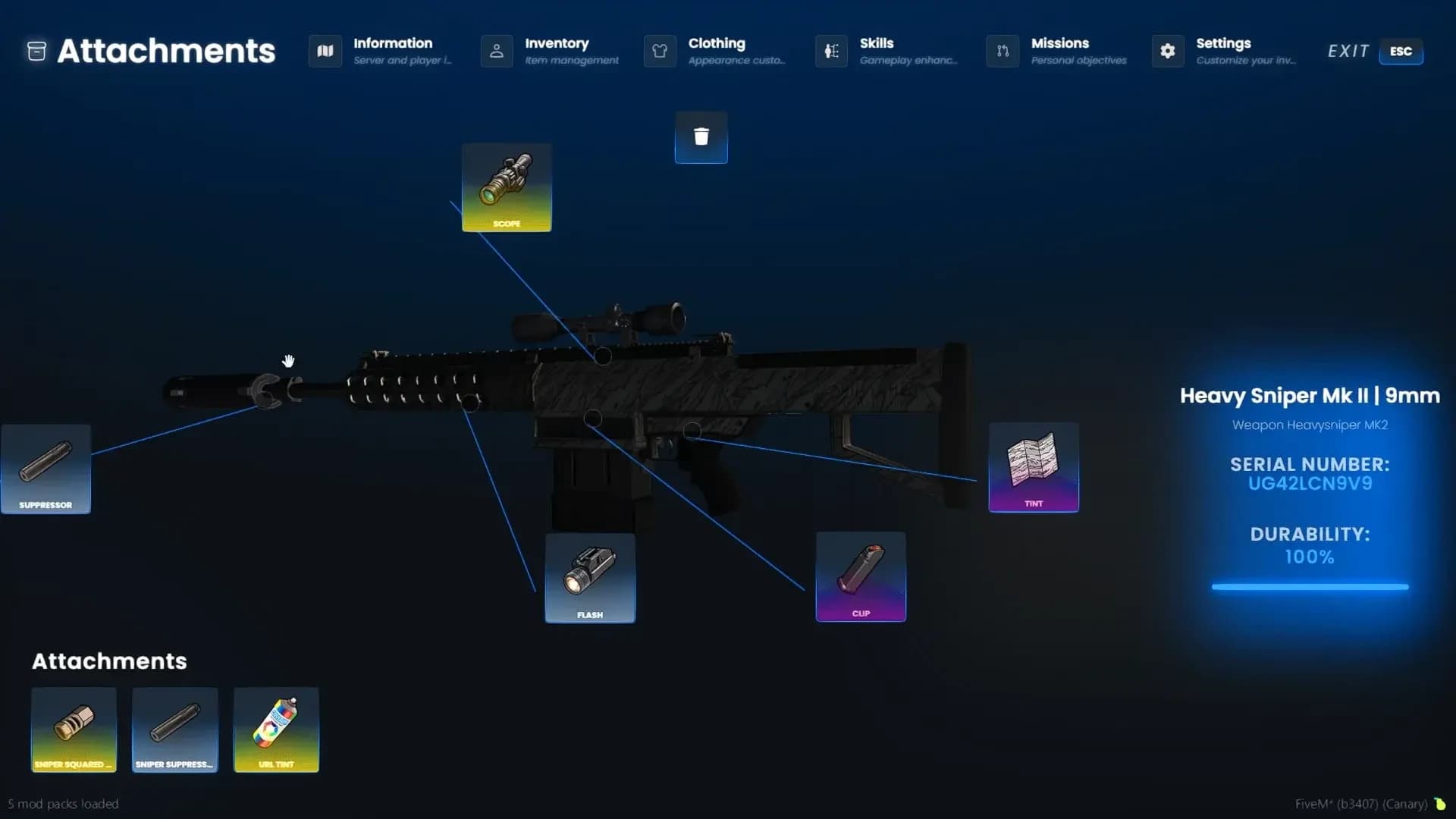
Attachments are items linked to weapon components. Use the attachment item with the weapon equipped, or open the weapon's attachment view in the inventory — a 3D showcase of the weapon you can rotate, with a line from each slot to its part. One attachment per type (scope, grip, clip, suppressor, flashlight, barrel, tint) is fitted at a time; fitting another returns the old one to the inventory.
Config.WeaponAttachments = {
    ['WEAPON_PISTOL'] = {
        defaultclip  = { component = 'COMPONENT_PISTOL_CLIP_01', item = 'pistol_defaultclip' },
        extendedclip = { component = 'COMPONENT_PISTOL_CLIP_02', item = 'pistol_extendedclip' },
        flashlight   = { component = 'COMPONENT_AT_PI_FLSH', item = 'pistol_flashlight' },
        suppressor   = { component = 'COMPONENT_AT_PI_SUPP_02', item = 'pistol_suppressor' },
        luxuryfinish = { component = 'COMPONENT_PISTOL_VARMOD_LUXE', item = 'luxuryfinish_weapontint' },
    },
}

Config.WeaponAttachmentItems = {
    { item = 'rifle_suppressor', attachment = 'suppressor', type = 'suppressor' },
    { item = 'luxuryfinish_weapontint', attachment = 'luxuryfinish', type = 'tint' },
    { item = 'weapontint_url', attachment = 'weapontint_url', type = 'tint', isUrlTint = true, tint = -1, forEveryWeapon = true },
}
An entry with forEveryWeapon = true is added to every weapon automatically.
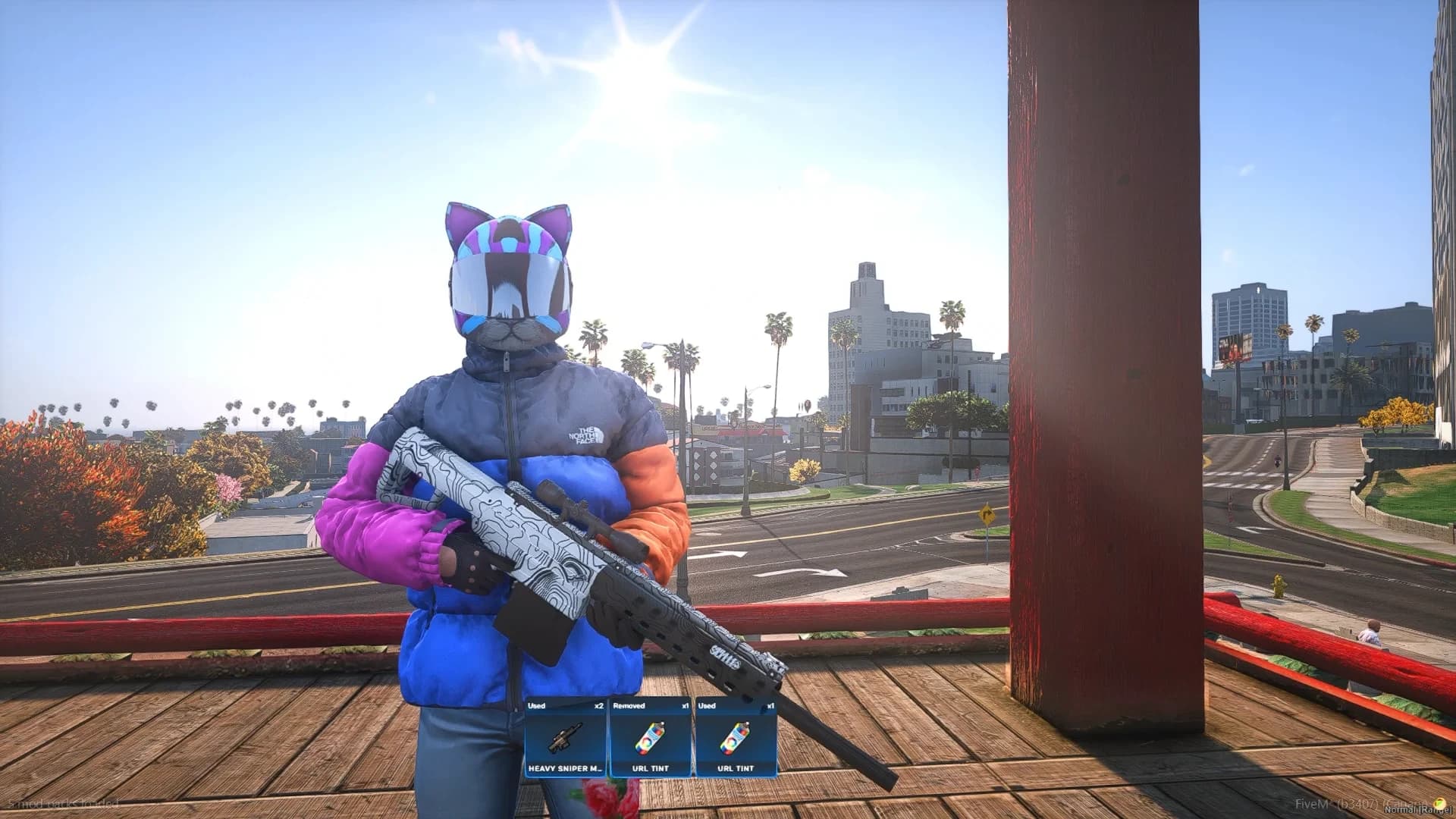
Besides the GTA tint colours, the weapontint_url item paints a weapon with any image or GIF from a URL. Use it with the weapon equipped, paste the link, and the texture is replaced live. Config.WeaponTints lists which texture of each weapon model is replaced. Config.RemoveTintAfterRemoving = true destroys the tint item when the tint is removed.
Register attachments and durability for weapons that do not ship with GTA in Config.CustomWeapons, keyed by spawn name:
Config.CustomWeapons = {
    ['WEAPON_AK47'] = {
        attachments = {
            defaultclip  = { component = 'COMPONENT_AK47_CLIP_01', item = 'rifle_defaultclip' },
            extendedclip = { component = 'COMPONENT_AK47_CLIP_02', item = 'rifle_extendedclip' },
            suppressor   = { component = 'COMPONENT_AT_AR_SUPP', item = 'rifle_suppressor' },
        },
        durability = 0.15,
    },
}
Then add the weapon to your items file (type = 'weapon', its ammotype, unique = true), to weapons.lua on ESX and Qbox, add its image, and restart. The name must match exactly in every place.
Grenades, molotovs, sticky bombs, flares, snowballs and the other names in Config.Throwables are consumed one at a time as they are equipped. weapon_petrolcan uses its ammo as fuel and keeps its level in the item's quality.