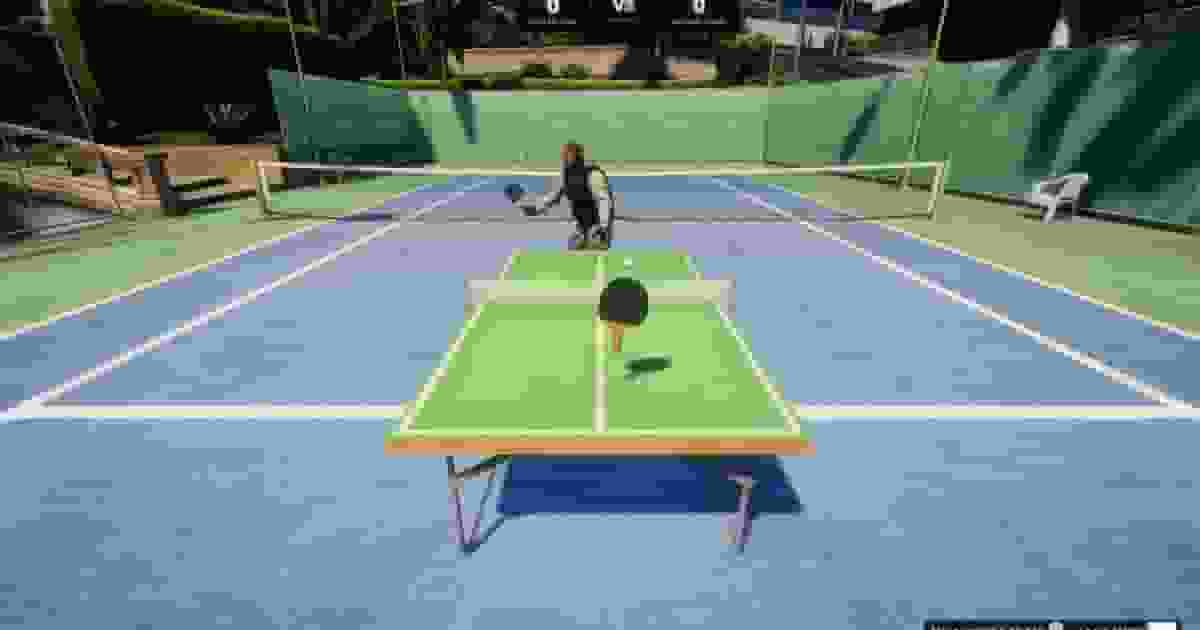
How FiveM Ping Pong plays: placing tables, matches against the bot or a player, hitting with the mouse, scoring, the five game modes, bets, the ELO leaderboard and spectators.
Every match follows the same loop, whether it is against the bot or another player.
Moment
What happens
At the table
Within 2.5 m of a table the [E] - Ping Pong prompt floats over it. E opens the menu: Play vs Bot, Play vs Player and Leaderboard.
Settings
Choose the mode, the ball speed, the score to reach, the bot's difficulty (against the bot) and the stake, then press Ready.
Taking your place
The view moves to a camera behind your end of the table. Your character is hidden and held in place, the HUD and minimap disappear, and your racket appears over the table. Your opponent takes the far end with a racket in hand.
Serving
The ball is tossed up at the server's end. Bring the racket into it to put it in play. The serve alternates every point, starting with you — or with the challenger in a duel.
Rallying
Hit the ball back every time it comes to your side. A ring on the table shows where each shot will land — green on your half, blue on your opponent's.
Points
When the ball leaves the table the point is decided, the scoreboard updates, a notification shows the score and the next point starts two seconds later.
The end
The first to the score limit wins. A win or loss message and sound, the bet settled, your character and camera handed back. A duel also updates the leaderboard.
In a duel, one game decides everything. The challenger's game runs the ball and every point; the other player's racket is sent to it every 16 ms and their ball follows the challenger's, so both see the same rally and the same score. Spectators get the same match a few times a second.
Tables are placed in game with the creator and saved to the database. Each one is spawned for a player only within 30 m (Config.StreamDistance), so a server can have as many as it likes.
/pingpongcreator opens the Ping Pong Table Creator: every table on the server on the left, with a search box, and the selected table's form on the right. + starts a new table.
Section
What you set there
Table Info
The table's name. Required.
Pricing
A price and a payment method — Cash Money or Bank Transfer. 0 shows Free to play.
Game Modes
A switch for each of the five modes.
Placement / Location
Where the table stands. A new table has Select; a saved one shows its X, Y, Z and heading, with Reposition.
Save Table needs a name and a location. An existing table is saved with Save Changes or removed with Delete, after a confirmation. The teleport button next to each table in the list takes you to it. ESC closes the creator.
Select (or Reposition) closes the window and hands you a placing mode. A see-through table follows the spot the camera is aimed at, up to 50 m away, with a red marker and a line back to your character. The heading and height offset are shown at the top of the screen.
Key
Does
Mouse
Aim the camera at the spot — the floor, or the top of a prop.
Left click
Place it here. Only works while the aim is on a surface.
Z / X
Rotate it for as long as the key is held — 80° a second (Config.Creator.rotateSpeed).
Mouse wheel
Up raises it, down lowers it, 5 cm per step (Config.Creator.heightStep).
Backspace
Cancel and go back to the creator.
The creator reopens with the location filled in. It always places Config.Creator.model — prop_table_tennis, the blue table — and every change reaches every player at once.
Leave room at both ends. Each player stands 1.5 m from the centre of the table along its length. A table's ID comes from where it stands, so moving it gives it a new one, and two tables in the same 10 cm square count as one.
Walk up to a table — the prompt appears within 2.5 m of its centre — and press E.
Play vs Bot → choose the settings → Ready. A stake, if you set one, is taken now; without enough money the match does not start. The bot takes the far end as a random character from Config.AIModels, and you serve first.
Difficulty
Reaction
Misses a reachable ball
Aim error
Easy
600 ms
25 %
0.35
Normal
400 ms
10 %
0.18
Hard
200 ms
3 %
0.08
All three are in Config.BotDifficulty. Bot matches are never rated on the leaderboard.
Play vs Player lists every player within 15 m of the table (Config.NearbyPlayerRadius), nearest first. Pick one, choose the settings and press Ready.
They receive an invitation showing your name, the mode, the speed, the score limit and the stake, and have 30 seconds to Accept or Decline. When they accept, both stakes are taken and the match starts at once, with you serving first.
Each player can have one challenge out and one waiting at a time. A table with a duel on it refuses new challenges. A declined, expired or cancelled challenge is reported to the player who sent it.
Every mode in Config.Modes — see Game modes below.
Speed
Slow, Normal or Fast. Against the bot each one shows its reward multiplier.
Score Limit
3, 5, 7, 11 or 15 in Classic, Accelerated and Walls. Billiard and Target Practice have a single limit, so the choice is hidden.
Bot Difficulty
Easy, Normal or Hard, each with its reward multiplier. Against the bot only.
Bet Amount
A slider from No Bet up to Config.Betting.max, in steps of Config.Betting.step. Against the bot it also shows the potential win. Hidden when Config.Betting.enabled = false.
Your racket follows the mouse over your half of the table: left and right move it across, up and down move it towards the net or back towards you. There is no button to press — the ball only has to meet the racket.
Get behind the ball
Watch the landing ring and bring the racket to where the ball is going. The racket is drawn faint while it cannot hit: for half a second at the start of every point, and until you have moved it clear of the ball.
Swing through it
Move the mouse forward as you meet the ball. The faster the flick, the faster the return; a yellow arrow over the racket shows a swing in progress and a white flash marks the hit.
Steer it
Sweeping the mouse sideways as you connect sends the ball left or right. Returns are held inside the width of the table — except in Walls, where the sides send it back.
Every return is kept between a minimum and a maximum speed for the chosen ball speed, and its arc is lowered until it comes down on the table rather than past the far end. You can only hit when the ball is on its way to you, and once every 350 ms (Config.Physics.hitCooldown).
Each row of Config.Ball.speeds sets the bounce, drag, lift and speed range of the ball at that level; Config.SpeedIndex ties each speed name to its row.
Every racket hit in a rally is 5 % faster than the one before, up to double speed; the bot's own returns keep their pace. Each new point starts over.
Walls
3, 5, 7, 11, 15
The long sides of the table act as walls: a ball heading out wide bounces back in, so points end on long shots and misses. Shots can be angled as sharply as you like.
Billiard
61
Standard rallies over a long match to 61.
Target Practice
100
Standard rallies, first to 100 — an endurance session.
Each mode is one line of Config.Modes with its list of score limits. Change the list to offer other limits, or remove a line to hide that mode. The five id values are fixed: a new one has no rules behind it.
The scoreboard: both names and scores, with the mode and the stake — or VS without one — between them.
Bottom right
The keys: Backspace to leave and the mouse to move the racket.
On the table
The pulsing landing ring, the yellow swing arrow and a white flash wherever the ball is struck.
Notifications
Match started, every point with the running score, the serve tip when it is your serve, and the result with what the bet paid.
Everything else is locked while you play: you cannot walk, draw a weapon or open other menus. The camera positions are in Config.Camera, and the ring, arrow and flash colours in Config.Render.
The stake is taken when the match starts and must be between Config.Betting.min and Config.Betting.max. Win and you get it back with a profit of stake × difficulty multiplier × speed multiplier; lose, or leave, and it is gone. The settings window shows the potential win before you press Ready. What a $1,000 stake pays back on a win:
Difficulty
Slow ×1.0
Normal ×1.25
Fast ×1.5
Easy ×1.0
$2,000
$2,250
$2,500
Normal ×1.5
$2,500
$2,875
$3,250
Hard ×2.5
$3,500
$4,125
$4,750
The multipliers are in Config.BotRewards:
lua
Config.BotRewards = {
    difficulty = { easy = 1.0, normal = 1.5, hard = 2.5 },
    speed      = { slow = 1.0, normal = 1.25, fast = 1.5 },
}
The challenger picks the stake and the invitation shows it. Both players must have it when the challenge is sent and again when it is accepted; both stakes are taken as the match starts.
How the duel ended
The pot
A player reached the score limit
The winner takes both stakes.
A player left with Backspace → Confirm
The player who stayed takes both stakes.
A player disconnected
The player who stayed takes both stakes.
Stakes are cash: the ESX money account, and cash on QBCore and Qbox. Standalone, the slider still shows but no money moves. To use the bank or your own currency, see Integrations. Set Config.Betting.enabled = false to remove the slider and every bet.
Leaderboard in the table menu lists the top 20 players by rating (Config.Leaderboard.topCount) with their ELO, wins and losses and best streak, and shows your own rank and rating above the list.
Only duels between players are rated, and only those that end with a winner after at least 15 seconds (Config.Leaderboard.minMatchDuration). A duel somebody leaves is not rated, and neither is a match against the bot.
Everyone starts at 1200 (Config.ELO.base). After a duel both ratings move by the standard ELO formula with a K-factor of 32 (Config.ELO.k): beating a stronger player gains more than beating a weaker one, and a rating never drops below 0. Two players on 1200 come out at 1216 and 1184. A win adds one to the winner's streak; a loss resets it to zero.
Players are kept by their ESX identifier, their character's citizenid on QBCore and Qbox, or their Rockstar license standalone. Config.Leaderboard.enabled = false stops rating duels; the leaderboard still opens with what it already holds. To start it over, see Commands and Controls.
Leaves the match. Against the bot it counts as a loss and the stake is lost; in a duel your opponent is told you left and takes the pot. The dialog warns you when a stake is at risk.
Backspace, then Cancel
Back to the match.
Disconnecting
The same as leaving, and any challenge you sent or were waiting to answer is cancelled.
Ping Pong is made to be watched. Everyone within 15 m of a table (Config.SpectateDistance) when a match starts — or who walks into that range while it is on — sees it play out: both players at their ends with their rackets, serving, hitting and reacting to every point, and the ball in flight. Bot matches are watched the same way.
Spectators keep full control of their character, and walking out of range stops it. When a player's character is not loaded for a spectator, a stand-in from Config.AIModels plays in their place.