
Documentation
Learn how to use every feature included with Quasar Pause Menu Creator. This section covers gameplay, table management, available commands, multiplayer challenges, and common troubleshooting, helping both administrators and players get the most out of the resource.
/pausecreator
Opens the editor |
Open /pausecreator.
Pick a theme on the left.
Rearrange it — drag modules, edit properties in the inspector.
Save.
Set live.
Every player gets it immediately. Nobody reconnects.
The live theme travels in the connection handshake, so a player who hits
ESCseconds after joining gets your theme, not the default one.
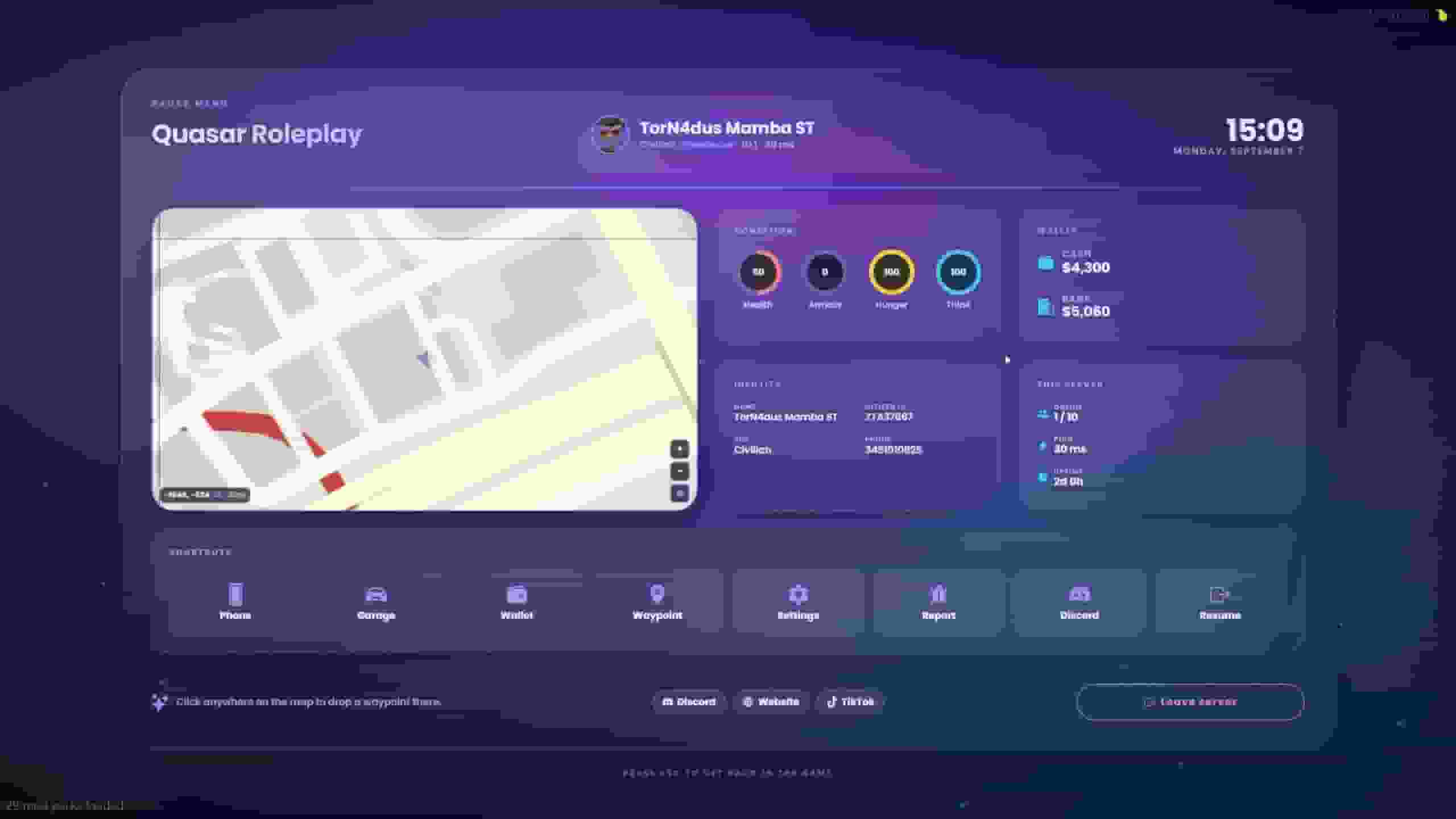
Eight themes ship with the resource: Launch (the default), Onyx, Aurora, Carbon, Cyberpunk, Ivory, Hackerman and Velvet.
They are starting points, not a menu of eight. Duplicate one and it becomes yours — everything in them was built with the same creator you have.
Launch ships in Spanish. Every string is a text module, so translating it is a pass through the inspector — no files to edit.
Everything on screen is a module. Add them from the library, drag them where you want, and set their properties in the inspector.
Group | Modules |
|---|---|
Basics | text, image, shape, icon, effect |
Player | player card, status bars, money, identity |
Server | server info, clock, location, map |
Navigation | nav buttons, quick bar, disconnect |
Content | news, rules, staff, social, tips, keybinds |
Media | video, slideshow |
The text module binds to live values — server name, player count, ping, job, cash, the street you are standing on, the in-game clock. Pick a source in the inspector and it updates itself.
A module either lives on one page or on every page at once.
That is what lets one theme hold a map page, a rules page and a settings page without them fighting over the same screen — while a header or a player card stays put across all of them.
Pages are managed under Settings. A theme with no pages is simply a single screen.
Every clickable thing runs one action:
Action | What happens |
|---|---|
Open a page | Switches page, menu stays open |
Close the menu | Closes it |
Run a command |
|
Trigger a client / server event |
|
Copy a link | Copies to the clipboard — FiveM cannot open a browser |
Set a waypoint here | Drops a GPS marker where you are standing |
Open GTA's settings | Hands the screen to the game's own frontend |
Leave the server | Asks first, then disconnects |
Always include an "Open GTA's settings" button. Replacing the pause menu takes graphics, audio and the controller layout away from your players — that button hands them back. All eight bundled themes carry one.
Commands and events are deliberately open. The one guard rail is Config.Actions.blockedCommands, which no theme can talk its way past.
There is nothing to install. The imagery is Rockstar's own Social Club atlas, streamed from their servers — no files in this resource, and nothing added to the download every player takes on join.
It is the same atlas qs-smartphone's Maps app uses, so a server running both gets one world that lines up in the phone and in the menu.
Three renders to choose from: Render (illustrated), Game (radar art) or Print (fold-out poster).
Zoom runs 4 to 9. Themes open around 7.
Double click sets a waypoint, where you clicked. The route is GTA's own GPS, so it follows the streets and matches your minimap exactly.
Radar mode turns the world so you always face up — look-only, panning and clicking are disabled.
If the game has no road route to give, it draws a dashed straight line instead, so a guess is never mistaken for a route.
Right click the map to save a place with a name, an icon and a colour. Right click it again to edit or delete it.
Places belong to the player, not the theme — they are stored against the character and survive a reconnect. Limit, icons and colours are set in Config.Places, and a theme can switch the feature off per map module.
Inside the creator the panel works, but nothing is written — places made while designing go away with the draft.
Folder | For |
|---|---|
| Logos, headers, avatars |
| Background clips (WebM only) |
Anything you drop in shows up as a dropdown in the creator, so nobody has to type a URL — but the URL field is still there, and a CDN link works fine.
Everything in these folders is downloaded by every player on join. Keep files sized for what they are — a background clip has no business being 30 MB.
FiveM's browser ships without the H.264 licence, so an .mp4 decodes to a black screen:
ffmpeg -i in.mp4 -c:v libvpx-vp9 -crf 34 -b:v 0 -an out.webmThe player card can use the character's own portrait as its avatar. It is on by default and needs no extra resource — the game renders the headshot and the UI reads that texture directly.
The photo is taken shortly after spawn, retaken when the ped model changes, and refreshed on Config.Mugshot.refresh as a backstop.
Config.Mugshot.transparent picks whether the ped is cut out or comes with the flat mugshot backdrop.
An avatar picked in the theme wins over the photo — an owner who pointed that field at a logo meant it.


