Usage — Advanced Inventory | Quasar Store | Quasar Store
Documentation
Usage
How Quasar Advanced Inventory works in game and how to configure it: hotbar and wallet, drops, give, throw and place, trunks and gloveboxes, stashes, robbery, crafting, vending, garbage, selling, clothing slots and the ESC pause menu.
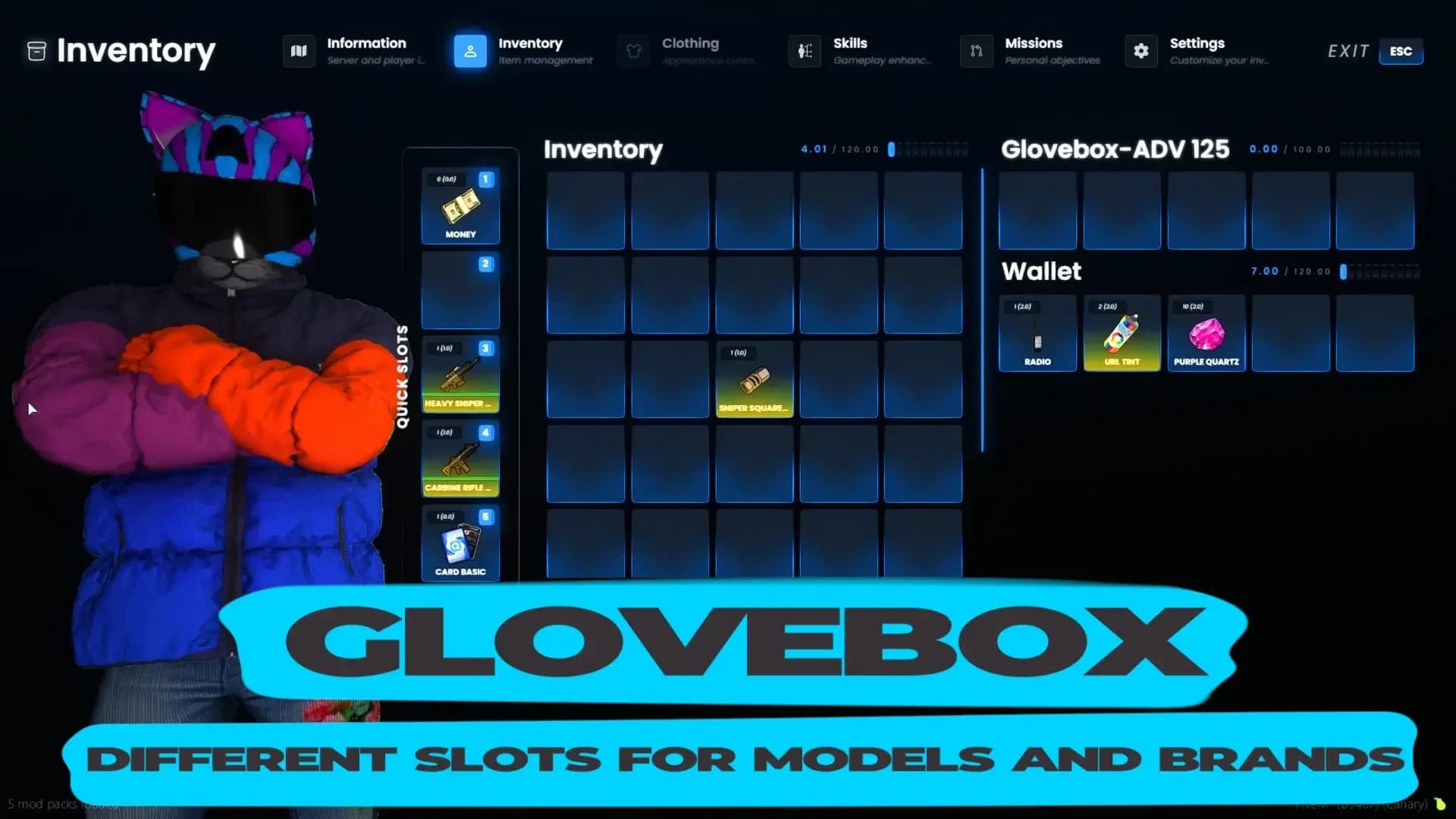
Press TAB to open the inventory. What opens depends on where you stand: in a vehicle you get its glovebox, behind an unlocked vehicle its trunk, next to a ground drop that drop, next to a dumpster or a vending machine that container — and anywhere else your own inventory. Your character is rendered beside the grid and reacts to what you equip.
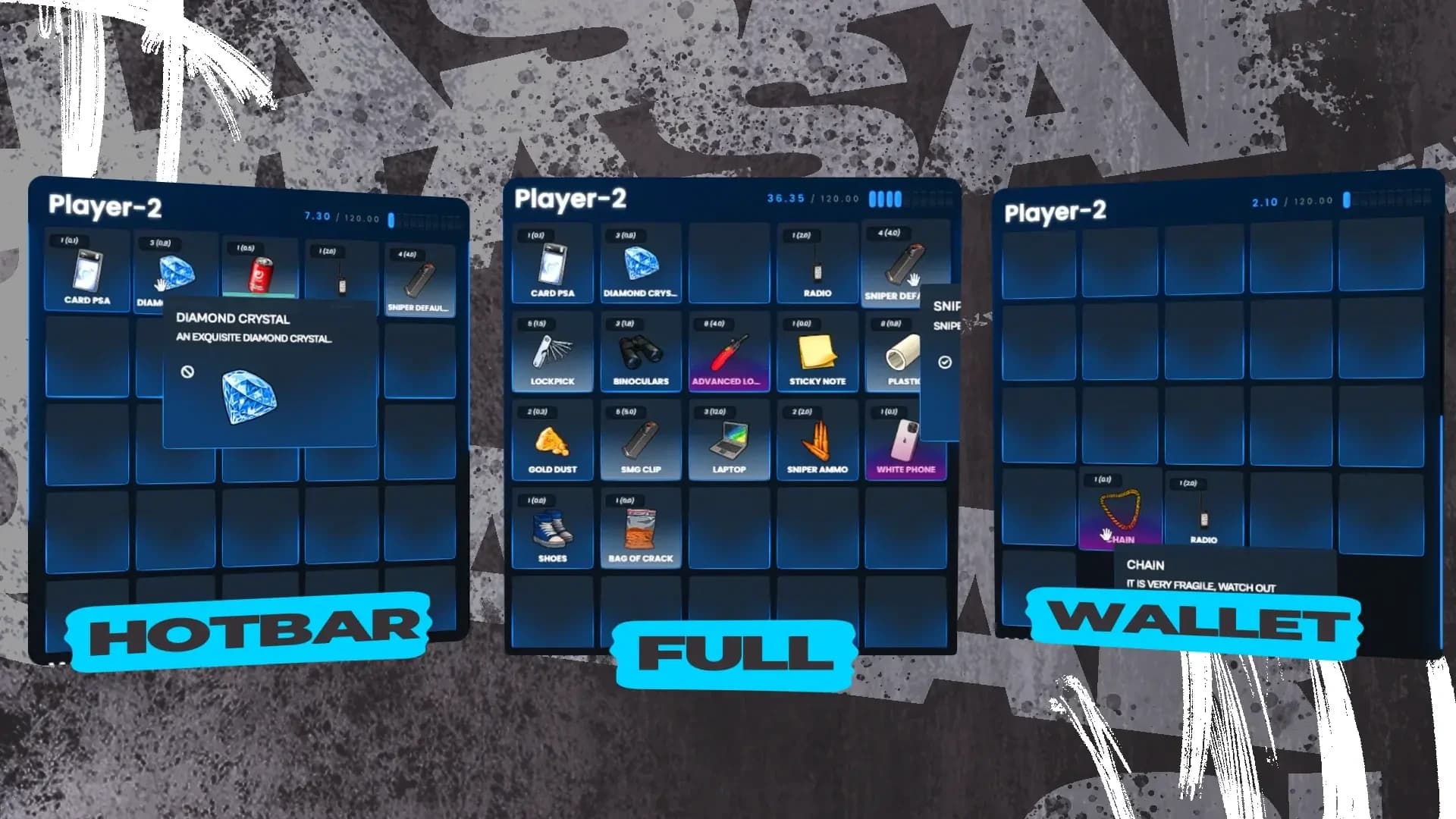
The player inventory is split into three sections by slot:
Section
Slots
Used for
Hotbar
1 – 5
Quick use with keys 1 – .
5
Inventory
6 onwards
General storage.
Wallet
The last five
Cards, IDs and cash. Searches can be limited to this section.
With the default 41 slots, slot 41 is the protected slot used by key 6. Set Config.InventoryWeight.slots = 40 if you do not want it.
Right-click or drag an item to reach its actions: use, give, throw, place, split, rename, combine and, on weapons, attachments. Hovering an item shows its information panel — the owner of an ID card, the number of a phone, the serial and ammo of a weapon — configured in Items and Weapons.
The settings page lets each player choose, for themselves, the ped preview, a transparent background, whether they can walk with the inventory open, the interface colours and one of 32 3D backgrounds. Choices are saved on the player's machine.
Option
Default
Description
Config.EnablePedInventory
true
Shows your character inside the inventory.
Config.TransparentBackground
false
Starts with the transparent background (the game visible behind the UI).
Config.DisableTransparentToggle
false
Locks transparency to the value above and greys out the toggle.
Config.EnableControlInInventory
false
Lets the player move while the inventory is open.
Config.CyberpunkInventory
false
The Cyberpunk theme. Forces the ped preview on, transparency off and movement off.
Config.OpenInventoryAnim
true
Plays an animation when the inventory opens.
Config.IdleCamera
true
Slow camera movement while the inventory is open.
Config.EnableSounds
true
Interface sounds.
Config.OpenProgressBar
false
A short progress bar before the inventory opens.
Factory colours live in config/default.lua (Config.DefaultColors) and are what the reset button restores. The background presets are Config.Backgrounds; qs_gradient_022 is the default.
Weights are in grams throughout: an item of weight = 500 is half a kilo. The carry weight skill raises a player's limit above Config.InventoryWeight.weight.
Option
Default
Description
Config.OnePerItem
{ backpack = 1 }
The most a player can carry of an item. Backpacks, briefcases and paramedic bags share the backpack limit.
Config.notStoredItems
{ backpack = true }
Items that cannot go into stashes, trunks or gloveboxes.
Keys 1 – 5 use the item in hotbar slots 1 – 5, and 6 uses the last slot. Z shows the hotbar overlay. Using a weapon from the hotbar equips it; using it again holsters it.
Option
Default
Description
Config.UsableItemsFromHotbar
true
Enables the number keys.
Config.BlockedItemsHotbar
{ 'lockpick' }
Items that cannot be used from the hotbar.
The GTA weapon wheel and its number keys are disabled while the inventory manages your weapons. A script can give them back with the WeaponWheel export.
FiveM Quasar Advanced Inventory item drop and ground placement
Drops. Drag an item out of the grid to drop it. A single item appears as its own prop (the item's object), a pile as a paper bag. Anyone can open it with TAB while standing next to it, one player at a time.
Option
Default
Description
Config.ItemDropObject
prop_paper_bag_small
The prop for a pile, or false for a marker.
Config.DropRefreshTime
15 * 60
Seconds before an unattended drop is cleaned up.
Config.MaxDropViewDistance
9.5
How far away a drop's label is drawn.
Give. The give action lists players within 3 metres. Both players play a hand-over animation and the receiver must have room. Config.GiveItemHideName = true shows ids instead of names.
Throw. Throw an item from its menu, or press H to throw the weapon in your hand. It flies with physics and lands as a prop anyone nearby can pick up with E. An item with disableThrow = true cannot be thrown.
Option
Default
Description
Config.EnableThrow
true
Enables throwing.
Config.ThrowKeybind
'H'
Key to throw the weapon in hand, or false.
Config.UseJonskaItemThrow
false
Uses jonska-itemthrowing instead of the built-in throw.
Place. The place action puts an item into the world as a prop, in a free placement mode where you move and rotate it before confirming. Props can be placed on vehicles and travel with them. Anyone nearby can pick a placed prop up with E; only its owner can move it. Config.PlaceableItems enables it, and Config.KQPlaceableItems = true hands placement to kq_placeable_items.
Open the inventory while seated to reach the glovebox, or behind an unlocked vehicle to open its trunk (at the front for mid- and rear-engine cars in Config.BackEngineVehicles). Locked vehicles refuse. Each container can be used by one player at a time.
FiveM Quasar Advanced Inventory vehicle trunk and glovebox storage
Option
Default
Description
Config.IsVehicleOwned
false
true keeps trunk and glovebox contents only for vehicles in owned_vehicles / player_vehicles.
There is no stash list to fill in: a stash exists as soon as a script opens it, and its contents are saved to inventory_stash when it closes. Lockers, evidence rooms, motel rooms, job storage and house safes are all stashes opened by other resources. A stash can be used by one player at a time; /resetinv stash <id> frees one left stuck by a crash. Commands and Exports has every way to open, fill and read one, and the bundled add-ons in Shops and Add-ons include ready-made job stashes.
With Config.Handsup = true, X raises your hands. A player with hands up — or dead, with Config.StealDeadPlayer — can be robbed: the robber aims, a short progress bar plays and the victim's inventory opens beside their own. The robbed player is told, and the inventory closes if they move apart.
Option
Default
Description
Config.Handsup
true
Enables hands up and robbery.
Config.StealDeadPlayer
true
Allows looting dead players.
Config.StealWithoutWeapons
false
true lets a player rob without holding a weapon.
Police scripts can open a search limited to one section — the hotbar, the wallet or everything — as shown in Integrations.
FiveM Quasar Advanced Inventory selective looting and robbery
config/crafting.lua defines crafting tables placed in the world. Each table can be limited to a job or gang and its grades, shows a blip, and lists recipes with their costs, crafting time and chance of success.
lua
Config.Crafting = true
Config.CraftingTables = {
[1] = {
name = 'Police Crafting',
isjob = 'police', -- job or gang name, or false for everyone
grades = 'all', -- 'all' or a list of grades
text = '[E] - Police Craft',
blip = { enabled = true, title = 'Police Crafting', scale = 1.0, display = 4, colour = 0, id = 365 },
location = vec3(459.771, -989.050, 24.898),
items = {
[1] = {
name = 'weapon_pistol',
amount = 50,
info = {},
costs = { ['iron'] = 80, ['metalscrap'] = 70, ['rubber'] = 8, ['steel'] = 60, ['lockpick'] = 5 },
type = 'weapon',
slot = 1,
rep = 'attachmentcraftingrep',
points = 1,
threshold = 0,
time = 5500, -- milliseconds per unit
chance = 100-- percent
},
}
},
}
Press E at the table (or use the target), drag the result into your inventory and wait for the progress bar. The materials are spent even when the chance roll fails. On QBCore, Config.CraftingReputation adds reputation per craft and Config.ThresholdItems hides recipes until the player has enough. Weapons are crafted one at a time. To open a crafting menu from your own script — a workbench prop, a phone app — see SetUpCrafing in Commands and Exports.
With Config.EnableGarbage = true, the dumpster models in Config.GarbageObjects can be searched with TAB. Each model has loot sets; one is rolled at random with random amounts, and the dumpster refills after Config.GarbageRefreshTime seconds (120 by default). Turn it off when a garbage job script such as 17mov_GarbageCollector handles dumpsters.
lua
Config.GarbageItemsForProp = {
    [joaat('prop_dumpster_02a')] = {
        label = 'Garbage',
        slots = 30,
        items = {
            [1] = {
                [1] = { name = 'aluminum',   amount = { min = 1, max = 5 }, info = {}, type = 'item', slot = 1 },
                [2] = { name = 'metalscrap', amount = { min = 1, max = 5 }, info = {}, type = 'item', slot = 2 },
            },
            [2] = {
                [1] = { name = 'iron',  amount = { min = 1, max = 5 }, info = {}, type = 'item', slot = 1 },
                [2] = { name = 'steel', amount = { min = 1, max = 5 }, info = {}, type = 'item', slot = 2 },
            },
        }
    },
}
config/selling.lua places NPC buyers on the map. The player drags an item onto the matching slot and is paid price × amount into the account set in blip.account (money or bank).
lua
Config.SellItems = {
    ['Seller item'] = {
        coords = vec3(2682.7588, 3284.8857, 55.2103),
        blip = { active = true, name = 'Seller', sprite = 89, color = 1, scale = 0.5, account = 'money' },
        items = {
            { name = 'sandwich',     price = 3, amount = 1, info = {}, type = 'item', slot = 1 },
            { name = 'water_bottle', price = 2, amount = 1, info = {}, type = 'item', slot = 3 },
        }
    },
}
Config.UseTarget = true turns crafting tables, sell points, vending machines and dumpsters into ox_target or qb-target options instead of [E] prompts.
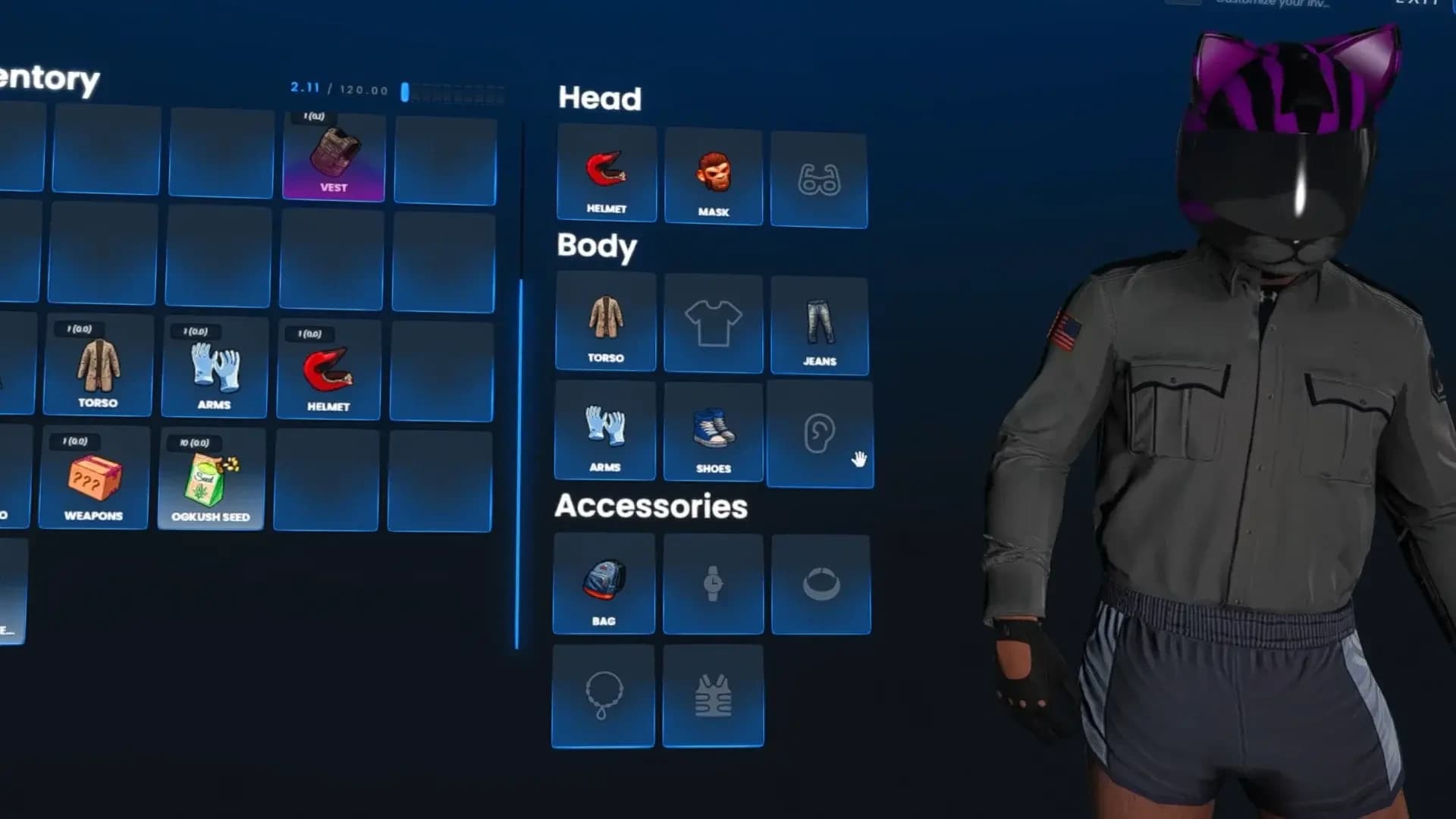
When the clothing page is on, what your character wears becomes items in fourteen slots — helmet, mask, glasses, torso, t-shirt, jeans, arms, shoes, ears, bag, watch, bracelets, chain and vest. Take a piece off by dragging it out of its slot; put one on by dragging it in or using it. Clothes bought in any clothing shop appear as items automatically, so they can be stored, traded, sold or looted.
FiveM Quasar Advanced Inventory clothing and gear slots
Option
Default
Description
Config.EnableArmor
true
Keeps the vest slot. A worn vest gives Config.DrawableArmor (100) armor, and its armor value is kept on the item.
Config.TakePreviousClothes
false
true returns the piece you replaced to the inventory.
Config.ClothingSlots
14 slots
Slot number, head/body/addon group, prop or drawable, component id and the take-off animation of each slot.
Config.Defaults
per gender
The drawable each slot returns to when emptied.
The appearance resource saves the outfit when the inventory closes — see Integrations for the supported ones and for the export a clothing shop should call. Clothing slots work on the freemode male and female models only and cannot be changed inside a vehicle.
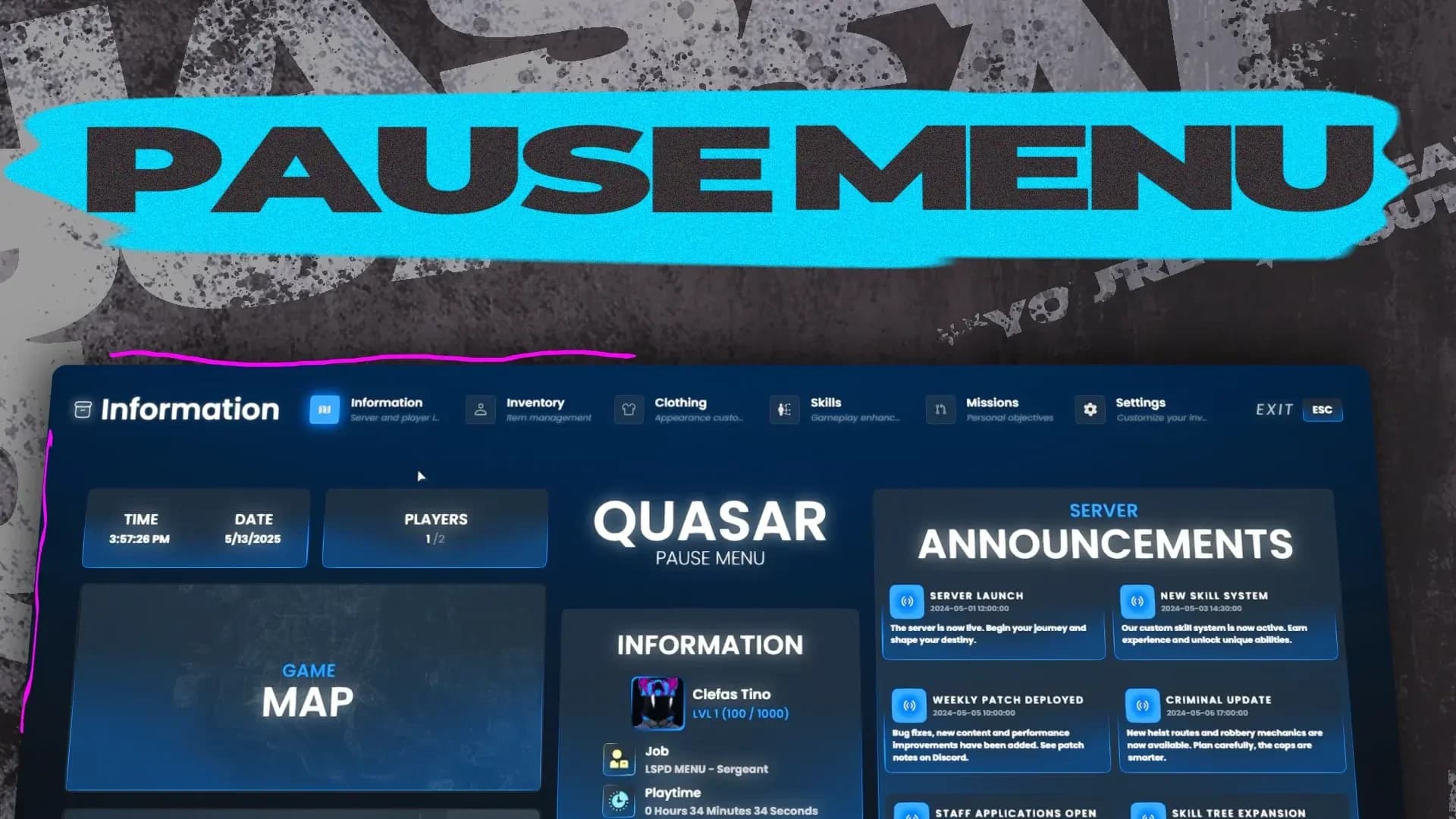
With Config.Pages.pause_menu and Config.UseInventoryPauseMenuByDefault, ESC opens the inventory's own pause menu instead of GTA's: the player's portrait, name, job and grade, cash and bank, level, players online, your announcements, buttons for the map, the game settings and leaving, and links to your community.
FiveM Quasar Advanced Inventory ESC pause menu
lua
Config.UseInventoryPauseMenuByDefault = true
Config.ServerName  = 'QUASAR'
Config.DiscordLink = 'https://discord.gg/quasarstore'
Config.YoutubeLink = 'https://www.youtube.com/@quasarstore'
Config.Announcements = {
    { title = 'Server Launch', message = 'Welcome to the city!', date = '2024-05-01 18:00:00' },
}
Announcements are shown newest first. The portrait comes from MugShotBase64.
'server' keeps Player(src).state.inventory on the server only; 'replicated' sends it to every client (only for client scripts that read another player's inventory); 'off' disables it.
Config.DisableShopGenerationOnClient
false
true only lets shops be created on the server with CreateShop / OpenShop.
Config.InventoryPrefix
'inventory'
Prefix of every event name. Do not change it unless you also change every script that uses those events.