


The Three Screens#
Medical Creator has three interfaces, each for a different person:
Screen | Opened with | Who it is for |
|---|---|---|
Hospital Creator |
| Admins and the jobs in |
EMS menu | or |

Documentation
How Quasar Medical Creator works in game: draw hospitals with beds and garages, last stand and respawn, check-in, body-part injuries, the EMS radial menu, CPR revive, medications, stretcher and wheelchair.
Medical Creator has three interfaces, each for a different person:
Screen | Opened with | Who it is for |
|---|---|---|
Hospital Creator |
| Admins and the jobs in |
EMS menu | or |
/ambulanceOn-duty staff of the jobs in |
Death screen | Going down | Every player. The countdown, the distress call and the respawn. |
Players rebind the EMS key in Settings → Key Bindings → FiveM ("Open Ambulance Menu"). The default comes from Config.EMSMenuKey.
Two places to be treated work out of the box, both defined in config/hospital.lua:
Place | What it has |
|---|---|
Pillbox Hospital | A complete hospital: blip, check-in doctor ($3,000, 15 s) with four beds, duty point, stash, boss menu, wardrobe, pharmacist, a ground garage with an |
Standalone check-in | A single doctor on the north-west coast ($5,000, 5 s, no beds). Standalone points only treat and respawn — |
Every hospital you draw with the creator is added on top of these, stored in the database and shown to everyone straight away.
Open /hospital_creator. The left panel lists your hospitals with dots for check-in, shop and garage, and a search by blip name; press + for a new one. The right panel holds the sections below. Each location field has a Select button: the window closes, you place the point in the world, and it reopens with the value filled in.
A free camera lifts above you. Click around the building to outline it: the walls are red until there are at least four points and the outline is long enough, then they turn green.
Key | Does |
|---|---|
W A S D | Fly the camera. The mouse looks around. |
E / Q | Up / down. |
Left click | Add a corner where the crosshair hits. |
Right click | Undo the last corner. |
Z / X | Raise / lower the zone's height — tall enough to cover every floor and the roof helipad. |
Enter | Done. |
Backspace | Cancel. |
Points are placed with your normal camera: aim with the crosshair, a ghost of the ped or vehicle follows it, Z / X turn its heading and left click places it. Points you already set are drawn as markers so nothing lands on top of another.
Section | What you set there |
|---|---|
Location Zone | The outline of the hospital. Entering it spawns the NPCs and interaction points; leaving it removes them. |
Blip Settings | Name (also its name in the list), sprite and colour from searchable lists with pictures, scale and position. |
Respawn Point | Required. Where a bled-out player appears — or, with Use Check-in Instead, they are laid on a free bed through the check-in flow. |
Check-in Settings | The doctor ped and where it stands, distance, price, duration (ms), Max On Duty, the respawn spot used when no bed is free, Disable Beds, and the beds themselves. |
Duty Settings | Where staff go on and off duty. |
Stash | The EMS locker. Each medic has their own (30 slots by default, |
Boss Settings | The boss menu point. Hiring, grades and salaries come from your framework's society resource. |
Wardrobe | Off by default. The heading you place it with is the way the player turns to change. |
Shop | The pharmacist: ped, idle animation, position, distance and the items with their price and description. Add Item picks from every item your inventory knows. |
Garage | As many as you want. Each has a menu point, a spawn point (also where vehicles are stored), a distance and its vehicles: model, label and the job grades allowed to take it. |
Every section except the zone, respawn and garages has a switch in its title — turning it off removes that point from the hospital. A new hospital starts with duty, stash, boss, check-in and shop on, wardrobe off, and the shop filled from Config.CreatorDefaultItems.
Add Bed asks you to aim at the bed prop itself. It is outlined and a ghost patient lies on it so you can line them up:
Key | Does |
|---|---|
Z / X | Turn the patient on the bed. |
Q / E | Raise / lower the patient onto the mattress. |
Left click | Save this bed. |
A bed already in use is outlined and cannot be picked twice. Any object works — some maps build their beds as vehicles. Unless Disable Beds is ticked, at least one bed is required.
Create Hospital (or Save when editing) applies it to every player at once, with no restart. A missing required field is marked in red. Delete asks for confirmation. Every change is logged to the
creatorwebhook.
A player who dies is not sent to the menu — they fall where they are, invincible, and the death screen takes over.
Phase | Lasts | What the player can do |
|---|---|---|
Last stand — "You are dying…" |
| Crawl with W / S, turn with A / D, talk, and press G to call EMS. Shooting, aiming and melee are blocked. |
Dead — "Your last minutes are running out…" |
| Lies still. G if EMS have not been called yet, hold E to give up and respawn. At zero they respawn on their own. |
With Config.LastStand = false the player goes straight to the dead phase. Config.EnableCrawl turns crawling off, Config.MuteDeadPlayer mutes them on voice while down, and Config.DeadAnimation sets the pose.
Respawning takes the player to the closest hospital — onto a free bed when its respawn uses check-in, otherwise to its respawn spot — free of charge. With Config.RemoveItemsAfterRPDeath on, everything in their inventory is taken except Config.KeepItemsOnDeath (phone, cash and ID card by default). Being revived by EMS keeps the inventory.
Going down in water replaces the timers with a blue drowning timer of Config.Drowning.duration (60 s). Reaching dry land stops it; letting it run out respawns the player.
Death is saved — in users.is_dead on ESX, in the player's metadata on QBCore and Qbox. A player who disconnects while down comes back down, with a notice that they were dead last time.
Anyone can walk up to a hospital's doctor and check in with E or the target option. In order:
If Max On Duty is above 0 and that many EMS are on duty, check-in is refused — real medics should treat the player instead.
The price is taken from the bank, with Config.InsuranceDiscount (50%) off for players with health insurance.
The screen fades, the player is laid on the least-used free bed with a camera on them, and a "Recovering…" bar runs for the check-in duration.
They get up fully healed: health restored, every injury and medication cleared. The bed is freed for the next patient.
If every bed is taken, or beds are disabled, the player waits through the progress bar and appears at the check-in's default respawn location instead.
Every hit lands on a body part — head, body, left arm, right arm, left leg, right leg — and the weapon decides the injury:
Injury | Caused by | Effects as it worsens (levels 1–4) |
|---|---|---|
Bleeding | Every firearm and blade. | Loses 1 / 2 / 3 / 5 health each tick, blood spurts from the wound, a red flash from level 3. It never kills on its own. |
Bruising | Fists, blunt weapons, falls and vehicles. | Legs: a limp down to half speed. Arms: weaker weapon damage. Head at level 4: distorted vision. |
Burning | Fire, molotovs, explosives, flares and electricity. | A rising chance to lose health, then blurred vision, camera shake and an orange flash. |
Each new hit raises that part's level by one, up to four. Effects are applied every Config.Injury.interval (25 s) and every one of them has its own switch in Config.Injury.effects. A hit only counts if it takes at least 5 health or 5 armour (damageThreshold), and weapons in weaponBlacklist — the stun gun by default — never injure.
Injuries are cleared by an EMS treatment, a full heal, a revive or a check-in. With Config.ForceTreatmentForRevive on (the default) they survive death, so the medic has to treat every wound before the defibrillator works.
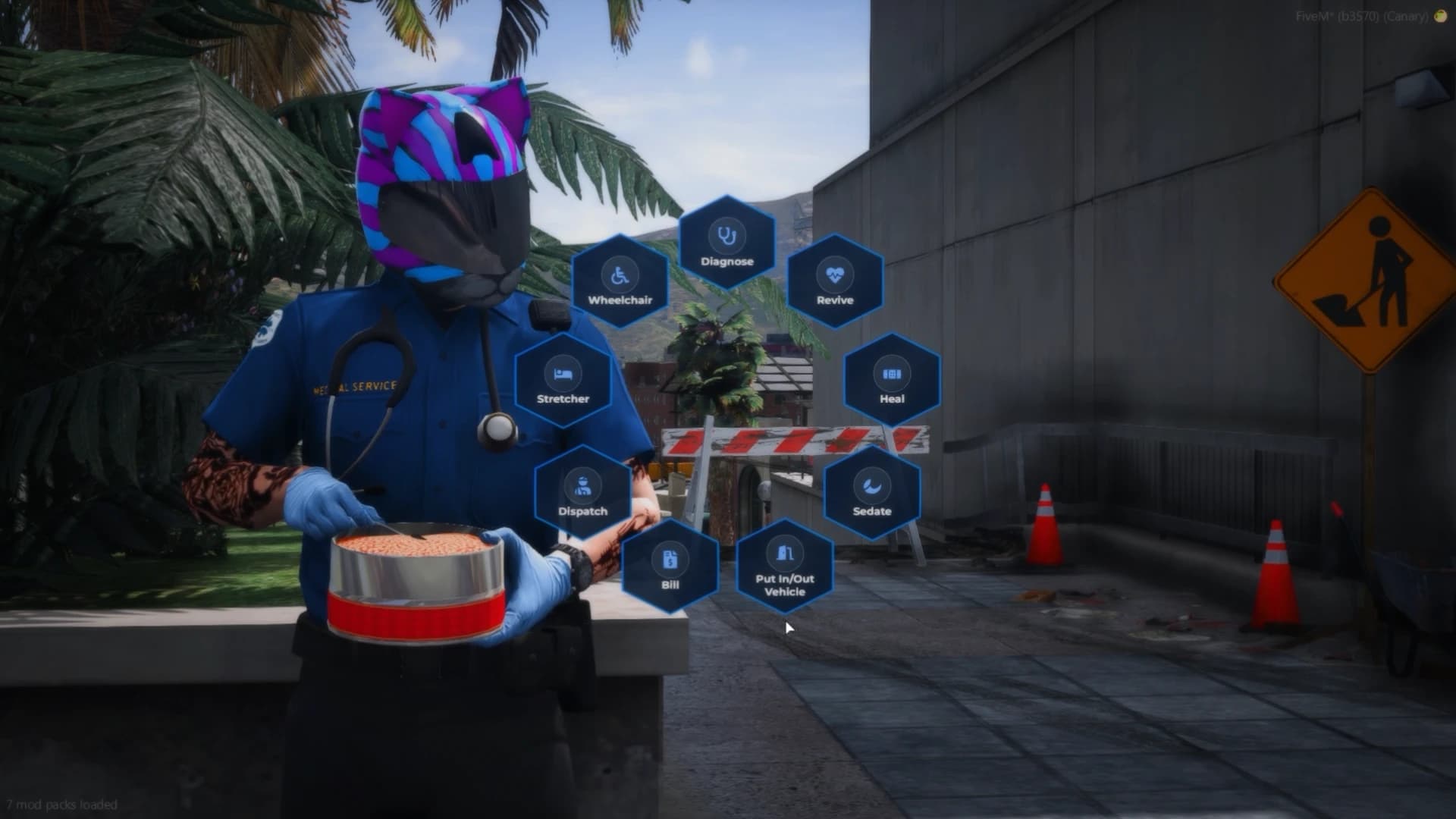
F5 opens a ring of hexagons for staff of Config.Jobs who are on duty and not down themselves. Actions aimed at a patient pick the closest player in range.
Action | Needs | What it does |
|---|---|---|
Diagnose | Patient within 4 m, or yourself | Opens the injury report. See Treating a Patient below. |
Revive |
| A CPR scene for both players, then the patient stands up. The medic earns |
Heal |
| Full health and every injury cleared. With nobody near, the medic heals themselves. |
Sedate |
| The patient ragdolls and loses control for 8 minutes. Sedating again wakes them early. |
Put In/Out Vehicle | Your ambulance nearby | Seats the patient in the first free passenger seat, or takes them out. |
Bill | A billing resource | Asks for an amount and invoices the closest player to the EMS society. |
Dispatch | — | Lists the open distress calls with name and time; choosing one sets a GPS waypoint. |
Stretcher | An ambulance or the | Takes out a stretcher. See Stretcher below. |
Wheelchair | Patient within 5 m | Prescribes a wheelchair for a number of seconds. |
Staff on duty also see each other on the map, named, refreshed every Config.PositionRefreshInterval. With Config.PoliceCanTreat on, police can revive, heal and use treatment items too, though they do not get the menu.
When a downed player presses G, every on-duty medic is notified and the call appears in Dispatch. It disappears when the player is revived or leaves. A supported dispatch or phone can receive the alert as well — see Integrations.
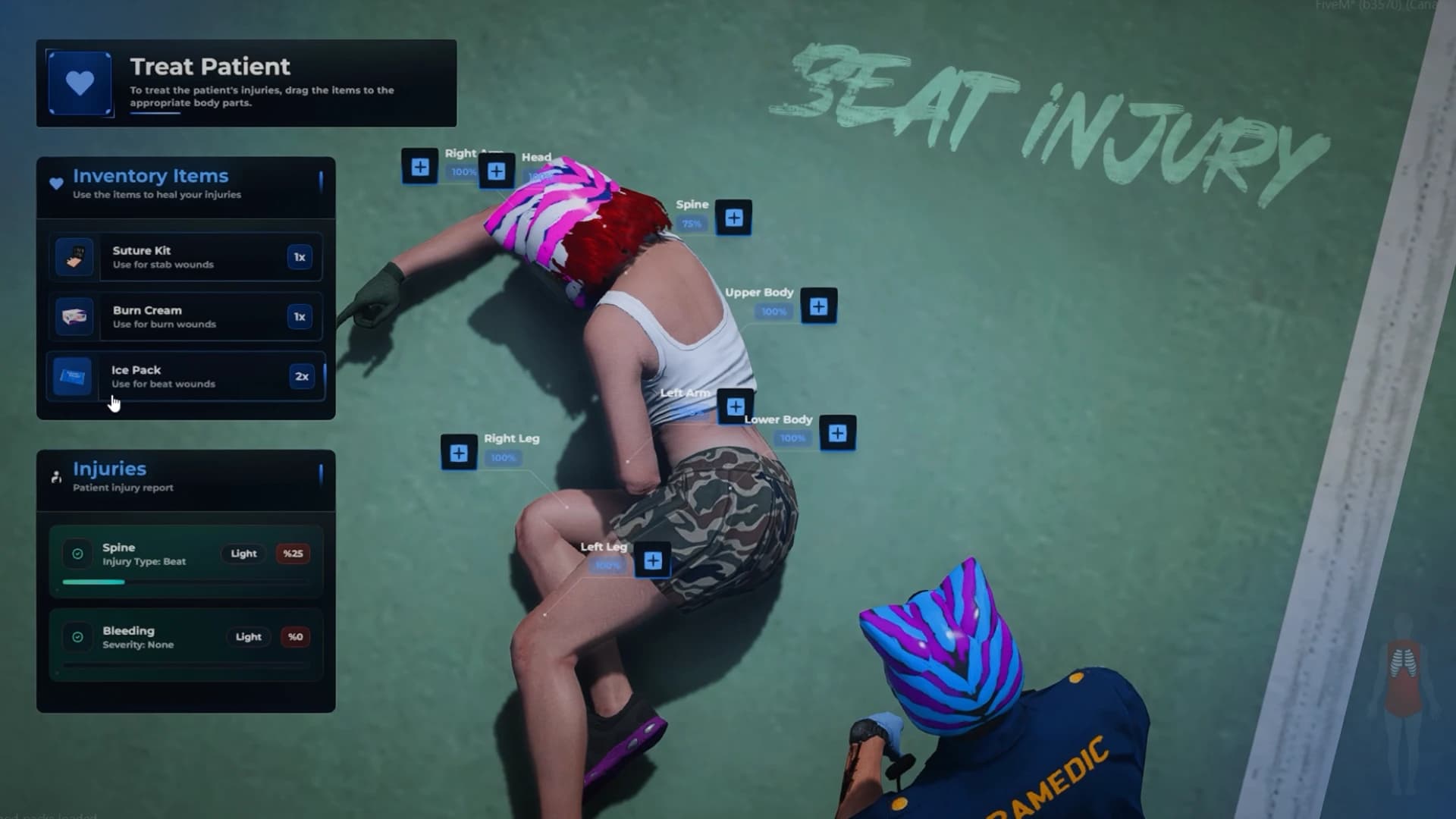
Diagnose kneels the medic beside a downed patient — or brings out a clipboard for a standing one — focuses a camera on them and freezes them for the examination. The report shows:
Every injury by body part, type and severity: Light, Moderate, Severe or Deadly.
Markers over the patient's body that follow each injured bone.
The treatment items the medic is carrying, with their pictures.
Drag an item onto a body part. The item has to match that part's worst injury — tweezers for bleeding, icepack for bruising, burncream for burning — otherwise "You are not using the correct equipment". A Config.TreatmentTime (9 s) bar runs, one item is used, and the report refreshes. Bleeding is treated first, then bruising, then burns. The pairs live in Config.TreatmentItems.
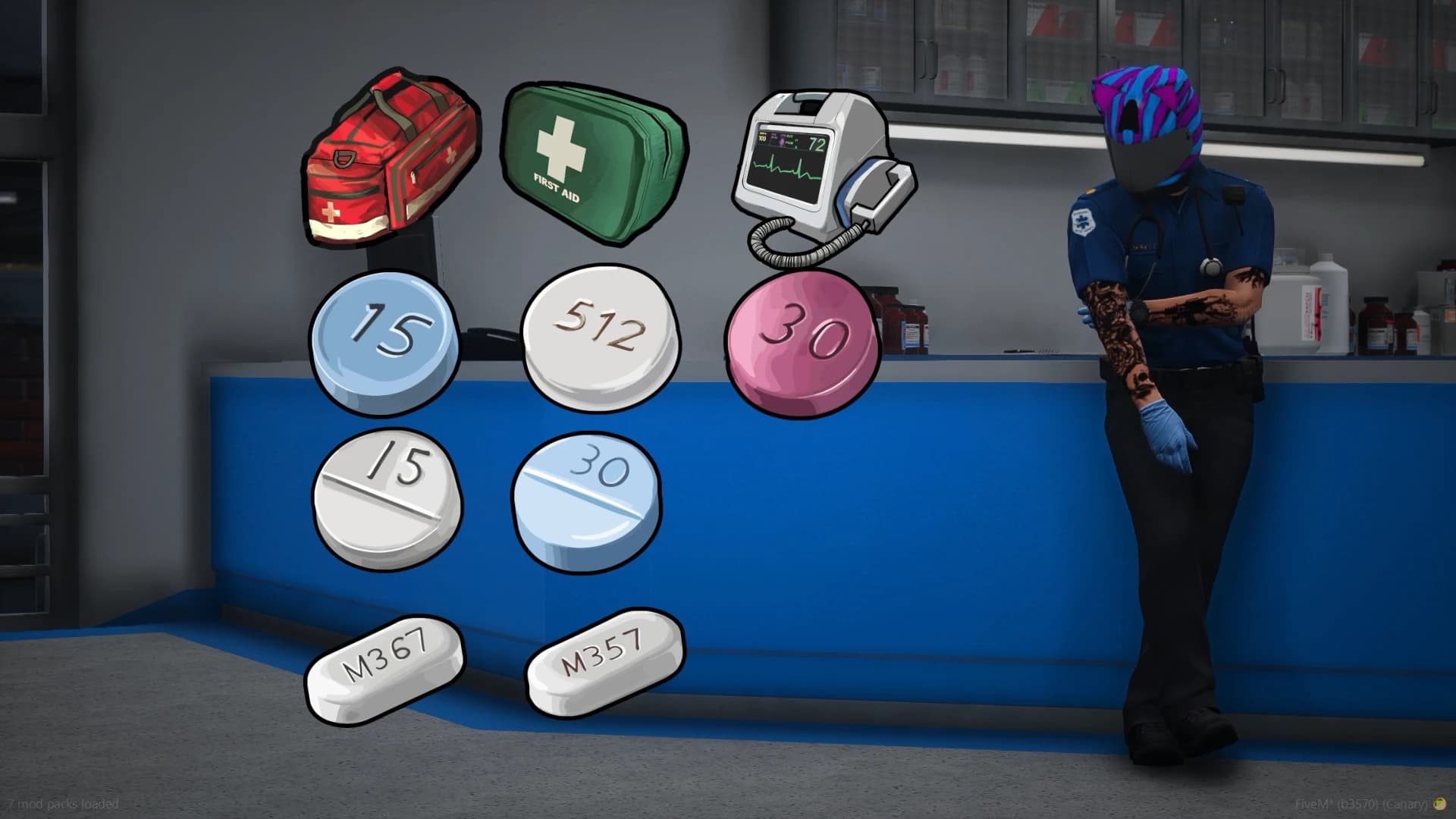
Any player can use these. Each lasts a set time and shows a notice when it wears off; the effects and durations are in Config.MedicalSystem.
Item | Lasts | Helps | Side effects |
|---|---|---|---|
| 20 s | Bruising −2, burns −1 | Light blur, slightly slower |
| 60 s | Bruising −4, burns −3, bleeding −1 | Blur and distortion, slower, half accuracy |
| 12 s | Bleeding −3, 80% chance to stop all bleeding | — |
| 24 s | Burns −2 | Cool screen tint |
| 18 s | Faster, more accurate, slow health regeneration | Camera shake |
| 90 s | Slow health regeneration | — |
| 30 s | +50 health at once, every injury −1, slightly faster and more accurate | Screen flash |
| 45 s | Bruising −3, burns −2 | Much slower, poor accuracy, blur, drowsiness and brief blackouts |
The bandage (Config.BandageItem) heals 20% of the missing health over 7 seconds; set healBleed = true if it should also stop bleeding without a medic.
Using the medbag item puts the bag in the medic's hand; E sets it on the ground. Any on-duty medic can then open it — E or the target option — and take tweezers, an ice pack, burn cream, a defibrillator, a medikit or a sedative, or pick the bag back up.
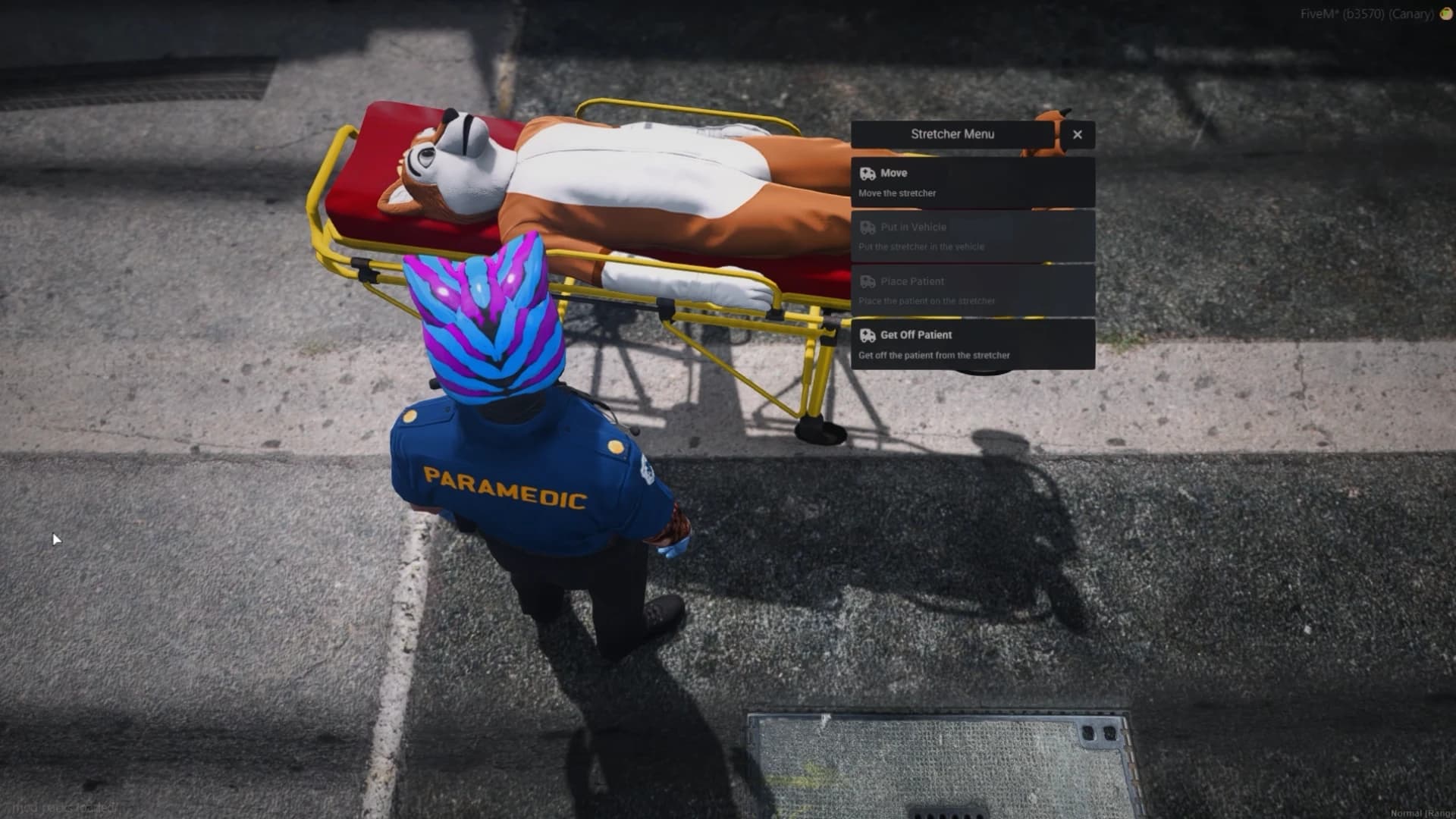
Each ambulance carries one stretcher. Stand near it and choose Stretcher in the EMS menu, or use the stretcher item anywhere. You start carrying it at once; aim at the ground in front of you and press E to set it down.
Press E beside a placed stretcher for its menu:
Option | Does |
|---|---|
Move Stretcher | Pick it up again — the patient stays on. From an ambulance, it also opens the rear doors. |
Place Patient | Lay the closest player on it. |
Get Off Patient | Take them off. A conscious patient can also press E to climb off. |
Put in Vehicle | Load it, patient included, into the ambulance nearby. The rear doors open and close on their own. |
Delete Stretcher | Remove it. |
Only vehicles listed in Config.StretcherVehicleOffsets (config/stretcher.lua) take a stretcher. The vanilla ambulance ships configured; to add your own model, copy its line and adjust the position and rotation:
Config.StretcherVehicleOffsets = {
    { model = joaat('ambulance'), coords = vec3(0.15, -3.0, 0.97), rotation = vec3(-1.3, 0.0, 90.0) },
    { model = joaat('my_ambulance'), coords = vec3(0.0, -2.8, 1.0), rotation = vec3(0.0, 0.0, 90.0) },
}
The same list decides which vehicles count as an ambulance for Put In/Out Vehicle. Storing an ambulance in the garage removes its stretcher. Config.StretcherItem = false lets medics take one out without the item.
Wheelchair in the EMS menu lists the players nearby, including yourself. Pick one and enter a time in seconds: they are seated in a wheelchair — a streamed vehicle, keys included — and cannot leave it until the time is up, when it disappears.
With a target resource, each point is a target option; with Config.UseTarget = false it is a 3D prompt you use with E.
Point | Who | What it does |
|---|---|---|
Check-in | Anyone | Paid treatment on a bed. |
Duty | EMS | Toggle duty (see below). |
Stash | EMS on duty | A personal locker in your inventory. |
Shop | EMS on duty | The pharmacist's stock, through your inventory's shop. |
Boss menu | EMS boss | Opens esx_society or qb-management. The boss is grade |
Wardrobe | EMS on duty | Your clothing script's outfit menu. |
Garage | EMS on duty | Lists the vehicles your grade may take. The vehicle spawns with keys and a full tank, unless the spawn point is occupied. Drive back to the spawn point to store it. |
ESX has no duty flag, so holding the EMS job is being on duty. Going off duty stores the job and grade in users.ems_duty and switches the player to Config.UnemployedJob; going back on restores them. Only someone who went off duty here can come back on.
The duty point toggles QBCore's own on-duty flag. Only on-duty staff count for the menu, the staff map and Max On Duty.
Everything below is in config/main.lua and needs a resource restart. Each line carries a tag: [EDIT] safe to change, [ADV] advanced, [AUTO] detected for you, [CORE] leave alone.
Config.Jobs = { 'ambulance' }                                -- EMS jobs
Config.PoliceCanTreat = { enable = true, jobs = { 'police' } } -- may revive, heal and treat
Config.CreatorJobs = { 'realestate', 'police' }              -- may open /hospital_creator
Config.UnemployedJob = { job = 'unemployed', grade = 0 }     -- ESX: job while off duty
Config.EMSMenuKey = 'F5'Config.LastStand = true
Config.EnableCrawl = true
Config.RespawnTimer = 5 * 60000 -- last stand length
Config.BleedOutTimer = 20 * 60000 -- automatic respawn
Config.Drowning = { enable = true, duration = 1 * 60000 }
Config.MuteDeadPlayer = true
Config.DisableHealthRegeneration = true
Config.DisableDeathAnimation = false
Config.DeadAnimation = { dict = 'mini@cpr@char_b@cpr_def', anim = 'cpr_pumpchest_idle' }
Config.RemoveItemsAfterRPDeath = true
Config.KeepItemsOnDeath = { 'phone', 'cash', 'id_card' }Config.ForceTreatmentForRevive = true -- treat every wound before the revive
Config.EMSRevivePrize = { enable = true, prize = 4000 }
Config.AmbulanceItems = {
revive = { item = 'defib', remove = false },
heal = { item = 'medikit', duration = 1000, healBleed = true, remove = true },
sedate = { item = 'sedative', duration = 8 * 60000, remove = true },
medbag = { enable = true, item = 'medbag', remove = true },
}
Config.TreatmentItems -- tweezers = bleeding, icepack = bruising, burncream = burning
Config.TreatmentTime = 9 * 1000Config.Injury = {
enable = true,
notifications = true,
bloodParticles = true,
interval = 25000, -- effect tick, minimum 5000
weaponBlacklist = { `WEAPON_STUNGUN` },
damageThreshold = { health = 5, armour = 5 }, -- false to count every hit
effects = { flash = true, shakeCam = true, blurCam = true,
depressedMovement = true, injuredMovement = true,
weaponDamageModifier = true },
}Which weapon causes which injury is in shared/data.lua (Config.DamageCategories), next to the weapon names used in the death logs.
Config.MedicalSystem.items holds each medication's label, duration in milliseconds and effects. Config.MedicalSystem.enable = false turns them all off. Config.BandageItem sets the bandage's item, heal share, duration and whether it stops bleeding.
Config.UseTarget = true          -- false = 3D prompts
Config.TargetWidth = 5.0
Config.TargetHeight = 5.0
Config.DefaultStashData = { maxweight = 1000000, slots = 30 }
Config.PositionRefreshInterval = 5000 -- staff map refresh
Config.DisableSounds = false
Config.Debug = false             -- ships true; turn it off on a live server
Config.ZoneDebug = false -- draws the target zonesconfig/hospital.lua holds Config.Hospitals — Pillbox is the full example, with every field commented — and Config.StandaloneHospitals for check-in-only doctors. Hospitals in this file are not shown in the creator; build new ones in game instead so they can be edited live.