


What Comes in the Package#
Resource | Required | What it does |
|---|---|---|
| Yes | Streams the 3D gradient and Cyberpunk backgrounds behind the character preview. |
| No | Basket shops with categories, shown inside the inventory. |

Documentation
The resources bundled with Quasar Advanced Inventory: qs-advancedshops basket shops with categories, qs-inventory-objects backgrounds, and the armor, backpacks, licenses, weapon draw and weapons on back add-ons.
Resource | Required | What it does |
|---|---|---|
| Yes | Streams the 3D gradient and Cyberpunk backgrounds behind the character preview. |
| No | Basket shops with categories, shown inside the inventory. |
|
No |
Usable armor vests with a visual vest and saved armor. |
| No | Backpacks and briefcases that open their own storage, with optional passwords. |
| No | Counters where players buy their ID card and licences. |
| No | Draw and holster animations. |
| No | Weapons in the inventory shown on the character's body. |
Start every add-on after qs-inventory, and do not rename any of them — each one checks its own folder name.
A stream-only resource: 31 gradient models and the Cyberpunk background, used by Config.Backgrounds in qs-inventory/config/default.lua. Players pick one in the inventory settings. The inventory lists it as a dependency, so it must be started first or the inventory will not start. Nothing in it needs configuring.
qs-advancedshops sells items through a checkout page inside the inventory: categories down the side, items with prices, a basket with quantities, and a choice of cash or card at checkout. It uses the inventory's theme and background, and the server recalculates every price from the config before charging, so players cannot change what they pay.
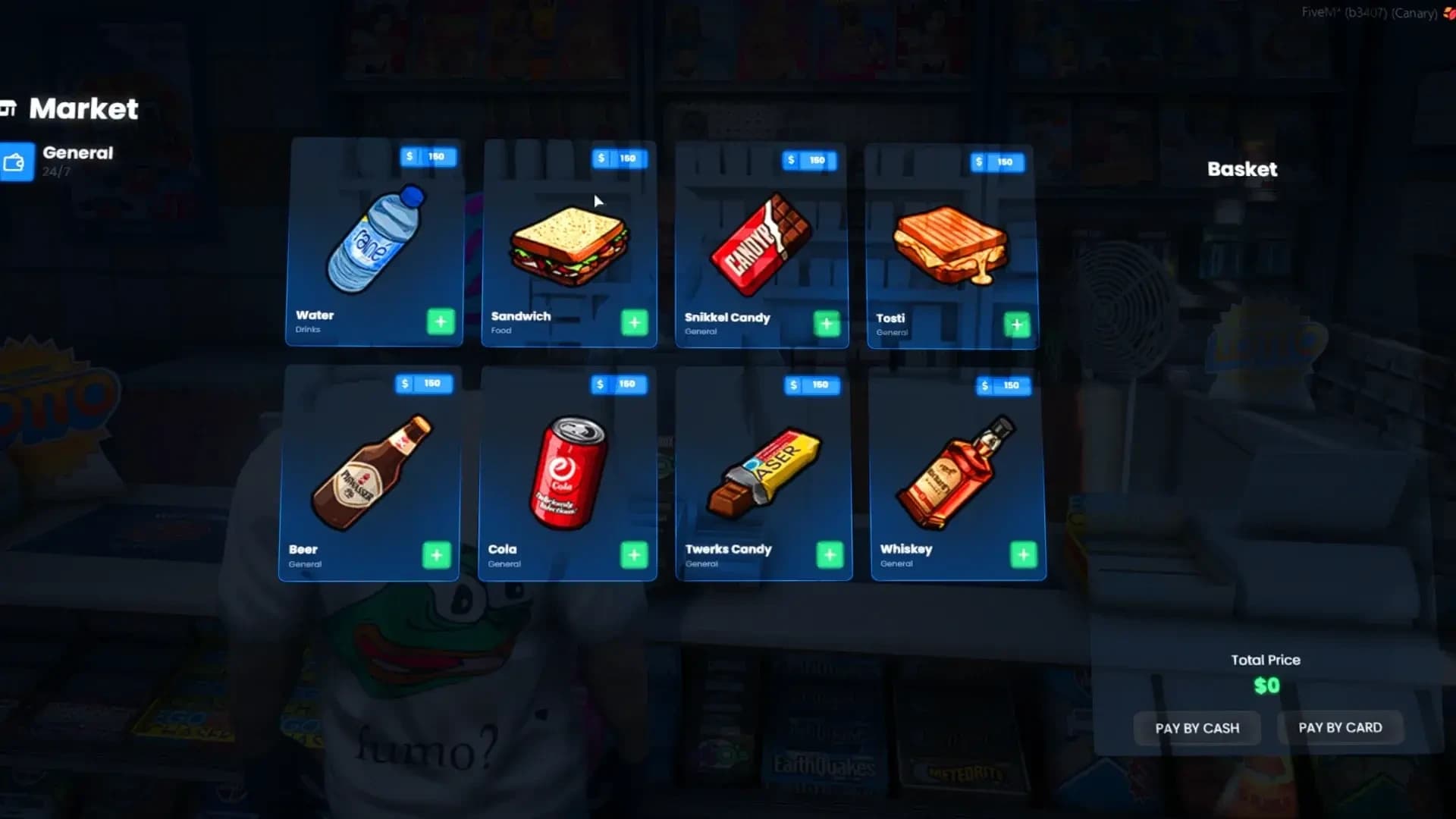
qs-advancedshops/shared/config.lua:
Option | Default | Description |
|---|---|---|
|
| Same convar as the inventory. |
|
|
|
|
| Where item images are read from. |
|
|
|
|
| Console logs. Set it to |
Config.Shops = {
    {
        name = '247market',              -- unique id
        label = '[E] - 24/7 Market',     -- prompt and title
        blip = true,
        blipSprite = 52,
        blipColor = 2,
        blipScale = 0.6,
        -- requiredLicense = 'police_license',
        -- jobs = { 'police' },
        -- grades = { 2, 3, 4 },
        categories = {
            [1] = {
                name = 'General',
                description = 'Everyday Essentials',
                icon = 'fa-solid fa-wallet',
                items = {
                    { name = 'water_bottle', label = 'Water',    perPrice = 150, description = 'Refreshment' },
                    { name = 'sandwich',     label = 'Sandwich', perPrice = 150, description = 'Quick Meal' },
                }
            },
            [2] = {
                name = 'Medical',
                description = 'Health Supplies',
                icon = 'fa-solid fa-notes-medical',
                items = {
                    { name = 'bandage', label = 'Bandage', perPrice = 100, description = 'First Aid' },
                }
            },
        },
        pedHash = 'mp_m_shopkeep_01',    -- remove the line for no ped
        scenario = 'WORLD_HUMAN_STAND_MOBILE',
        coords = {
            { ped = nil, coords = vector4(24.47, -1346.62, 29.5, 271.66) },
            { ped = nil, coords = vector4(-3039.54, 584.38, 7.91, 17.27) },
        }
    },
}
Shop field | Description |
|---|---|
| Unique id. Two shops with the same name refuse to load. |
| The prompt text and the shop title. |
| A blip on every location. |
| Jobs and grades allowed to open the shop. |
| A licence needed to open the shop. |
|
|
| The shopkeeper and what they do. |
| Every place this shop exists. One entry can be a whole chain of stores. |
Item field | Description |
|---|---|
| The item and the name shown. |
| Price of one unit. |
| Short text under the name. |
| Shows the item only to these jobs and grades (set both). |
| A licence needed to see the item. |
| Weapons: attachment keys fitted on purchase, such as |
| Weapons: tint index applied on purchase. |
The shipped config includes a 24/7 chain, gas stations, Rob's Liquor, hardware stores, Ammu-Nation, a weed shop, a black market and an LSPD armory. Every purchase fires the inventory's buyItem hook.
The same file can place job stashes in the world:
Config.Stashes = {
    [1] = {
        ['coords'] = vector3(450.67, -978.57, 30.68),
        ['targetLabel'] = '[E] - Open Stash',
        ['size'] = { weight = 50000, slots = 15 },
        ['label'] = 'police_stash',
        ['requiredJobs'] = { 'police' },
        ['requiredJobsGrades'] = { 2, 3, 4 },
        ['requiredLicense'] = nil,
        ['personal'] = false,  -- true = one stash per player
        ['distance'] = 5.0
    },
}
The stash id is Stash_<label>; with personal = true, each player gets their own copy.
-- server: register a shop that has no place in the world
exports['qs-advancedshops']:registerShop(shopTable)
exports['qs-advancedshops']:destroyShop('my_shop')         -- or a list of names

-- client: open it (or any shop table in Config.Shops format)
exports['qs-advancedshops']:openShop(shopTable)Usable armor and heavyarmor items. Using one plays an animation with a progress bar, gives the armor, puts a vest on the character, and stores the armor so it comes back after relogging or respawning. /resetarmor takes the vest off and returns the item.
Option | Default | Description |
|---|---|---|
|
| Durations in milliseconds. |
|
| Armor given by each item. |
|
| The command that removes the vest. |
|
| Puts a vest on the character. |
| per gender | Vest drawable and texture for each armor type. |
Add armor and heavyarmor to your items file if they are not there.
Containers you carry. Put a backpack in a hotbar slot and use it to open its own storage; it shows on your back (or in your hand for a briefcase) while it is in the hotbar. Each bag has its own id, so a bag keeps its contents when it is given, sold or dropped. Briefcases can be locked with a password the first time they are used.
Config.Items = {
    ['backpack'] = {
        slots = 10, weight = 100000, locked = false,
        cloth = { male = { ['bag'] = { item = 45, texture = 0 } }, female = { ['bag'] = { item = 45, texture = 0 } } },
    },
    ['briefcase'] = {
        slots = 3, weight = 5000, locked = true,
        prop = { model = 'prop_ld_suitcase_01', animation = { dict = 'missheistdocksprep1hold_cellphone', anim = 'static', bone = 'RightHand',
            attaching_position = { x = 0.10, y = 0.0, z = 0.0, x_rotation = 0.0, y_rotation = 280.0, z_rotation = 53.0 } } },
    },
}
Use either cloth (a bag drawable, recommended for back bags) or prop (an attached object, for hand-held cases) — never both on one item. Shipped bags: backpack, backpack2, briefcase and paramedicbag.
Option | Default | Description |
|---|---|---|
|
|
|
|
| Password prompts: |
|
| Slots that count as "carrying" the bag. |
|
| Password length. |
|
| Logs in F8. Set it to |
/bagpreview <index> [texture] browses bag drawables on your character so you can pick the item number, and /bpdebug prints what the resource sees. Only one bag can be carried at a time (Config.OnePerItem in the inventory), and bags cannot be stored inside stashes.
Counters on the map where players buy their documents. After a confirmation and a progress bar, the price is taken from the bank and the item is given with the character's name, birth date and gender. Using the document shows it to nearby players.
Config.Shops = {
    [1] = {
        name = 'id_card',                 -- the item given
        text = '[E] - Identity License',
        label = 'ID',
        type = 'Document',
        price = 150,
        isjob = false,                    -- or a job name
        timer = 2500,
        location = vec3(-545.08, -204.13, 38.22),
        blip = { enable = true, name = 'Identity License', sprite = 409, color = 0, scale = 0.7 },
    },
}
The shipped counters sell id_card, weaponlicense and driver_license. A script can open a purchase directly:
TriggerEvent('qs-licenses:client:Target', {
    label = 'License Example', type = 'Weapon license', name = 'id_card', price = 10,
})Plays a draw animation when a weapon is taken out and a holster animation when it is put away, and blocks firing until the animation ends. If the character wears a holster (Config.WeapDraw.variants), pistols are drawn quickly from the hip and the holster drawable swaps between empty and full.
Config.WeapDraw = {
    variants = { 130, 122, 3, 6, 8 },   -- drawables that count as a holster
    fastDrawWhenOnBody = false,         -- quick draw for weapons shown by qs-weaponsonback
    weapons = { 'WEAPON_KNIFE', 'WEAPON_NIGHTSTICK', ... },  -- weapons that animate
    holsterWeapons = { 'WEAPON_PISTOL', 'WEAPON_COMBATPISTOL', ... },
}
Add your add-on weapons to weapons so they animate too.
Long guns in the inventory are shown on the character's back or spine while they are not in hand — with their attachments and tint — and every player sees them. Each weapon has a model, a bone and an offset:
Config.WeaponPositions = {
    ['weapon_carbinerifle'] = {
        model = 'w_ar_carbinerifle',
        hash = -2084633992,
        bone = 10706,          -- 10706 spine, 24816 back
        x = 0.0, y = 0.17, z = -0.25,
        x_rotation = 0.0, y_rotation = 75.0, z_rotation = 180.0
    },
}
Seventeen rifles, SMGs and shotguns are configured. Only one model per weapon type is shown. The client export IsWeaponShownOnBody(weaponHash) tells other scripts whether a weapon is currently on the body.