

Kick what is on the ground
With no weapon in hand, walk up to a dropped item and press Left click or R: it flies off and rolls with real physics. Everyone sees it land in the same spot.

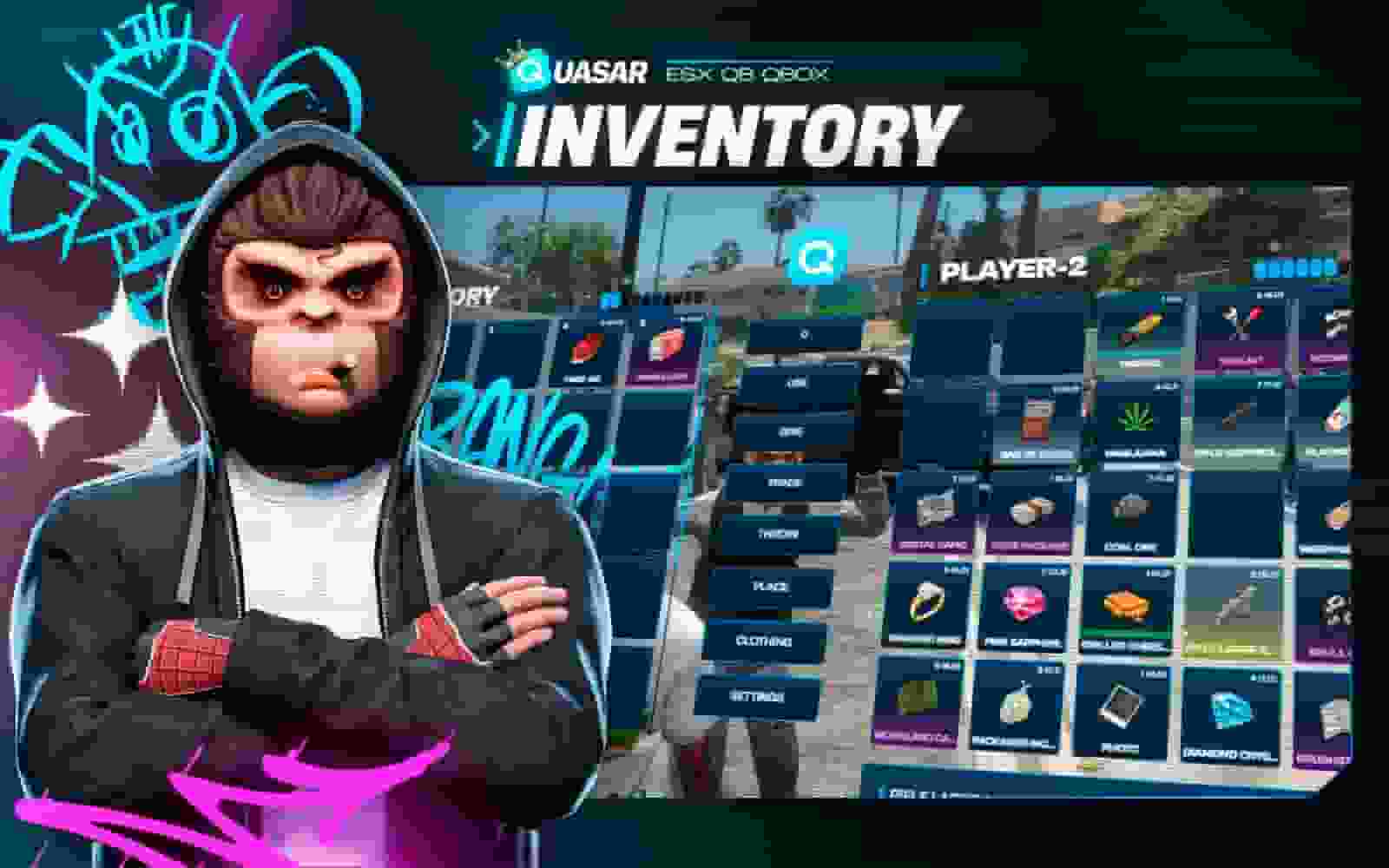
Inventory
A modern evolution of the classic FiveM inventory, rebuilt with enhanced visuals, smooth drag & drop, categories, hotbars, and a fully responsive layout. Lightweight yet powerful, it supports stashes, trunks, item drops, and complete slot/weight logic. Compatible with major frameworks, it brings clarity and performance to item management.
Overview
Quasar StoreFiveM · ESX · QBCore · QboxLive demo
Quasar Inventory (qs-inventory) is the FiveM inventory script for ESX, QBCore and Qbox. Not a video: the real inventory running in your browser. Drag items from side to side, hover them, open the style studio.
The FiveM inventory your players handle every day, on ESX, QBCore and Qbox. Scroll slowly: the live demo changes with you.
Grab an item and drop it anywhere. On a matching one they stack; on a different one they swap. You can try it yourself in the demo at the very top.
Type an amount in the box at the top and drag: only that part moves. With 0, everything moves.
Right-click sends it to the other side. Ctrl + right-click sends half. Double-click uses it.
Drop an item on a button. Give opens the nearby players list; throw tosses it by hand; place puts it in the world as a real prop.
Search lights up what you want and dims the rest, ignoring accents and capitals. Next to it, sort groups everything (weapons first) without touching your 1-5 bar.
Hover it: weight, description and its data (the ID with a name, the bag with its cash, the weapon with serial and ammo). The little bar is its condition: food goes off and weapons wear. The background colour is its rarity.
Every slot of this FiveM inventory tells you something: amount, weight, durability, shortcuts, health, hunger, thirst and money.
Top right of every slot: the amount and, in brackets, the stack's total weight in kilos. Huge amounts are shortened (1.2M, 50B) so they never overflow.
The line at the bottom is the condition. Weapons wear as you shoot and food goes off over time; at zero the item is broken or spoiled.
Items with decay lose condition over time, even if you don’t use them: this coffee is half gone and the toastie nearly off.
At zero they have expired and can’t be used; if you want, they delete themselves when someone tries. How long they last and whether they delete is set per item in /inventorycreator.
The first five slots carry their number: the key that uses them without opening the inventory (1-5).
The weight bar fills in steps and shows the kilos you carry and your maximum. When full, you can't pick up more.
On the left, how your character is doing, without closing the inventory to check.
On the right: your ID, cash, bank and dirty money. Each one can be hidden from the settings.
Hover it and its card appears: description and its own data. The ID card shows a name and number; a weapon, its serial and ammo.
Click one of your items, type the name and confirm. From then on its card shows it and the search finds it by that name.
Weapons cannot be renamed. In /inventoryconfig → Item rules you decide whether it is allowed, what it costs and which items cannot be renamed.
Every item can have a rarity, and players tell it at a glance by its colour. Create your own rarities in game.
Gold: the most valuable. Gold bars, jewellery, the collector's weapon…
Purple: special items you don't find just anywhere.
Grey: everyday things. You can also leave items with no rarity and no colour.
In the style studio, each player can turn on "Rarity outline": rare items also get a border in their colour, like in this demo.
Three come built in, but in /inventoryconfig → Item rules you create your own with a name and colour (up to 30), and assign them to any item from /inventorycreator.
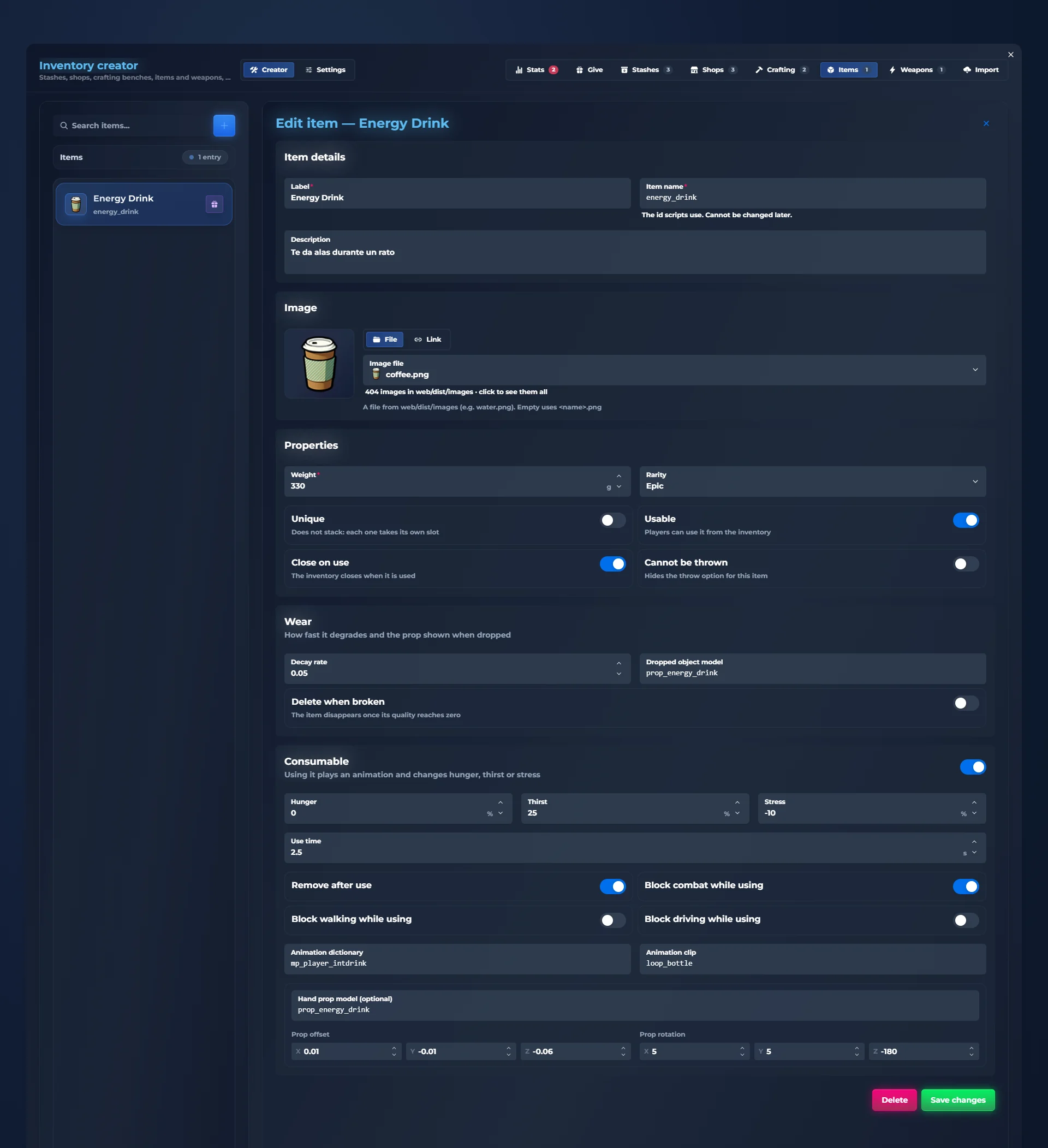
Create FiveM items from the in-game panel, with no item files: picture, weight, rules, decay and what it does when used.
In game type /inventorycreator. All the creator’s tabs are at the top.
On the left, everything you have already created. Click one to edit it, or create a new one.
The name players see, the item’s internal name and the description on its card.
Pick one of the inventory’s images or paste a link.
Weight, rarity, whether it is unique, usable, closes the inventory when used and can be thrown.
How long it takes to go off, whether it deletes itself once broken and which prop shows when dropped on the ground.
How much hunger, thirst or stress it removes, how long using it takes, its animation and the prop in hand. Save and it exists on your server.
Stashes, trunks, gloveboxes, shops, gun stores and pawn shops for your FiveM server: everything opens next to your pockets.
For houses, gangs, jobs. Each with its own slots and max weight. Created in game, at the spot you mark.
Every car has its own, and capacity depends on the vehicle type. You decide who can open them.
A price on each slot and, with limited stock, the units left in orange. Sold-out items cannot be bought. Drag to your pockets to pay.
Any shop can sell whatever you want: weapons with their serial number, ammo or attachments.
Selling points that buy at a fixed price. What you don't carry shows dimmed.
With their hands up (X) you can see and take what they carry. You decide whether dead players can be robbed too.
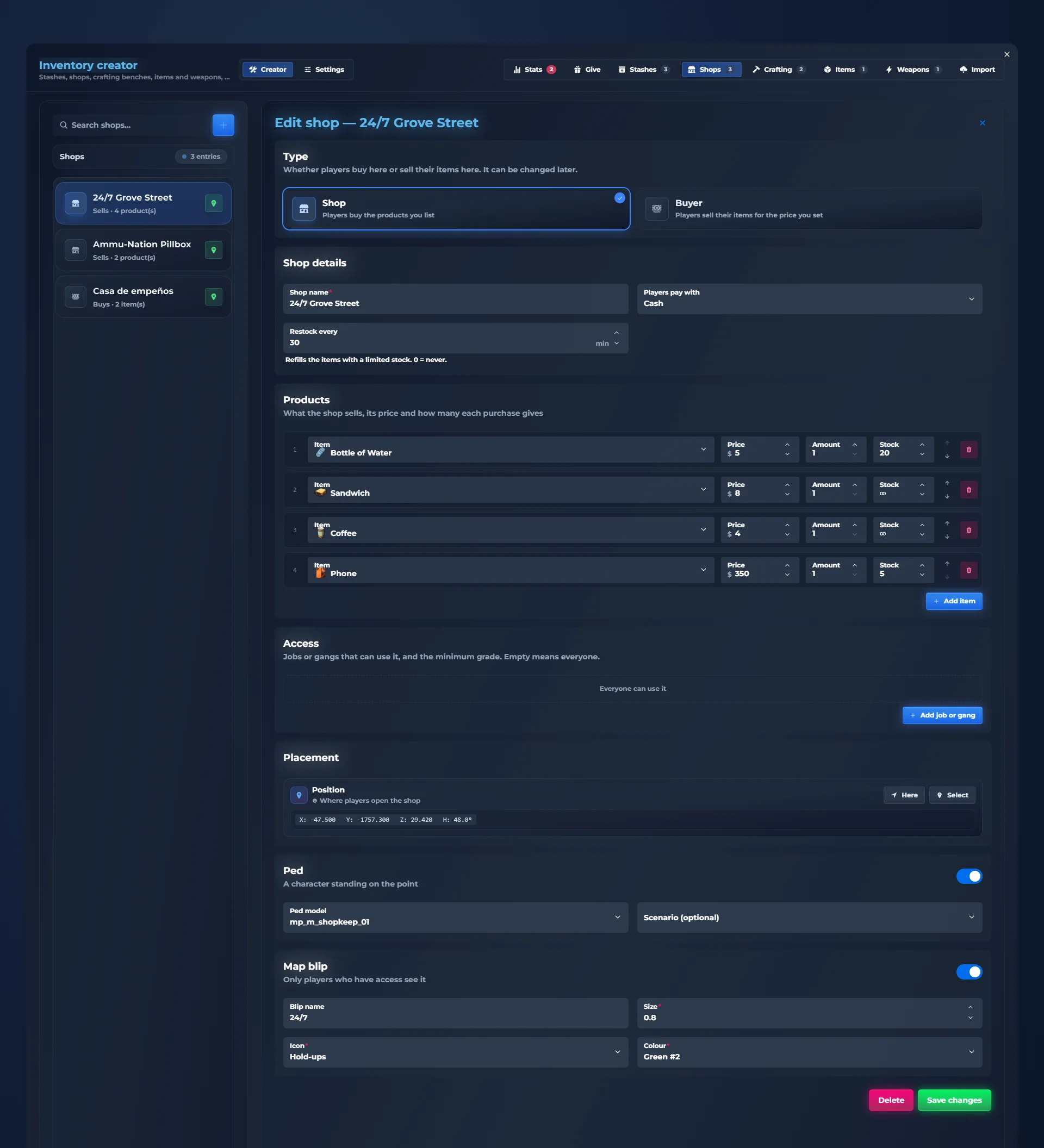
Create a FiveM shop without touching files: items, prices, stock, jobs, ped and blip, all from the panel in game.
In game type /inventorycreator. All the creator’s tabs are at the top.
On the left, everything you have already created. Click one to edit it, or create a new one.
A shop sells what you put in it; a buyer buys players’ items at the price you set.
Give it a name, choose how players pay (cash, bank or dirty money) and how often stock refills.
Add items with their price and, if you want, a limited stock that refills on its own every so often.
Leave it open to everyone or only for certain jobs or gangs, with a minimum rank.
Stand on the spot and press "Here". Pick the ped behind the counter and, if you want, what they do.
Blip name, icon, colour and size. Save and the shop works right away.
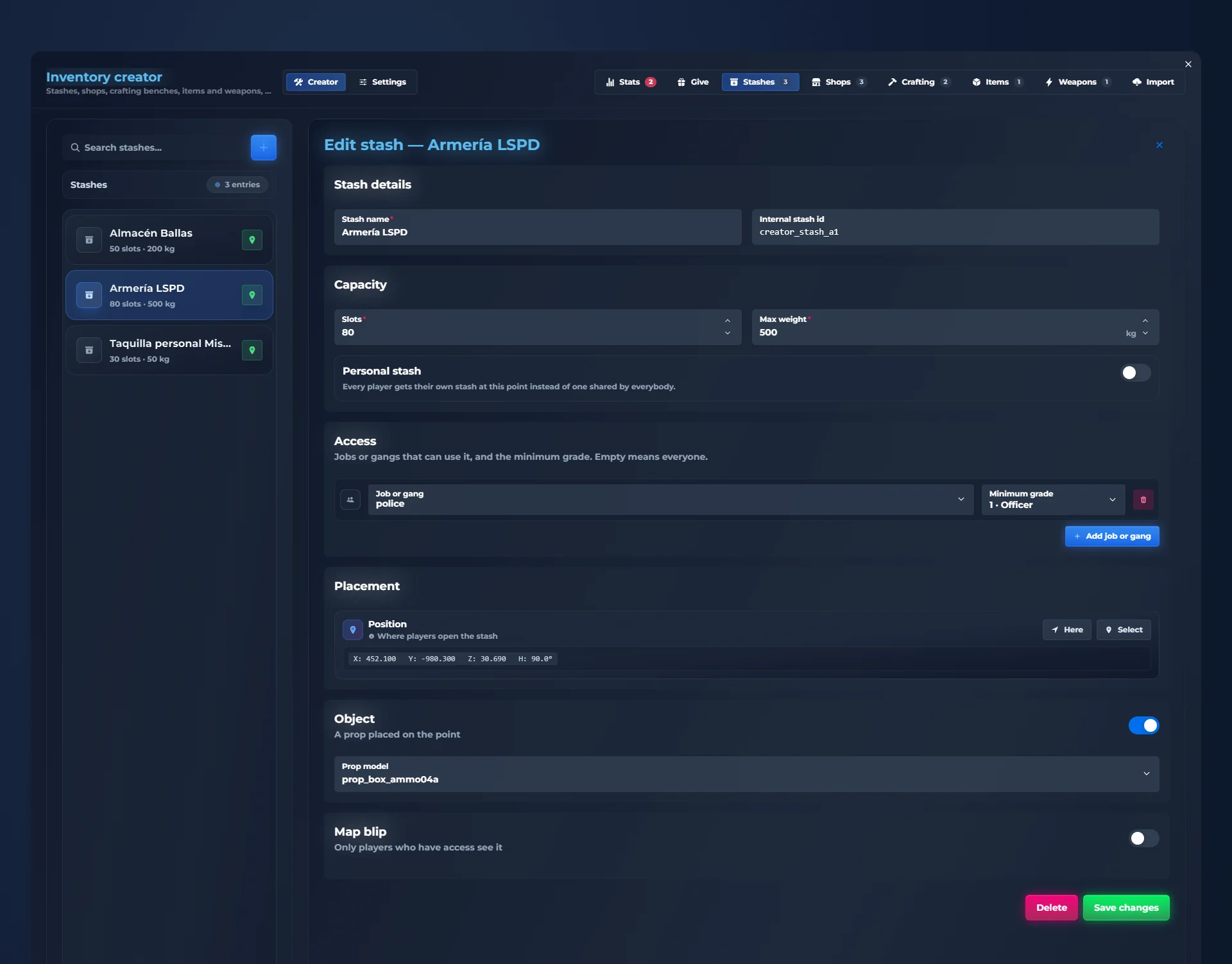
FiveM stashes for a house, a gang or the police station, with their own slots, weight and job access, from the same panel.
In game type /inventorycreator. All the creator’s tabs are at the top.
On the left, everything you have already created. Click one to edit it, or create a new one.
The name players see when they open it.
How many slots it has and how much weight it holds.
Choose which jobs or gangs can open it and from which rank.
Stand where you want the stash and press "Here".
If you want, place a prop (a locker, a crate…) and a map blip. Save and done.
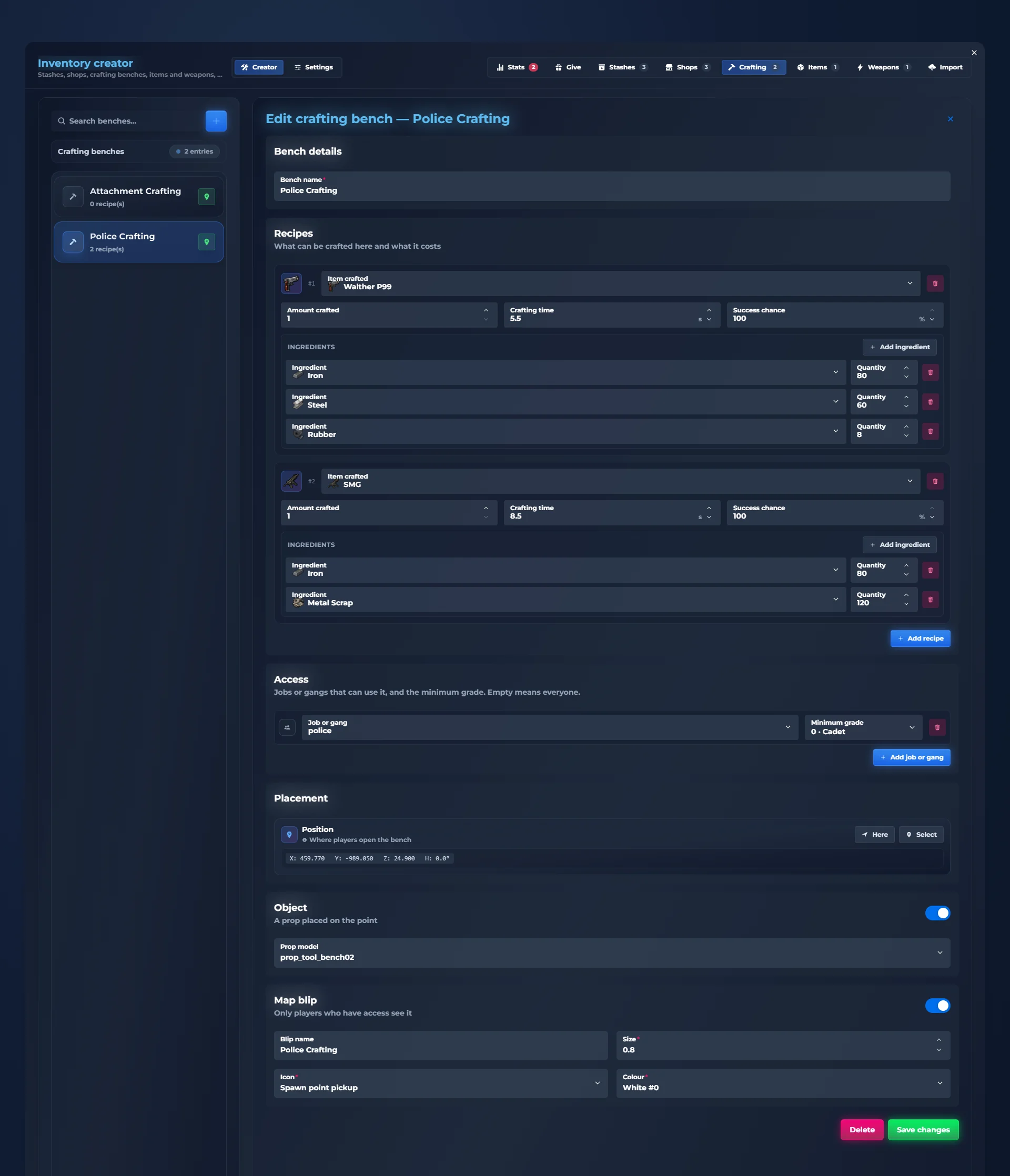
A complete FiveM crafting system: workbenches with recipes, ingredients, crafting time and success chance.
Each recipe shows what you need and how much you have. A green tick if you can make it now; a red cross if something is missing.
To craft, drag the recipe to your pockets. The amount box decides how many you make at once.
Each recipe has its crafting time and, if you want, a chance to succeed. Hover to see it.
Create benches and recipes from /inventorycreator in game: mark the spot, add recipes, done.
Mark the spot, add recipes, done: crafting benches for ESX, QBCore and Qbox without config files.
In game type /inventorycreator. All the creator’s tabs are at the top.
On the left, everything you have already created. Click one to edit it, or create a new one.
What the workbench is called.
Each recipe: the item it makes, how many, how long it takes, the chance it succeeds and its ingredients with amounts.
Open to everyone or only for jobs and gangs, with a minimum rank.
Stand where you want it and press "Here".
The prop seen in the world and, if you want, a blip. Save and it can be used right away.
Your first 5 slots are your hotbar. Each player picks a quick bar or a GTA-style radial wheel.
Press Z and your bar shows what you carry in slots 1 to 5.
Rather have a wheel? Hold the key, aim with the mouse or the stick and release to use.
Keys 1-5 use whatever sits in that slot: eat, drink, draw your weapon… without opening the inventory.
Every weapon is a unique item: serial number, ammo, durability, attachments and custom tints, with stats to compare.
Hover a weapon: its serial number, the ammo it has loaded and its condition.
The card shows damage, fire rate, accuracy, range and magazine.
If you hold another weapon, it is compared with it: the ghost bar is yours, and the difference shows green when better and red when worse.
Ammo is just another item. Each type reloads its weapons (pistol, rifle, shotgun…) and you can make a universal ammo that fits them all.
With the weapon in hand, R reloads using ammo from your inventory. You choose whether each reload leaves exactly one magazine or adds magazines, and whether each ammo item is one bullet or a whole magazine.
Every shot uses a little durability, at a different rate for each weapon (and you can make some never wear). At zero the weapon is broken and won't fire.
Fix it with a repair kit, which adds a percentage each time, or at repair points, which bring it to 100% for its price.
Click your weapon and press the attachments button: the weapon appears in front of you, its details on one side, the attachments you carry below and a slot for each part.
Drag the attachment from your bag to its slot. It is fitted at once and you see it on the weapon.
Drag the fitted attachment onto "Remove attachment" and it goes back to your inventory.
Paste an image link and your weapon is painted with it. With a preview before saving.
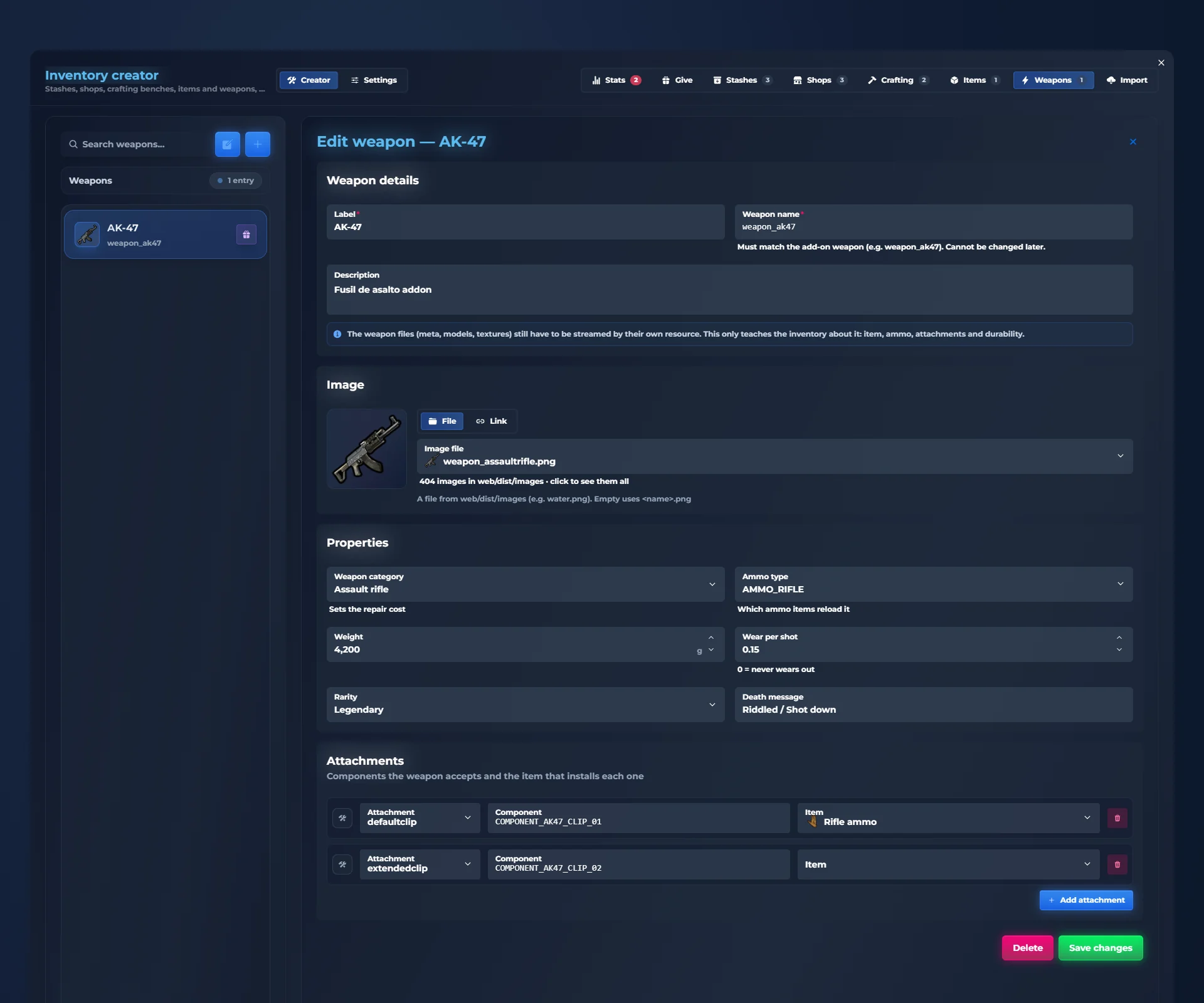
Add weapons to your FiveM inventory from the panel, with their ammo type, wear per shot and attachments.
In game type /inventorycreator. All the creator’s tabs are at the top.
On the left, everything you have already created. Click one to edit it, or create a new one.
Display name, the weapon’s game name and its description.
An inventory image or a link.
Category, ammo type, weight, how much it wears per shot, rarity and the kill message.
Each attachment with its game component and the item that fits it. Save and it can be equipped.
Clothes are inventory items too: take them off, store them, sell them or give them away, on ESX, QBCore and Qbox.
Press the clothing button: your character shows up in the middle, with a line from each piece to its place on the body.
Drag a piece from your inventory to its spot to wear it, or out to your inventory to take it off. Hat, glasses, shirt, trousers, shoes, bag, vest…
Press back or ESC and you return to the inventory without closing it.
A night on a FiveM roleplay server, start to finish: looting, crafting, robbing and selling. Watch the alerts and the money.
There is material inside. You move it to your pockets and it stacks with what you already had.
At the workbench you already have what the recipe needs: 5 iron and 3 plastic. You drag the recipe to your pockets and in a few seconds the lockpick is yours.
With their hands up they can't do a thing: you take the watch and the cash.
Drop the watch on its price and the money comes in at once: watch it go up on the right.
A fully customizable FiveM inventory UI: 12 complete styles, 8 slot shapes, 6 effects, fonts, particles, sizes and animations. Each player picks their look from the inventory itself, and you set the default.
Compact mode takes less screen: great for small monitors.
Drag the bar to reveal one style over the other: it is the same inventory.
In this FiveM inventory, what you drop does not vanish: you see it, throw it, kick it and pick it up.
With no weapon in hand, walk up to a dropped item and press Left click or R: it flies off and rolls with real physics. Everyone sees it land in the same spot.
Walk up to anything on the ground and press E to take it.
Drop an item on "Throw" and your character tosses it by hand. With a weapon out, H throws it. Thrown things can be kicked too.
Drop an item on "Place", move and rotate it with the keys shown on screen, and confirm with Left click. It stays in the world until someone picks it up.
City bins hold items and refill on their own every so often.
Machines around the map sell whatever you set up, at your price.
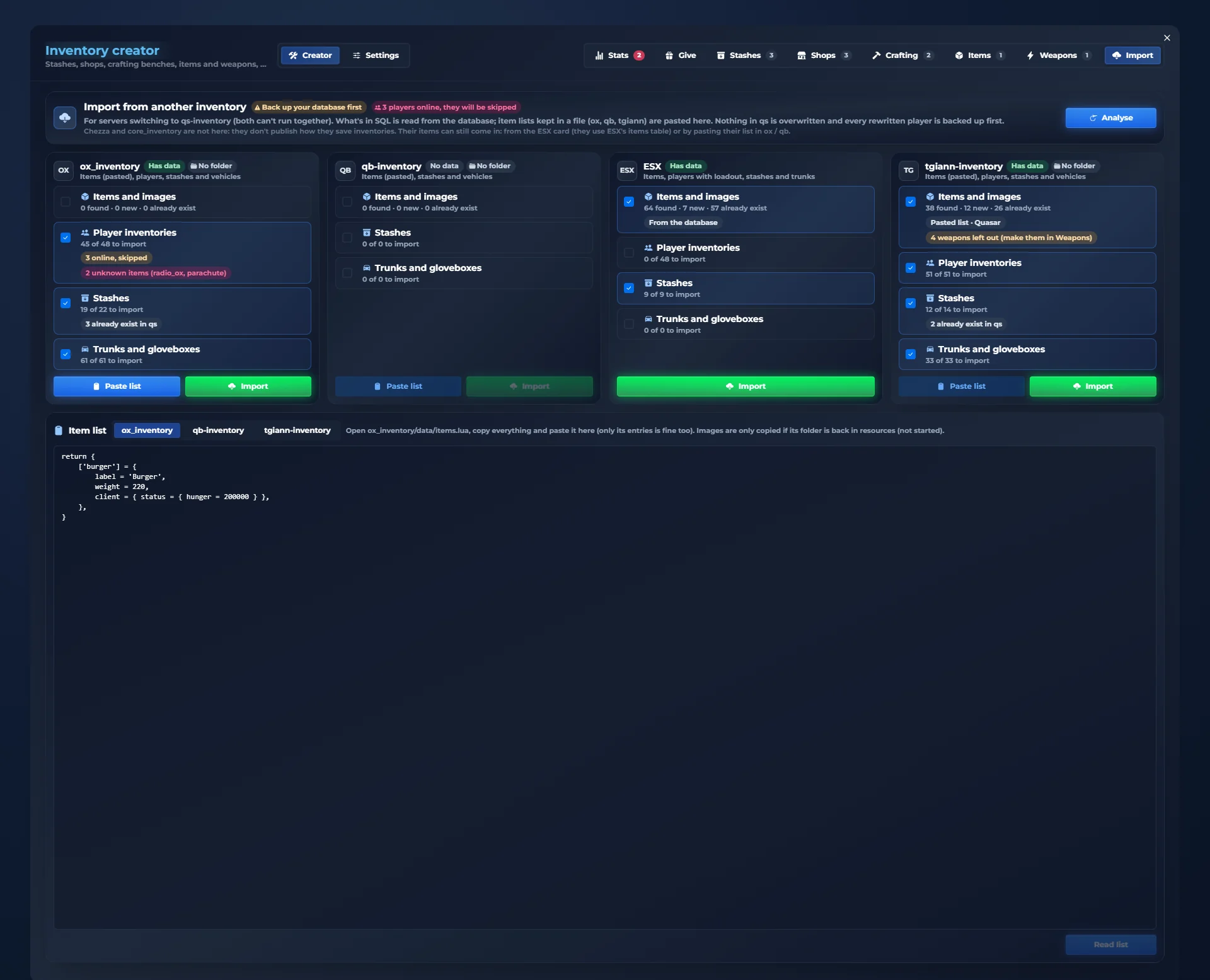
Switching to qs-inventory from another FiveM inventory? The importer brings your items, your players’ inventories, stashes and trunks from ox_inventory, qb-inventory, ESX and tgiann-inventory.
In /inventorycreator, the last tab. It is for servers switching to qs-inventory: both inventories can’t run at the same time.
It reads your database and tells you what each inventory has. It reminds you to back up the database and warns if players are online: those are skipped.
ox_inventory, qb-inventory, ESX and tgiann-inventory. For each you see how many items, player inventories, stashes and trunks there are, and tick what you want to bring.
What already exists in qs is kept, unknown items are pointed out and weapons are created separately, in the Weapons tab. It never overwrites anything in qs.
If your items are in a file (ox, qb, tgiann), open it, copy it all and paste it here: the importer reads the items from the list.
Items are created at once and saved inventories move to qs-inventory. Before a player is rewritten, a copy of what they had is saved.
qs-inventory against the FiveM inventories servers usually come from: ox_inventory, qb-inventory and esx_inventoryhud.
| qs-inventory | ox_inventory | qb-inventory | esx_inventoryhud | |
|---|---|---|---|---|
| Frameworks | ESX · QBCore · Qbox | ESX · Qbox · ox_core | QBCore | ESX |
| In-game panel to create shops, stashes, crafting, items and weapons | ✓ | — | — | — |
| Server settings from in game, no files | ✓ | — | — | — |
| Import from other inventories | ✓ | — | — | — |
| 12 visual styles each player picks | ✓ | — | — | — |
| Clothes as items, with your character on screen | ✓ | — | — | — |
| Attachments screen with the weapon in front of you | ✓ | — | — | — |
| Weapon tints from your own image | ✓ | — | — | — |
| Player trading with double confirmation | ✓ | — | — | — |
| GTA-style quick wheel | ✓ | — | — | — |
| Rename items | ✓ | — | — | — |
| Rarities with colour | ✓ | — | — | — |
| Kick ground items and place props | ✓ | — | — | — |
| Anti-dupe alerts | ✓ | — | — | — |
| Crafting benches | ✓ | ✓ | ✓ | — |
| Shops with stock | ✓ | ✓ | ✓ | — |
| Durability and decay | ✓ | ✓ | ✓ | — |
| Features in the list | 16 | 3 | 3 | 0 |
Comparison of what each resource includes out of the box, without add-on scripts, based on each one’s public information. Some features can be added to the others with third-party resources.
Two in-game admin panels: /inventorycreator to create items, weapons, shops, stashes and crafting, and /inventoryconfig to tweak the whole inventory. Save, and most changes apply instantly, no restart.
/inventorycreatorShops, stashes, crafting, items, weapons, alerts… created with the mouse./inventoryconfig17 settings sections built so nobody gets it wrong: switches, sliders and keys you pick by pressing them.A FiveM inventory in 41 languages: inventory, alerts and admin panels 100% translated. Pick one and watch the demo change.
Everything server owners ask before switching to qs-inventory, the FiveM inventory for ESX, QBCore and Qbox.
Quasar Inventory, or qs-inventory, is a FiveM inventory script by Quasar Store. It replaces your server’s inventory with a drag and drop inventory that includes shops, stashes, trunks, crafting, weapon attachments and tints, clothing as items, player trading, 12 visual styles, 41 languages and two in-game admin panels.
Yes. qs-inventory is a FiveM inventory for ESX, QBCore and Qbox servers, with the same features on all three frameworks.
Yes. The importer in /inventorycreator reads your database and brings your items, player inventories, stashes and trunks from ox_inventory, qb-inventory, ESX and tgiann-inventory. It never overwrites what already exists in qs-inventory, skips players who are online and saves a copy of each player’s inventory before rewriting it.
No. qs-inventory has two in-game admin panels: /inventorycreator to create items, weapons, shops, stashes and crafting benches, and /inventoryconfig to change the inventory’s settings. Save, and most changes apply instantly, without restarting the server.
Yes. In /inventorycreator you create shops with prices and limited stock, buyers that pay for players’ items, stashes with their own slots and weight, and crafting benches with recipes, crafting time and success chance. You choose which jobs or gangs can use them, mark the spot where you stand and add a blip.
Yes. Every weapon has a serial number, loaded ammo and durability that wears as you shoot. The attachments screen shows the weapon in front of you: drag an attachment to fit it and drag it out to remove it. Ammo is an inventory item, weapons can be repaired, and custom tints are painted from your own image.
Yes. Clothing is stored as inventory items: players take clothes off, store them, sell them or give them away, and dress up by dragging each piece onto their character.
Yes. Player trading has double confirmation: each player puts in their offer, sees the other offer live, and the trade only happens when both confirm.
Yes. From the style studio inside the inventory, each player picks one of 12 complete styles, 8 slot shapes, effects, colours, fonts and sizes, a compact mode for small screens and a performance mode for modest PCs. The server sets the default style.
qs-inventory includes 41 languages, with the inventory, the alerts and the admin panels fully translated.
Yes. Weapons wear as they are used and food goes off over time. At zero the item is broken or spoiled, and you decide per item how long it lasts and whether it deletes itself.
Yes. The first five slots are the hotbar, used with keys 1 to 5 without opening the inventory, and each player can switch to a GTA-style radial wheel instead.
ESX, QBCore and Qbox. 12 styles, 41 languages and two in-game admin panels.
Need a hand
Our team answers setup, framework compatibility and integration questions before and after purchase.
Item alerts and player trading You always know what happens.
Alerts for what comes in and goes out, required items for your scripts and safe player-to-player trading.
What comes in and goes out
Every time you get, lose or use something, an alert shows the amount. If it repeats, it adds up in the same alert. Each player picks which corner they want it in.
Required items
When a script asks for something (a lockpick to open, a drill to rob…), you see exactly what you need at the bottom.
Someone wants to trade
A card shows who is asking, with a countdown. E accepts, G declines.
Trade with double confirmation
Each player puts in their offer and sees the other offer live. The trade only happens when both confirm.
A trade from start to finish
You drag your repair kit into your offer. Sam puts in two gold bars and confirms. You confirm and the swap happens: the alerts tell you what went out and what came in.
If someone doesn’t confirm, nothing happens: everyone keeps their own.