
Advanced Inventory
FiveM-Inventar für ESX, QBCore und Qbox mit neuem Pausenmenü, realistischer 3D-Karte, Skillbaum mit 43 Skills, Missionen, dem Style Studio, In-Game-Creator und kostenlosen DLCs.
- ESX
- QBCore
- Qbox
- QSCore

FiveM-Inventar für ESX, QBCore und Qbox mit neuem Pausenmenü, realistischer 3D-Karte, Skillbaum mit 43 Skills, Missionen, dem Style Studio, In-Game-Creator und kostenlosen DLCs.
[02] Medien · 267 Screenshots · 01 Video
Real in-game captures of Advanced Inventory. Click to zoom, use ← → or swipe to browse.
Kaufen[03] Die Details
Your character, your pockets and everything around you on one screen, on ESX, QBCore and Qbox. Scroll slowly: the live demo changes with you.
Page tabs across the top: information, inventory, clothing, skills, missions and settings. Your character on the left, lit even at night. Next to it your 5 quick slots, your pockets, whatever is around you and a wallet for cards and documents.
It opens with an animation and plays GTA’s own native sounds.
Pick something up off the ground and drop it in your pockets. On a matching item it stacks; on an empty slot it stays there. The same with stashes, trunks and shops.
Pick how many with the amount box: type a number or tap 1, 5, 10 or All. When you drag, only that part moves.
Double-click uses the item.
Right-click an item and its menu opens with its condition and weight: use, place, give, trade, throw or drop it on the ground. Weapons add their attachments; your items, a rename.
Hover it: description, weight and its own data (the ID with a name, the bag with its cash, the weapon with serial and ammo). The little bar is its condition: food goes off and weapons wear. The background colour is its rarity.
Each player turns it on in Settings → Style studio → Inventory → "Mini inventory" (it applies when they save), and you set the default for everyone in /inventoryconfig.
From then on the inventory key opens a small one in the corner and you keep walking: drag and drop, right-click and item cards included, with a button to open the full one. Shops, stashes, trunks and the pause menu still open in full.
Every slot of this FiveM inventory tells you something: amount, weight, durability, shortcuts, load and documents.
Top right of every slot: the amount and, in brackets, the stack’s total weight in kilos. Huge amounts are shortened (1.2M, 50B) so they never overflow.
The line at the bottom is the condition. Weapons wear as you shoot: this rifle is down to 46%. At zero the weapon is broken.
Items with decay lose condition over time, even if you don’t use them: this coffee is half gone and the toastie nearly off.
At zero they have expired and can’t be used; if you want, they delete themselves. How long they last is set per item in /inventorycreator.
The first five have their own column and their number: the key that uses them without opening the inventory (1-5) and what shows on the bar and the wheel.
Every block shows the slots in use, the kilos you carry, your maximum and the percentage. The bar fills in steps and turns amber at 75% and red at 95%. When it is full, you can’t pick up more.
Your ID, driving licence and cards have their own place: the wallet, weighed on its own, always at hand and out of your pockets.
Hover it and its card appears: description and its own data. The ID card shows a name and number; a weapon, its serial, ammo and attachments.
Right-click one of your items, "Rename", type the name and confirm. From then on its card shows that name.
Weapons cannot be renamed. In /inventoryconfig → Item rules you decide whether it is allowed, what it costs and which items cannot be renamed.
Optional: turned on, a backpack gives you pockets and a wallet opens the cards block. Each server decides.
Without a backpack you carry the 5 quick slots and 20 pockets: four rows. The rest of the block is one space asking for a backpack, showing what each one adds.
The inventory keeps the same height as the one next to it: nothing moves around.
Drag a backpack onto the space: the basic one opens one more row and the large one every pocket. The new slots pop in one by one.
Now you are wearing it: it takes the block’s icon, with what it adds in the corner.
The 5 slots for cards and documents stay shut until you put on a wallet.
Drop it in its space and you can keep your ID, licence and bank card there.
Drag the icon out to take the backpack or the wallet off. If the slots it opened hold anything, empty them first: the server never lets anything vanish.
Nothing goes into a locked slot, and each equip slot only takes its own items.
Whoever searches or robs you sees your locked slots padlocked: they can’t put anything there. What you wear, the backpack and the wallet, they can’t take.
If you wear a wallet, your cards are in sight. And the last slot stays protected.
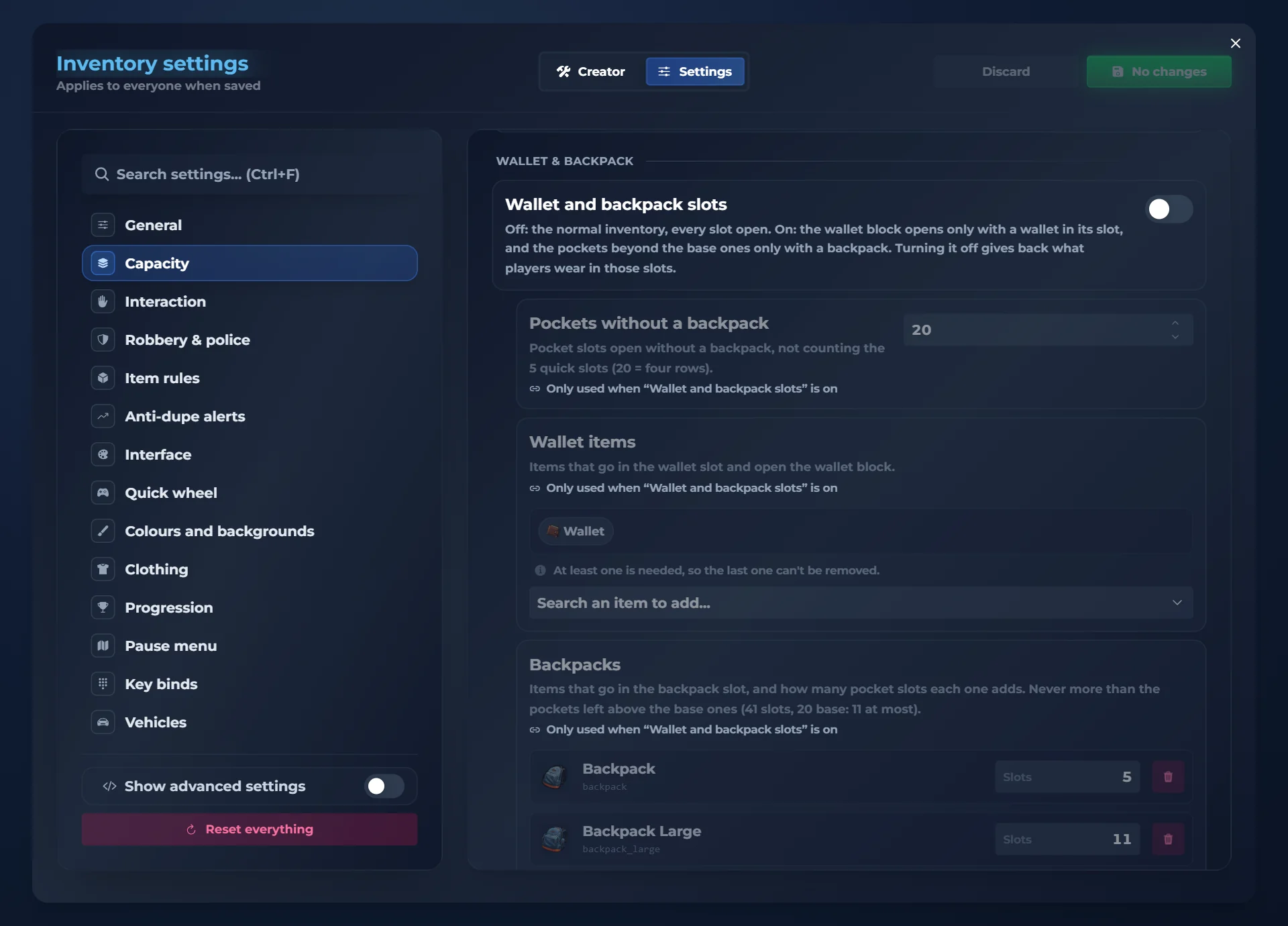
It ships turned off: the usual inventory, everything open. Switch it on in /inventoryconfig → Capacity → Wallet & backpack, and it applies at once.
There you pick how many pockets come without a backpack, which items count as a wallet and how many slots each backpack opens. All 20 styles dress it their own way.
From the settings panel, in game: switch it on and decide how much everyone carries.
With admin rights, type /inventoryconfig in chat: the inventory settings panel opens.
In the left column, Capacity: how much players can carry. The Wallet & backpack section is there.
It ships off: the usual inventory. Switch it on and the options below come alive.
The pockets open without a backpack, not counting the 5 quick slots. 20 is four rows.
Pick with the search, pictures included, the items that open the cards and documents block. You can have several wallets.
Add your backpacks and how many pockets each one opens. The basic one (+5, a row) and the large one (+11, all that is left) come ready.
It applies to the whole server at once, no restart. If you switch it off one day, whatever players wore goes back to their pockets.
Every item can have a rarity, and players tell it at a glance by its colour. Create your own rarities in game.
Gold: the most valuable. Gold bars, jewellery, the collector’s weapon…
Purple: special items you don’t find just anywhere.
Grey: everyday things. You can also leave items with no rarity and no colour.
In the style studio, each player can turn on "Rarity outline": rare items also get a border in their colour, like in this demo, in your pockets and in any other inventory.
Three come built in, but in /inventoryconfig → Item rules you create your own with a name and colour (up to 30), and assign them to any item from /inventorycreator.
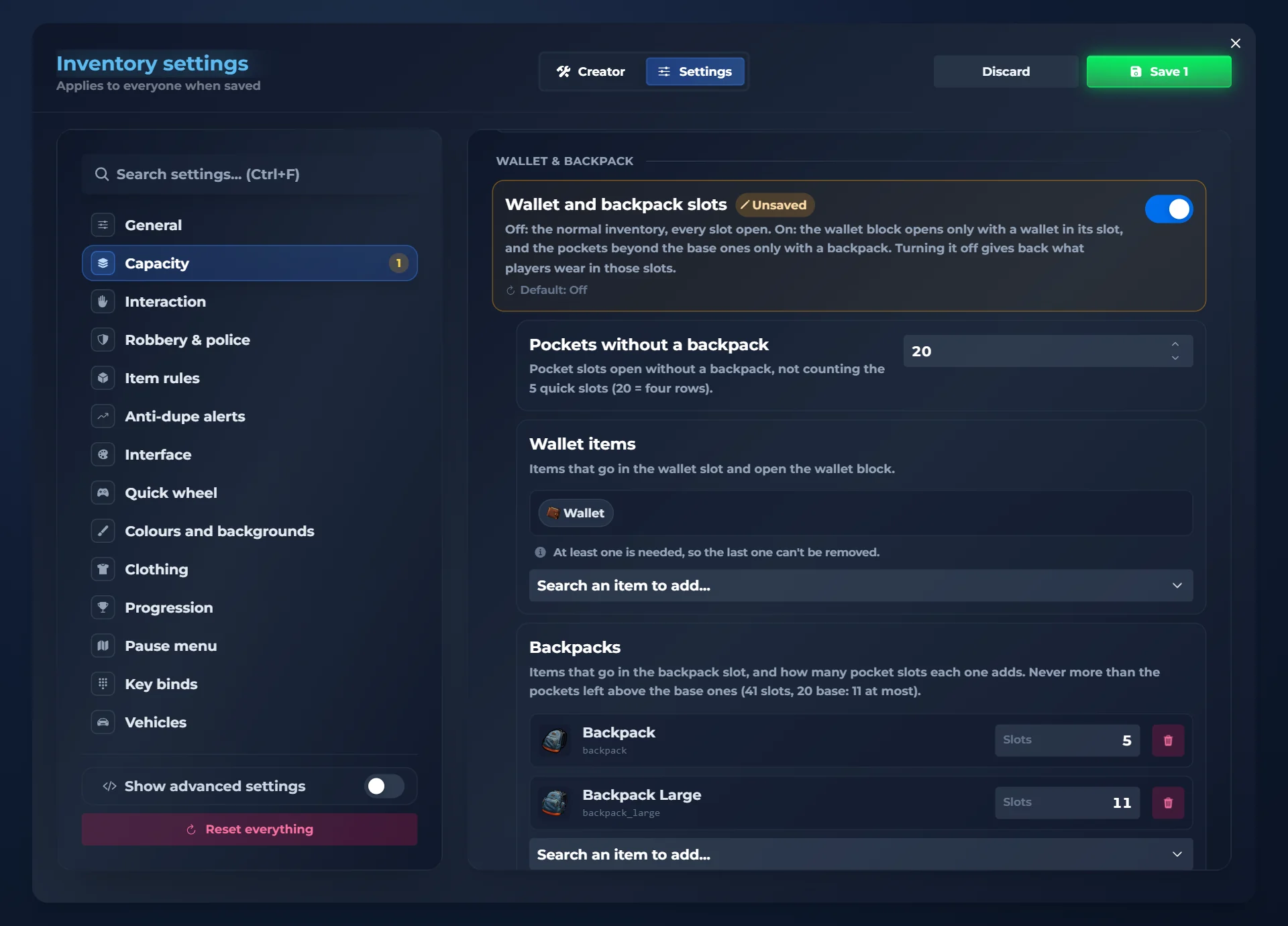
Create FiveM items from the in-game panel, with no item files: picture, weight, rules, decay and what it does when used.
In game type /inventorycreator. Under the title, a row with every tab of the creator.
On the left, everything you have already created. Click one to edit it, or create a new one.
The name players see, the item’s internal name and the description on its card.
Pick one of the inventory’s images or paste a link.
Weight, rarity, whether it is unique, usable, closes the inventory when used and can be thrown.
How long it takes to go off, whether it deletes itself once broken and which prop shows when dropped on the ground.
How much hunger, thirst or stress it removes, how long using it takes, its animation and the prop in hand. Save and it exists on your server.
Stashes, trunks, gloveboxes, shops, pawn shops and robberies for your FiveM server: each place with its own colour, icon and weight.
For houses, gangs, jobs. Each with its own slots, max weight and load bar. Created in game, at the spot you mark.
Every car has its own, and capacity depends on the vehicle type. You decide who can open them.
Shops open as a page of the inventory: products by category, a search, a details panel for each product and a basket with + and −. One payment, in cash or by card; licensed items are marked.
It is built into the inventory: every shop you create in /inventorycreator, and any script that opens a shop, opens like this.
Every offer on its own card: price per unit, how many you carry and what you get for all of them. Drop the item on it and you get paid at once.
With their hands up (X) you see what they carry and take it. You decide whether dead players can be robbed too, and which items can never be stolen.
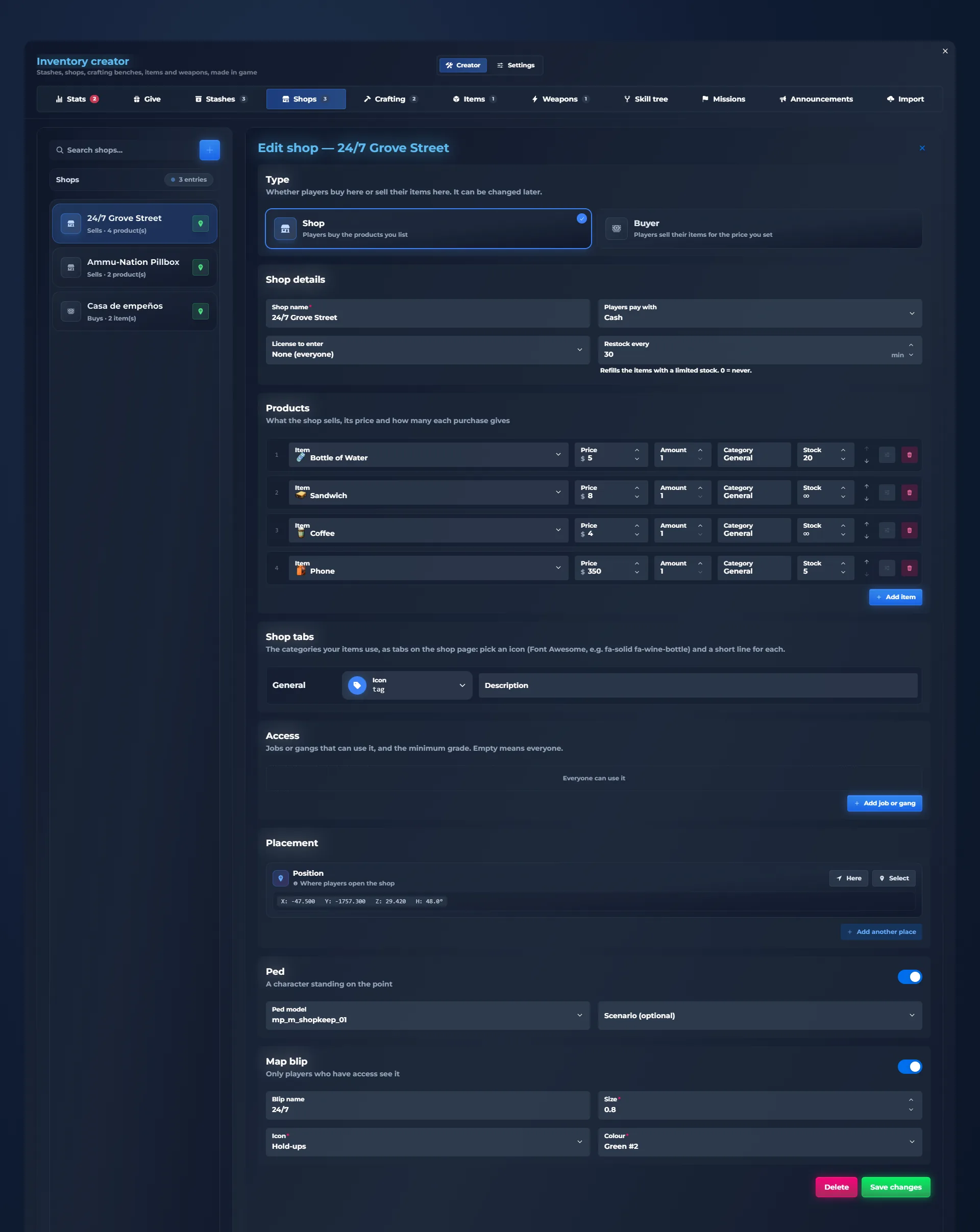
Create a FiveM shop without touching files: items, prices, stock, jobs, ped and blip, all from the panel in game.
In game type /inventorycreator. Under the title, a row with every tab of the creator.
On the left, everything you have already created. Click one to edit it, or create a new one.
A shop sells what you put in it; a buyer buys players’ items at the price you set.
Give it a name, choose how players pay (cash, bank and, depending on the framework, dirty money on ESX or crypto on QBCore), whether a licence is needed to enter and how often stock refills.
Every product with its price, how many each purchase gives, its category and, if you want, a limited stock that refills on its own.
Categories show up as tabs on the shop page: pick an icon and a one-line description for each.
Leave it open to everyone or only for certain jobs or gangs, with a minimum rank.
Stand on the spot and press "Here"; add more places if the same shop is in several spots. Pick the ped behind the counter and, if you want, what they do.
Blip name, icon, colour and size; only players with access see it. Save and the shop works right away.
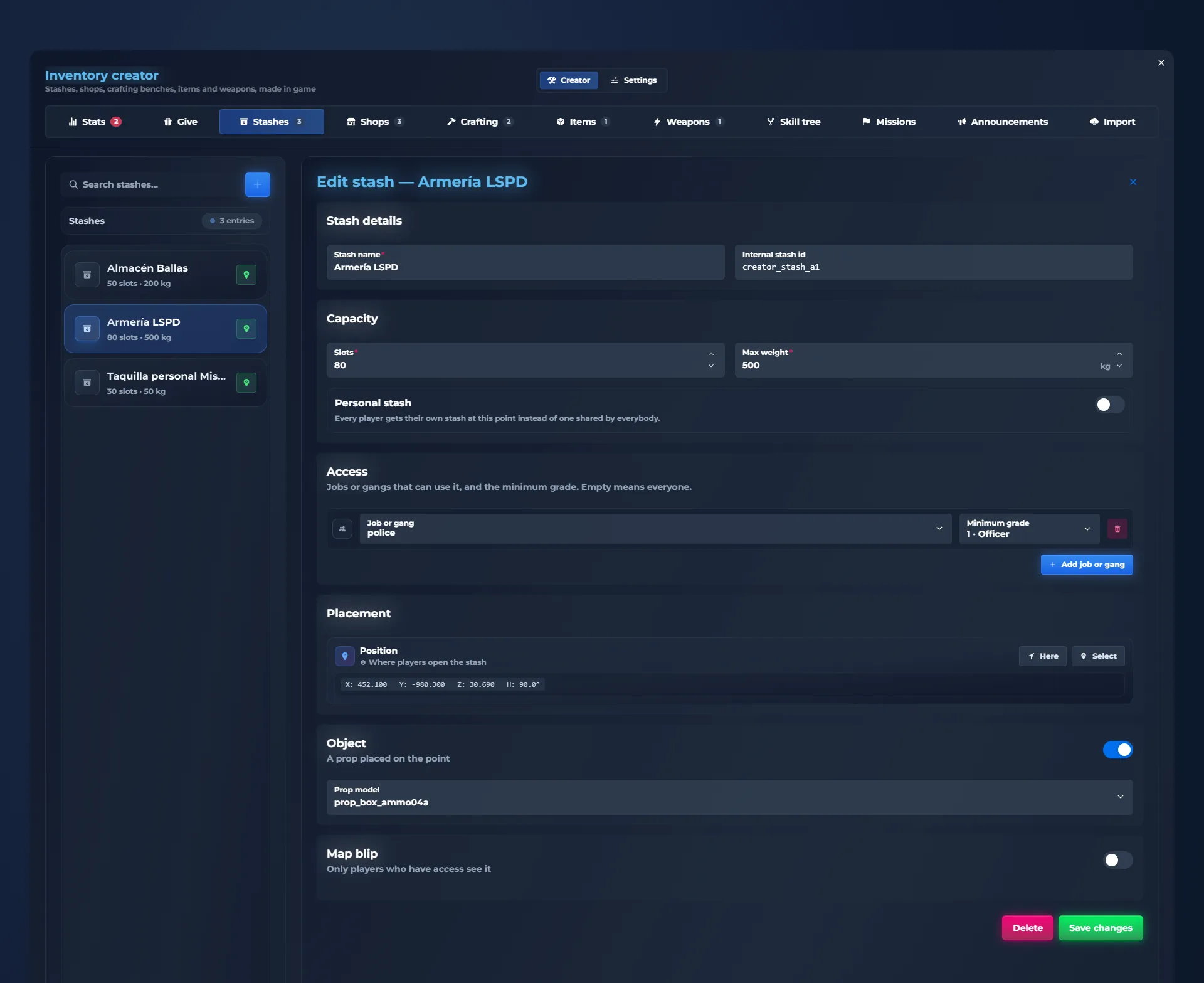
FiveM stashes for a house, a gang or the police station, with their own slots, weight and job access, from the same panel.
In game type /inventorycreator. Under the title, a row with every tab of the creator.
On the left, everything you have already created. Click one to edit it, or create a new one.
The name players see when they open it.
How many slots it has, how much weight it holds and whether it is personal: every player gets their own stash at that point.
Choose which jobs or gangs can open it and from which rank.
Stand where you want the stash and press "Here".
If you want, place a prop (a locker, a crate…) and a blip only players with access can see. Save and done.
A complete FiveM crafting system: workbenches with recipes, ingredients, crafting time and success chance.
Each recipe is a card: what you need, how much of each you carry, and a green tick if you can make it now (a red cross if something is missing).
To craft, drag the recipe into your pockets.
Each recipe has its crafting time and, if you want, a chance to succeed: this advanced lockpick works out 3 times out of 4 (and you are still short of aluminium).
The amount box decides how many you make. The cards multiply what they need and the time at once, and turn red when you are short.
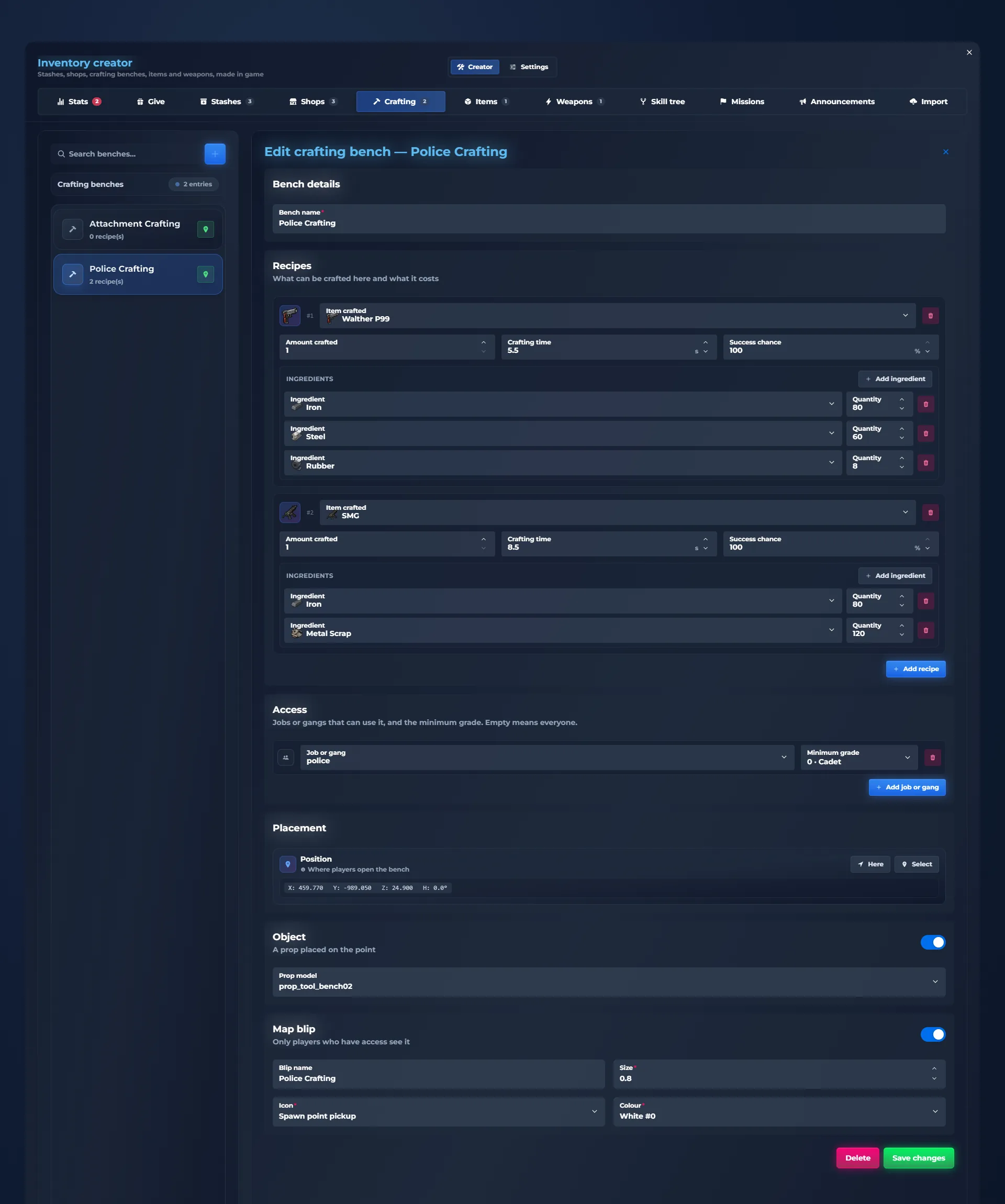
Create benches and recipes from /inventorycreator in game: mark the spot, add recipes, done.
Mark the spot, add recipes, done: crafting benches for ESX, QBCore and Qbox without config files.
In game type /inventorycreator. Under the title, a row with every tab of the creator.
On the left, everything you have already created. Click one to edit it, or create a new one.
What the workbench is called.
Each recipe: the item it makes, how many, how long it takes, the chance it succeeds and its ingredients with amounts.
Open to everyone or only for jobs and gangs, with a minimum rank.
Stand where you want it and press "Here".
The prop seen in the world and, if you want, a blip. Save and it can be used right away.
Your 5 quick slots without opening the inventory. Each player picks in their settings whether they want them as a bar or a GTA-style wheel.
Tap Z and your bar slides up with what you carry in slots 1 to 5: amount, weight and condition of each.
Rather have the wheel? Hold Z, aim with the mouse or the stick and release to use. The centre and the card beside it show what you are about to use, its ammo and its condition.
In /inventoryconfig you decide how many segments it has (4 to 8), whether the game slows down or blurs while it is open, whether it works in vehicles and its sounds. Each player picks bar or wheel in the style studio.
Release the key or click a segment and it is used at once. And keys 1-5 use whatever sits in that slot: eat, drink, draw your weapon… without opening the inventory.
Every weapon is a unique item: serial number, ammo, durability, attachments and custom tints, with stats to compare.
Hover a weapon: its serial number, the ammo loaded, the attachments it carries and its stats: damage, fire rate, accuracy, range and magazine.
If you hold another weapon, the card is compared with it: the ghost bar is yours, and the difference shows green when better and red when worse.
Ammo is just another item, and each type reloads its own weapons (pistol, rifle, shotgun…).
With the weapon in hand, R reloads using ammo from your inventory. You choose whether each reload leaves exactly one magazine and whether each ammo item is one bullet or a whole magazine.
Every shot uses a little durability, at a different rate for each weapon (and you can make some never wear). At zero the weapon is broken and won’t fire.
Fix it with a repair kit, which adds a percentage each time, or at repair points, which bring it back to 100%.
Right-click your weapon and "Attachments": the weapon appears in front of the camera, its details on one side, the attachments you carry below and a slot for each part, linked by a line to its spot on the weapon. Drag the background to turn it.
Drag the attachment to its slot: it is fitted at once and the camera moves in on the part so you see how it looks.
The tint is one more attachment with its own slot: drag it there and the weapon changes colour. You decide whether removing it gives it back or it is used up.
Drag the fitted attachment onto "Remove" and it goes back to your inventory.
The URL tint paints the weapon with any image you like: paste the link, check the preview and save it.
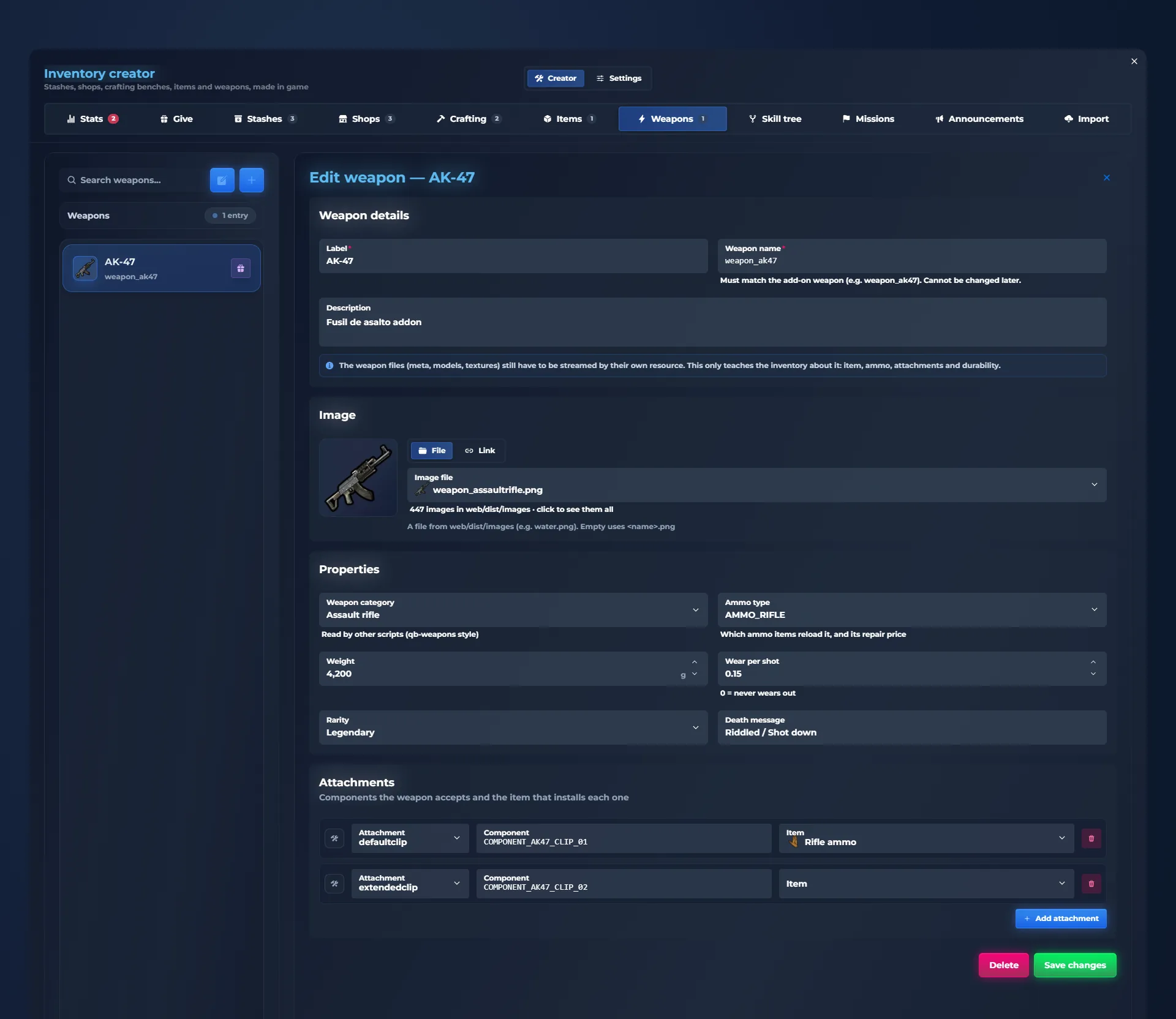
Add weapons to your FiveM inventory from the panel, with their ammo type, wear per shot and attachments.
In game type /inventorycreator. Under the title, a row with every tab of the creator.
On the left, everything you have already created. Click one to edit it, or create a new one.
Display name, the weapon’s game name and its description.
An inventory image or a link.
Category, ammo type, weight, how much it wears per shot, rarity and the kill message.
Each attachment with its game component and the item that fits it. Save and it can be equipped.
Clothes are inventory items too: take them off, store them, sell them or give them away, on ESX, QBCore and Qbox.
The clothing tab puts your pockets on one side, your character on the other and what you wear in between: head, body and accessories, each block with how many pieces you have on.
Every piece you wear has a hand button: tap it and the piece comes off your character and lands in your pockets like any other item.
Drag a piece from your pockets to its slot and you wear it at once. Hat, mask, glasses, shirt, trousers, shoes, bag, watch, vest…
What you take off is an item: keep it in a stash, sell it, give it away or trade it. The vest gives you its armour when you put it on, and if you change at a clothing store, what you had on can go back to your inventory.
The inventory tab takes you back to your pockets without closing anything. ESC closes the inventory.
ESC opens Information: your character, the server news and a live map of the city with the game's blips, your own pins and the GPS route. Then lift the camera and see it for real.
Name, ID, job and grade, your level ring with the XP to the next one, and cash and bank on their own tiles. All read from your framework the moment it opens.
Updates, events and notices you write in game (/inventorycreator), dated, with the latest one highlighted. One click opens it in full. Next to them: your Discord, your videos channel, and Disconnect with a confirmation.
Rockstar's map with the blips the game really has, read live with their name, icon and colour. Your arrow, your destination and the route on top.
Three styles: Atlas, which each style dresses its own way (Quasar and its colour templates tint it in their colour); Satellite and Road map.
Every blip with the name its script gave it, not a generic icon name. The inventory reads them from the game itself, one at a time, with the progress shown in the Places list.
Scripts can also hand it over with the SetBlipName export or the qs-inventory:blipName event, and Config.PauseBlipNames names the rest by icon. Hover a blip for its name, or turn on Map labels in Settings to always see them.
The Places list groups the blips by name, with how many there are of each. Search, tap one and the map flies to the nearest; the eye hides a whole group from the map.
Right-click the map and "Add a blip here". On its card you set the name, icon, colour and size, then Save.
It shows under My blips with the count against the limit (4/30; you set the maximum) and on the game's own map and radar too. Each player keeps theirs on their PC.
The pencil in My blips (or a click on the blip) opens its card: drag the blip across the map to move it, change anything, delete it with the bin, or press Set route to head there.
Double-click the map (or click a blip) to set the destination. The route is the game's own GPS, street by street, and the card tells you where you are and how far away it is.
The Realistic tab (when the server allows it, each player turns it on in Settings) swaps the flat map for the real world: the camera rises over the map and the blips, your pins, your position and the route stay pinned to the ground.
Drag moveRight-drag turnWheel ZoomClick waypointEsc back
In game the backdrop is the 3D world itself, seen from the camera; here, a capture of Sandy Shores.
Recorded in game: the realistic map is the real world seen from above. Drag to move, turn, zoom in and set your waypoint right on the city.
Blips, your pins and the GPS route stay stuck to the streets as the camera moves.
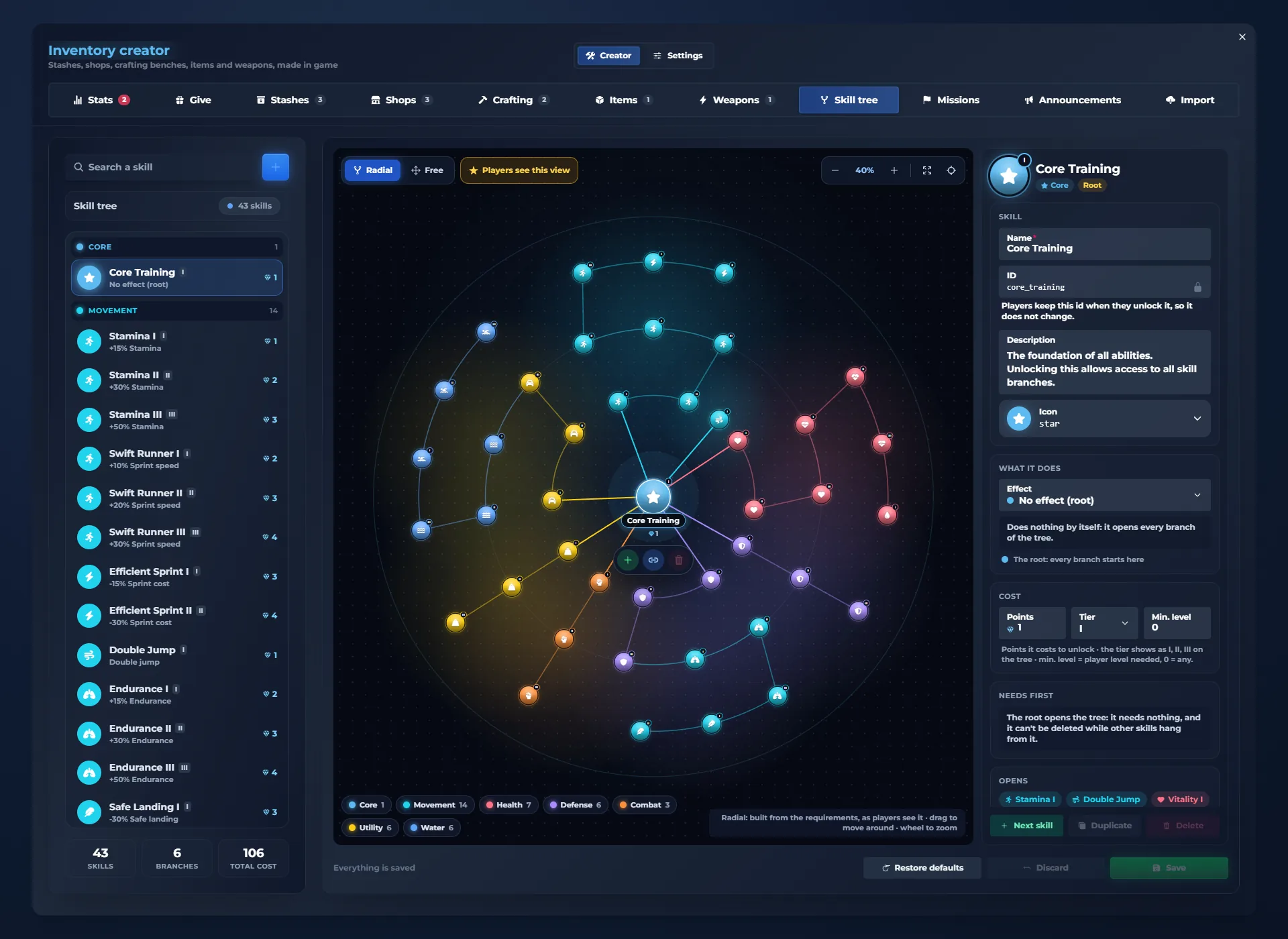
A real skill tree: branches growing out of the core, points you earn by levelling up, and upgrades the script applies in game.
Movement, health, defense, combat, utility and water grow out of the core. Unlocked skills glow, available ones pulse with their cost and locked ones wear a padlock. Drag and scroll to move around; the minimap keeps you oriented.
Tap one and the panel tells you what it does (+60% health), how many points it costs, what it needs first and what it leads to.
One click on Unlock (or double-click the node): the points are spent, the node lights up, the link glows and the next one in the branch opens. The server checks everything.
The branch list shows how far along each one you are. Tap one and the tree zooms onto it, dimming the rest.
Type and only the matches stay lit, with a hit count. Tap one to see what it takes to get there. Branches, names, costs and effects are all yours to edit in game with /inventorycreator.
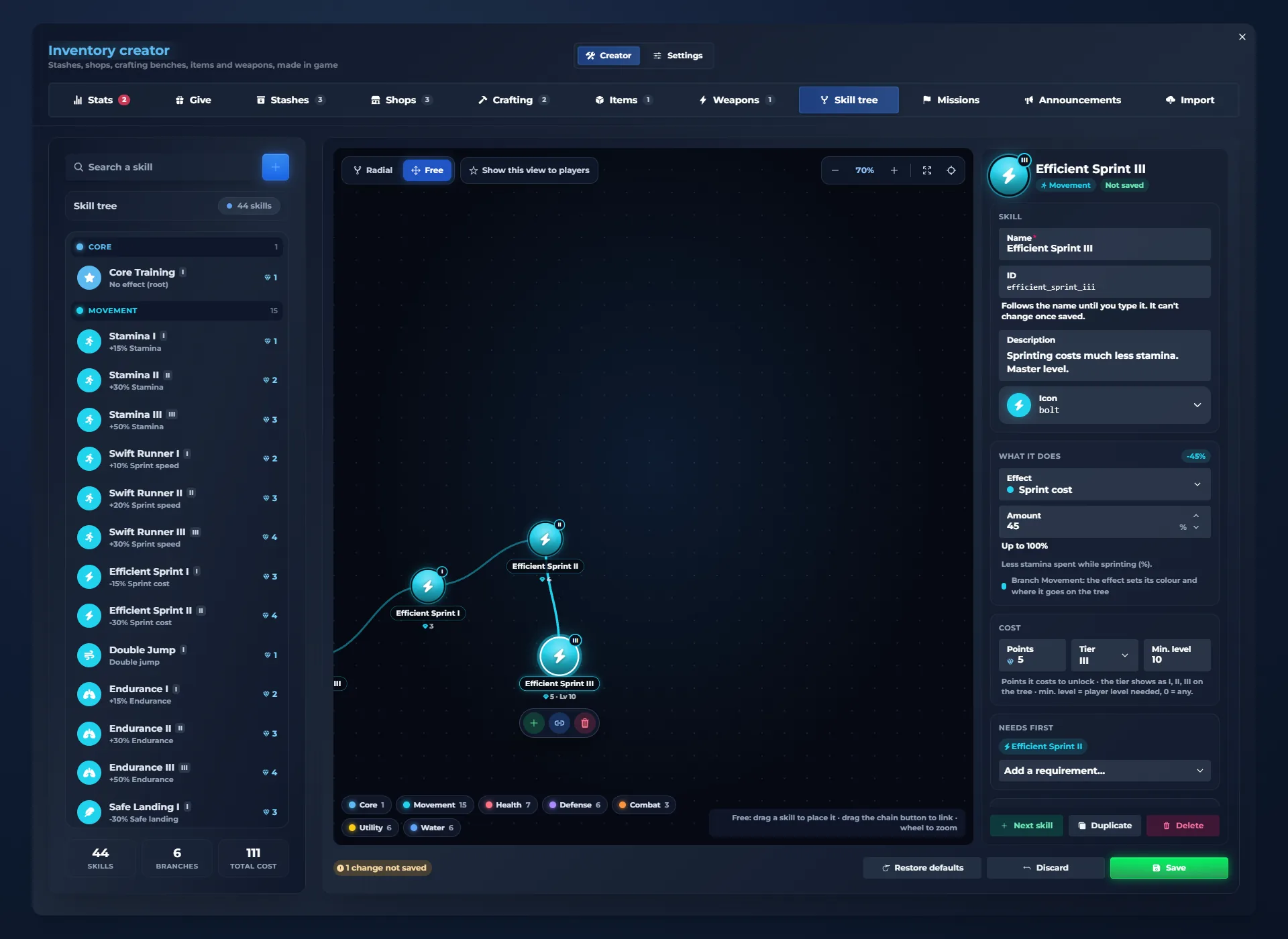
Build the whole FiveM skill tree in /inventorycreator: add a skill, choose what it does and what it costs, place it and link it. Save, and every player has it at once.
In /inventorycreator, on the row of tabs. It holds the tree your players see, ready to edit.
On the left, every skill with its branch and cost, plus a search. Below, how many there are, how many branches and what the whole tree costs.
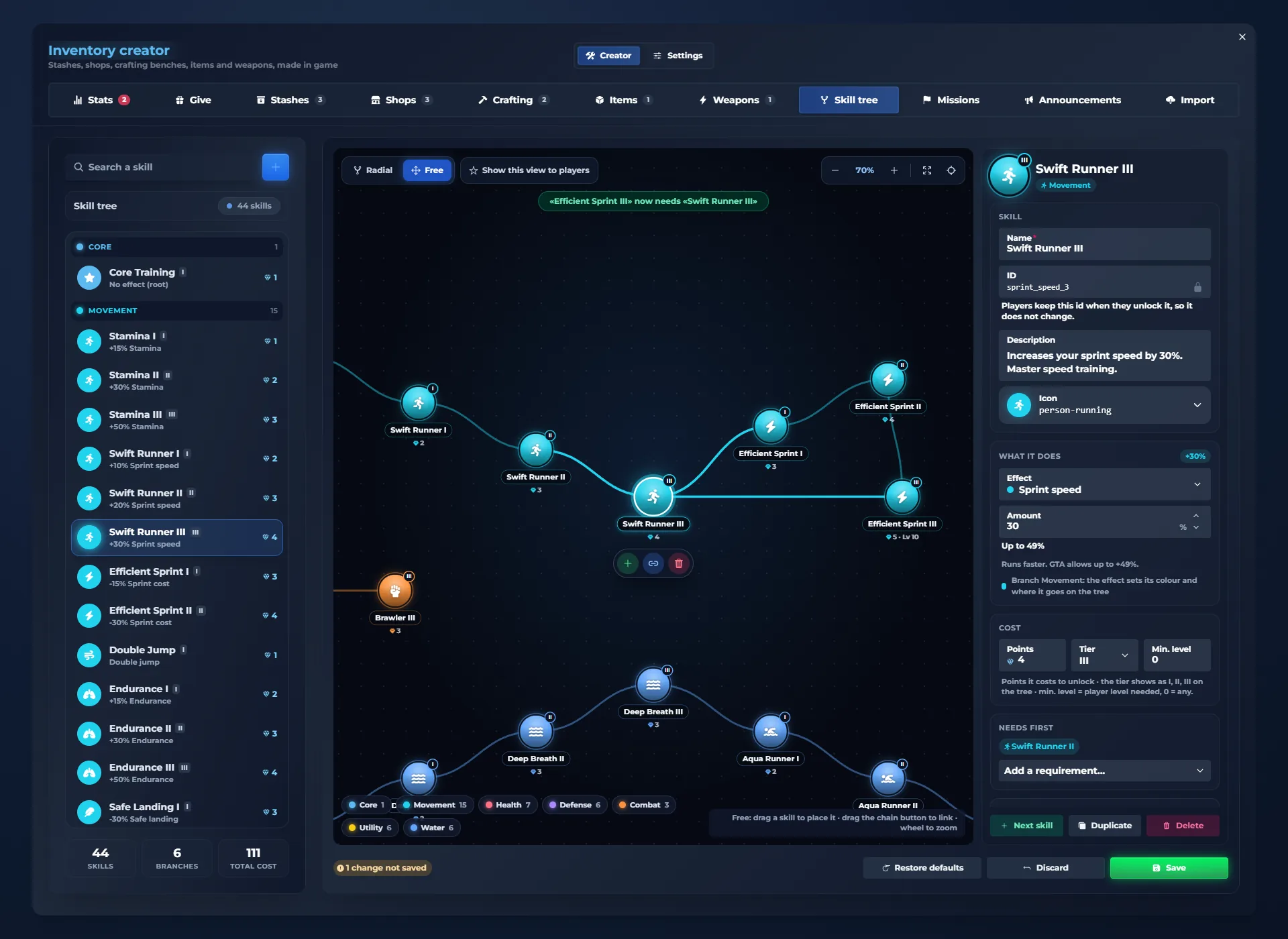
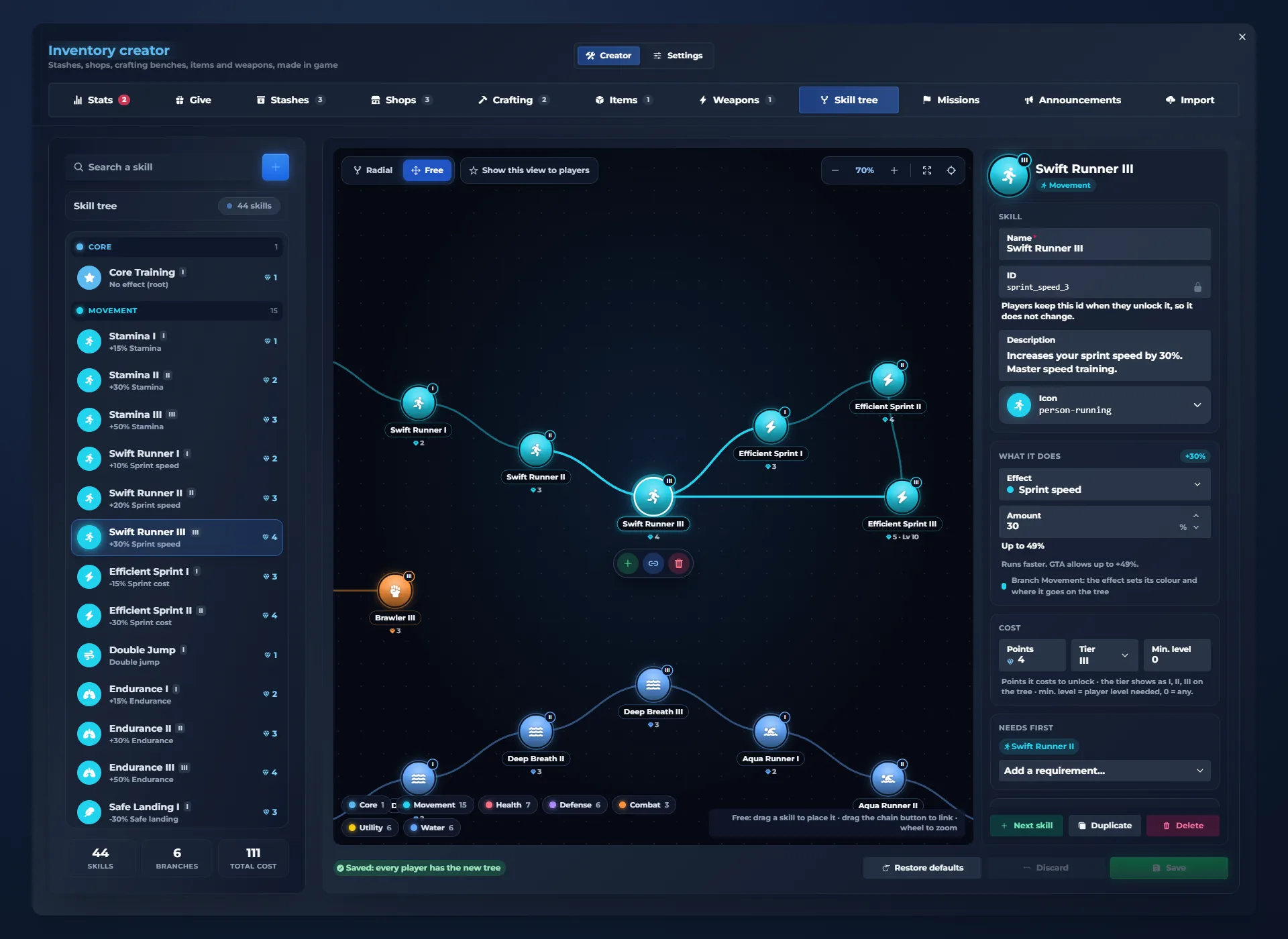
Radial lays it out by itself, as players see it; in Free you put every skill where you want. "Players see this view" decides which one their tree opens with.
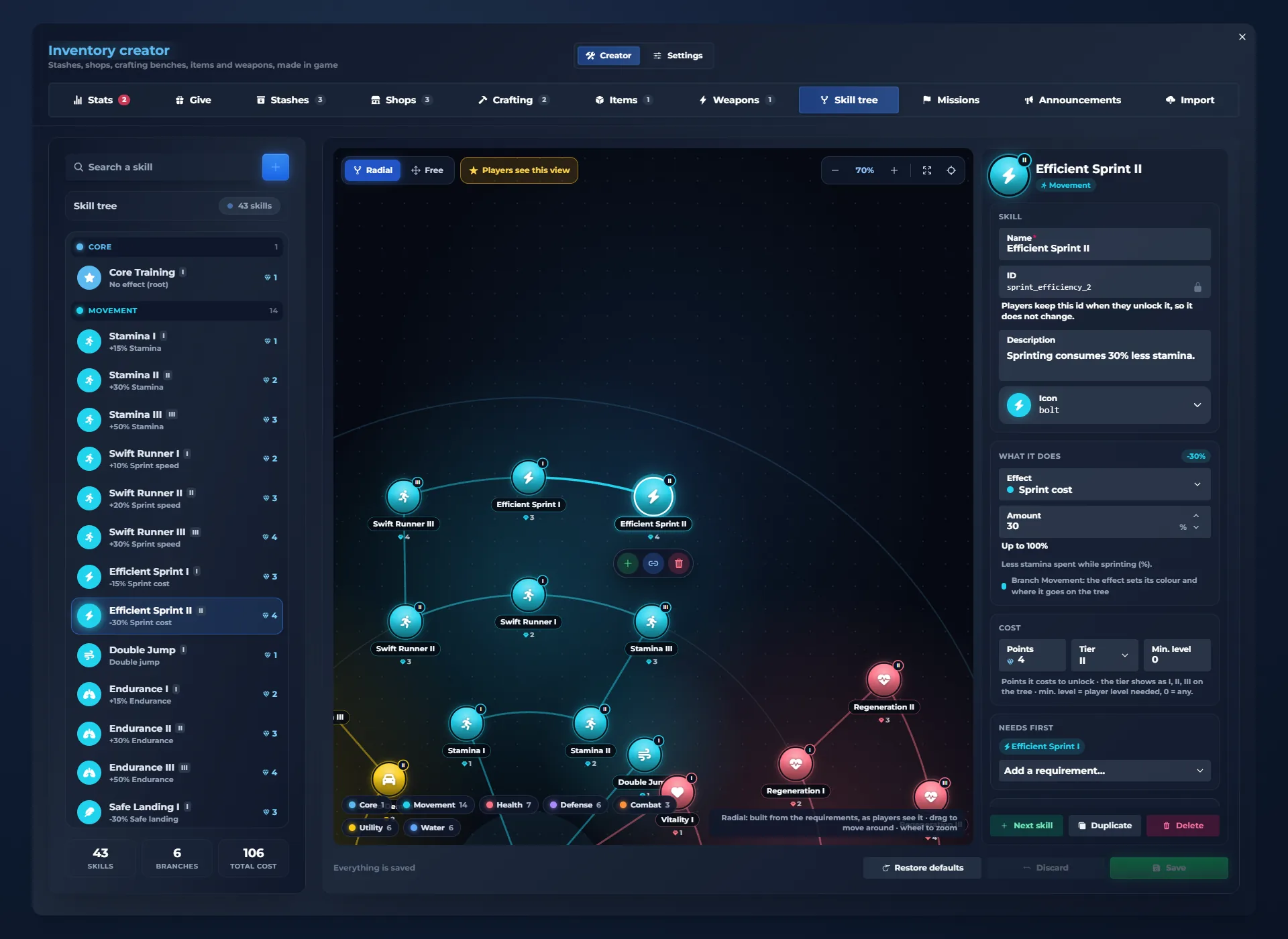
Select a skill and its buttons show up: + adds the next one of its branch, the chain links it and the bin deletes it. "New branch" hangs one from the root.
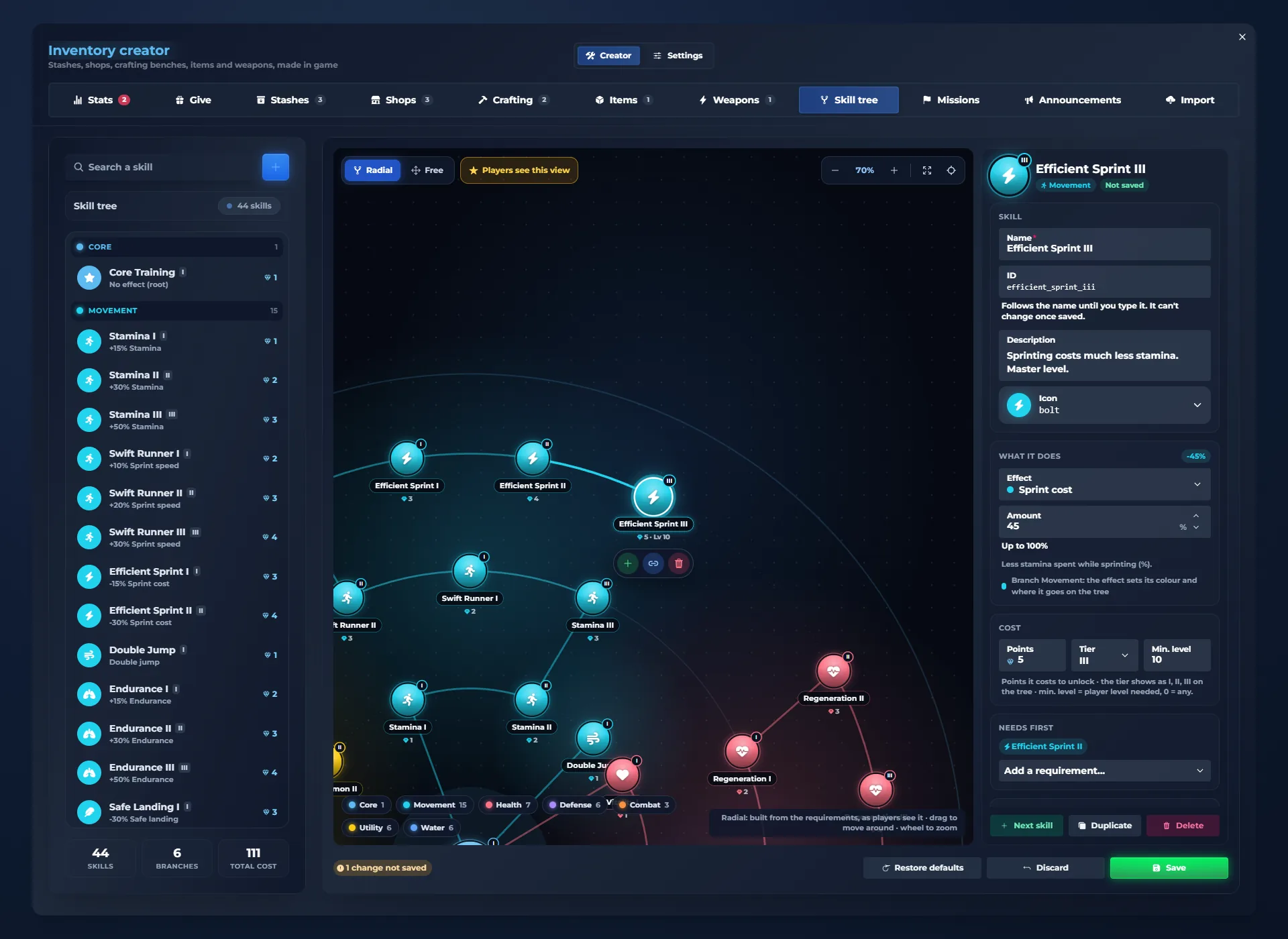
The new one already has a name, tier, cost and link. Write the description and pick the icon; the ID follows the name and is fixed once saved.
Stamina, speed, double jump, health, regeneration, armour, damage, carry weight, driving, swimming… with its amount and its limit. The effect sets the branch and the colour.
The points it costs, the tier shown on the tree (I to X) and the minimum player level to unlock it.
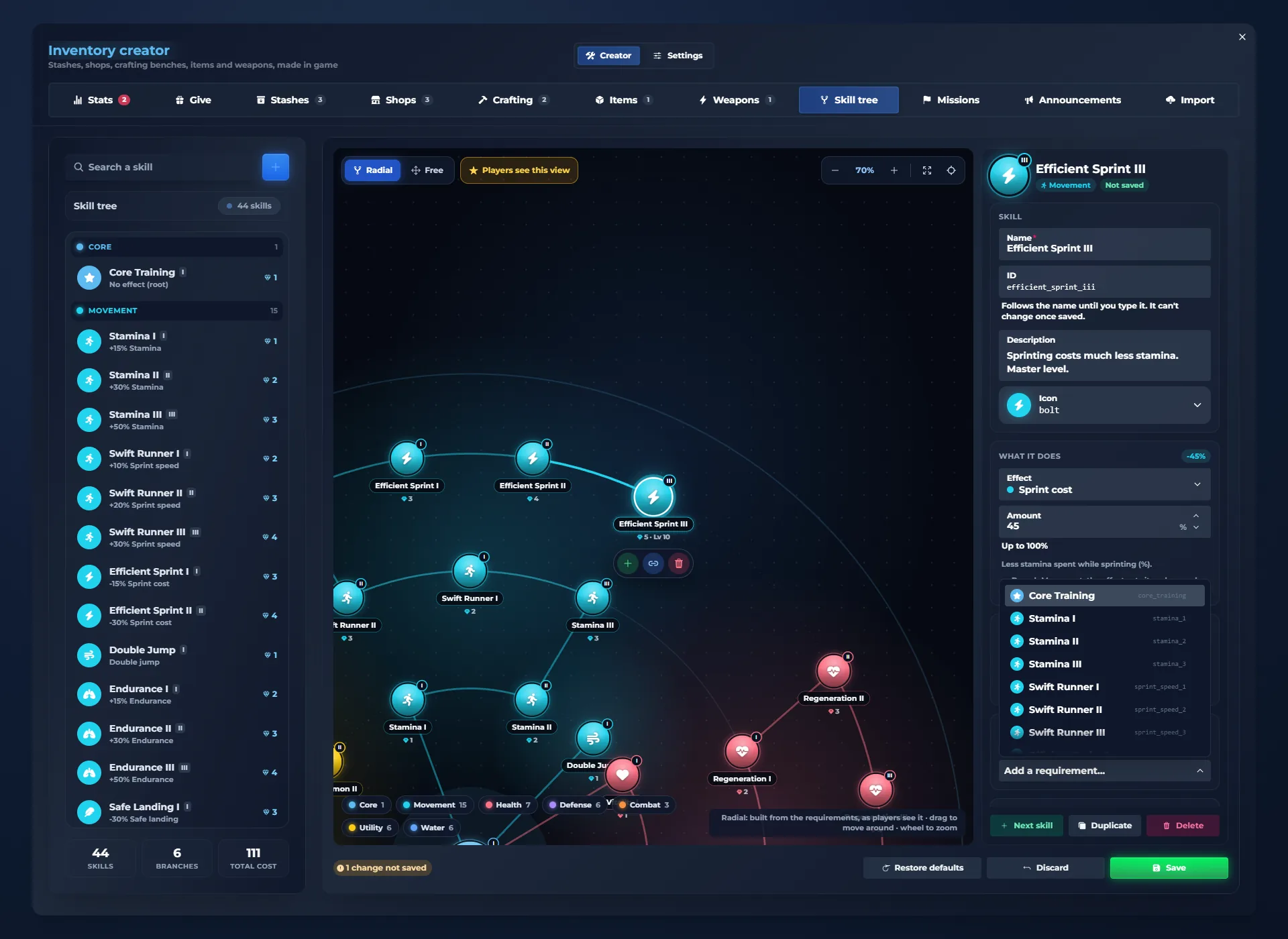
Up to 8 skills a player must have first. The editor won’t let you make a loop.
In Free view you drag each skill wherever you want; the mouse wheel zooms.
Drag a skill’s chain onto another one: that one will need it. Click a line to remove the link.
Nothing changes until you press Save (Ctrl+S). Then every player gets the new tree at once, no restart. If something is wrong, it shows in red first.
A mission journal inside the inventory: live progress, XP rewards you claim yourself and missions that open up as you level.
Up top: your level, what is ready to claim, the XP waiting for you and how many are done. Your character on the right, just like in game.
Ready to claim first, then in progress, locked and done, each group under its heading. Filter by state or search by name.
Its objective with a progress bar, the level it needs, the reward, and what it does to your level bar: what you have and what you are about to gain.
Finish one and it waits for you in green, its level bar already showing what it adds. One click on Claim: the XP goes into your level and, when it crosses the line, LEVEL UP!
Every level brings skill points for the skill tree (you choose how many). The mission moves to Done.
Some missions need a minimum level: they show padlocked until you get there. You create them in game (/inventorycreator), with their objective, reward and level.
Your level and experience, at the top: the bar fills with every mission you claim. Your other scripts can give experience too (a job, a minigame…) with an export, and an admin with /inventoryAddXP.
Fill it and LEVEL UP!: it shows in the middle of the screen, even with the inventory closed, and gives you skill points. Every level asks for a bit more; the difficulty and the points are yours to set in /inventoryconfig → Progression.
A GTA-style settings menu inside the inventory: display, graphics, audio, voice, camera, the Rockstar Editor and the keys of every script on your server. Plus the style studio.
Tabs on top (Q E), rows with ‹ value › and a preview with the explanation on the right. Mouse or arrow keys.
Minimap, expanded radar, GTA HUD, crosshair, names on the map… The script applies every change on the spot with game natives, and each player keeps their own on their PC.
Performance options for the PCs that need them (shadows and lights, detail distance, lighter population, an FPS counter) and colour filters with their strength, previewed over the city.
Radio, wanted music, the police scanner, sirens and ambience; the radio and call volume of your voice script; the camera on foot and in vehicles, and the Rockstar Editor to record clips.
In the Rockstar Editor tab press Record: the inventory closes and the game starts recording for the Rockstar Editor. A bar at the bottom shows the time and the key that stops it; one press stops and saves the clip, and the key can be changed in Key bindings. F9 by default.
Every key bind of every script in one list, grouped by resource, with a search. Tap one and press a new key: on the inventory's own actions it replaces the old one, on other scripts it is added. One button opens FiveM's own key menu too.
The first tab is the style studio: pick a template and every page changes on the spot, Information, Skills and Missions included. Further down, in Styles, you can see them all.
A night on a FiveM roleplay server, start to finish: looting, crafting, robbing, selling and a bite on the way. Watch your pockets change live.
There is material inside. You move it to your pockets and it stacks with what you already had.
At the workbench the lockpick has its green tick: you carry the iron, plastic, steel and rubber it needs. You drag the recipe to your pockets and in a few seconds it is yours.
With their hands up they can’t do a thing: their inventory opens next to yours and you take the watch and the cash.
You drop the watch on its card and you get paid at once.
You close the inventory and walk on. A tap on Z shows your bar and key 4 eats the sandwich; the alert in the corner confirms it.
A fully customizable FiveM inventory UI: 20 complete style templates in a style studio built into the game settings, with finishes, 8 box shapes, 5 light effects, colours, backgrounds, fonts, particles and animations. Every page follows the style, and players save their favourites and share them with a code. You set the server default.
A template restyles the whole inventory: the map, the skill tree and the missions too.
It lives in Settings → Inventory, in game. Every change shows up at once in the live preview; Save keeps it, Discard undoes it. You choose the server’s default template.
Drag the bar to reveal one template over the other: it is the same inventory.
In this FiveM inventory, what you drop does not vanish: you see it, throw it, kick it, place it and pick it up.
Drag an item into the ground block: it lands next to your feet in a bag everyone can see. Whoever walks over it finds it in their inventory, in the ground block.
With no weapon in hand, walk up to a dropped item and press Left click or R: it flies off and rolls with real physics. Everyone sees it land in the same spot.
Right-click an item and "Throw": your character takes it and tosses it by hand. What you throw stays in the world and can be kicked.
With a weapon out, H throws it. It lies on the ground with its ammo, attachments and condition, ready for whoever gets there first.
Right-click an item and "Place": move and rotate it with the keys shown on screen and confirm with Left click. It stays in the world until someone picks it up.
Walk up to anything thrown or placed and press E to take it: it goes back into your pockets.
City dumpsters open like an inventory and hold whatever the server sets; they refill on their own every so often.
Machines around the map sell whatever you set up, with its price, stock and payment.
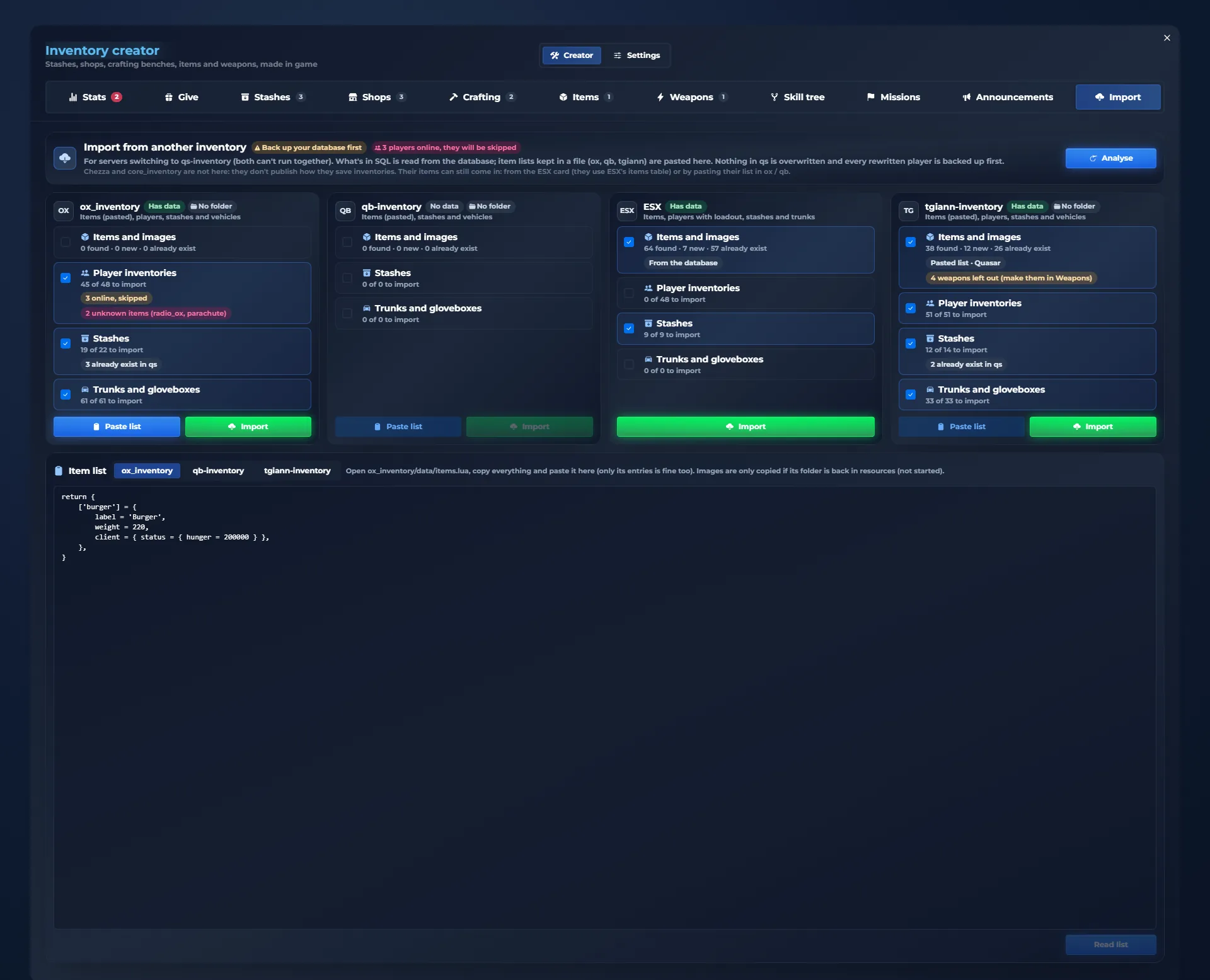
Switching to the Quasar Advanced Inventory from another FiveM inventory? The importer brings your items, your players’ inventories, stashes and trunks from ox_inventory, qb-inventory, ESX and tgiann-inventory.
In /inventorycreator, the last tab of the row. It is for servers switching to qs-inventory: both inventories can’t run at the same time.
It tells you what each inventory has: inventories, stashes, trunks and ESX items come from your database; ox, qb and tgiann item lists from the old resource’s folder or pasted here. It reminds you to back up the database and warns if players are online: those are skipped.
ox_inventory, qb-inventory, ESX and tgiann-inventory. For each you see how many items, player inventories, stashes and trunks there are, and tick what you want to bring.
What already exists in qs is kept and unknown items are pointed out. Weapons are only counted: you create them in the Weapons tab. It never overwrites anything in qs.
If your items are in a file (ox, qb, tgiann), open it, copy it all and paste it here: the importer reads the items from the list.
Items are created at once and saved inventories move to qs-inventory. Before a player is rewritten, a copy of what they had is saved.
The Quasar Advanced Inventory against the FiveM inventories servers usually come from: ox_inventory, qb-inventory and esx_inventoryhud. Not just an inventory: a pause menu, progression and an admin suite in one resource.
| Quasar Advanced | ox_ | qb-inventory | esx_ | |
|---|---|---|---|---|
| Frameworks | ESX · QBCore · Qbox | ESX · Qbox · ox_core | QBCore | ESX |
| Its own pause menu with a city map and a realistic 3D map | ✓ | — | — | — |
| Skill tree with levels and XP | ✓ | — | — | — |
| Missions with XP rewards | ✓ | — | — | — |
| Game settings and the keys of every script inside the inventory | ✓ | — | — | — |
| 20 style templates each player picks | ✓ | — | — | — |
| In-game panel to create shops, stashes, crafting, items and weapons | ✓ | — | — | — |
| In-game skill tree, missions and announcements editors | ✓ | — | — | — |
| Server settings from in game, no files | ✓ | — | — | — |
| Item stats and anti-dupe alerts | ✓ | — | — | — |
| Import from other inventories | ✓ | — | — | — |
| Clothes as items, with your character on screen | ✓ | — | — | — |
| Attachments screen with the weapon in front of you | ✓ | — | — | — |
| Weapon tints from your own image | ✓ | — | — | — |
| Private trading with double confirmation | ✓ | — | — | — |
| GTA-style quick wheel | ✓ | — | — | — |
| Rename items | ✓ | — | — | — |
| Rarities with colour | ✓ | — | — | — |
| Kick ground items and place props | ✓ | — | — | — |
| Crafting benches | ✓ | ✓ | ✓ | — |
| Shops with stock | ✓ | ✓ | ✓ | — |
| Durability and decay | ✓ | ✓ | ✓ | — |
| Features in the list | 21 | 3 | 3 | 0 |
Comparison of what each resource includes out of the box, without add-on scripts, based on each one’s public information. Some features can be added to the others with third-party resources.
Two in-game admin panels: /inventorycreator to create items, weapons, shops, stashes, crafting, skills, missions and news and to watch your economy, and /inventoryconfig to tweak the whole inventory. Save, and most changes apply instantly, no restart.
/inventorycreator11 tabs: stats (with alerts and who has what), give, stashes, shops, crafting, items, weapons, skill tree, missions, announcements and import./inventoryconfig21 sections with search, an advanced mode and restart notices: switches, sliders and keys you pick by pressing them.A FiveM inventory in 41 languages: the inventory, the pause menu, skills, missions, alerts and the admin panels, all translated. Pick one and watch the demo change.
Everything server owners ask before switching to the Quasar Advanced Inventory, the FiveM inventory for ESX, QBCore and Qbox.
The Quasar Advanced Inventory (qs-inventory) is a FiveM inventory script by Quasar Store. It has everything of the Quasar Inventory — drag and drop, shops, stashes, trunks, crafting, weapon attachments and tints, clothing as items, trading and two in-game admin panels — and turns it into a full menu for your players: an Information page with a city map and a realistic 3D map, a skill tree, missions, the game settings with every key bind, 20 style templates, a quick wheel and private trading.
Pages that go beyond the inventory: Information (player card, level, money, server news and a city map with places, waypoints and a realistic 3D map), a skill tree with levels and XP, missions with XP rewards, and a GTA-style settings menu with display, graphics, audio, voice, camera and the key binds of every script. It also brings 20 style templates that restyle every page, a GTA-style quick wheel, private trading, and creator tabs to edit the skill tree, the missions and the announcements in game.
Yes. The Quasar Advanced Inventory works on ESX, QBCore and Qbox servers, with the same features on all three frameworks.
Yes. ESC can open the inventory on its Information page instead of GTA’s pause menu: your character, level and money, the server’s announcements and a city map with your places, blips and route. It is on by default, and the server can turn it off to keep GTA’s own pause menu.
Players earn XP, level up and get skill points to unlock skills in branches such as movement, health, defense, combat, utility and water. Missions give XP when they are completed and claimed. Admins edit the whole skill tree, every mission and the pause menu announcements from /inventorycreator, without files.
Yes. The importer in /inventorycreator brings your items, player inventories, stashes and trunks from ox_inventory, qb-inventory, ESX and tgiann-inventory. Inventories, stashes, trunks and ESX items are read from your database; ox, qb and tgiann item lists are read from the old resource’s folder or pasted in the panel. It never overwrites what already exists, skips players who are online and saves a copy of each player’s inventory before rewriting it.
No. There are two in-game admin panels: /inventorycreator to create items, weapons, shops, stashes, crafting benches, skills, missions and announcements, and /inventoryconfig with 21 settings sections, a search, an advanced mode and restart notices. Save, and most changes apply instantly, without restarting the server.
Yes. In /inventorycreator you create shops with prices, limited stock, categories and licences, buyers that pay for players’ items, stashes with their own slots and weight (shared or personal), and crafting benches with recipes, crafting time and success chance. You choose which jobs or gangs can use them, mark the spot where you stand and add a blip.
Yes. Every weapon has a serial number, loaded ammo and durability that wears as you shoot. The attachments screen shows the weapon in front of you: drag an attachment onto the weapon to fit it and drag a fitted one to the bin to remove it. Ammo is an inventory item, weapons can be repaired, and custom tints are painted from your own image.
Yes. Clothing is stored as inventory items: players take clothes off, store them, sell them or give them away, and dress up by dragging each piece into its slot on the clothing page, next to their character.
Yes. Trading is private and has double confirmation: a player sends a request, the other accepts, each one puts in their offer and only sees what the other offers, and nothing changes hands until both confirm. Any change resets both confirmations, and moving apart cancels the trade.
Yes. In Settings → Inventory, the style studio offers 20 complete style templates that restyle every page, plus finishes, 8 box shapes, effects, colours, backgrounds, fonts, particles and animations, and a performance mode for modest PCs. Players save up to three looks and share them with a code. The server sets the default template.
Yes. The first five slots are the hotbar, used with keys 1 to 5 without opening the inventory. Each player can switch to a GTA-style quick wheel instead: hold the key, point at a slot with the mouse and let go to use it.
It includes 41 languages, all of them complete: the inventory, the pause menu, skills, missions, alerts and the admin panels.
ESX, QBCore and Qbox. Inventory, a pause menu with a 3D map, skills, missions and settings in one resource. 20 styles, 41 languages included and two in-game admin panels.
[27] Bewertungen · Rated 4.9 / 5
El sistema de advanced inventory es algo que si o si tienen que tener todos los servidores, es un sistemas que trae tantas funcionalidades con tanta calidad que cuando entro a un server y no está ya se me quitan las ganas de jugar, no lo dudes, es increible.
Antwort von Quasar Store
¡Muchísimas gracias, KaoTicXx! Nos alegra un montón que el Advanced Inventory se haya vuelto imprescindible para ti. Le hemos metido mucho cariño a cada funcionalidad, así que leer esto nos motiva muchísimo. Si alguna vez necesitas ayuda, aquí estamos.
This inventory system is the end all be all to inventory systems for FiveM. Not only can you set how it looks for your players, but you can let your players decide how their own screen looks. Quasar has an easy peasy tool on their website to help with item conversions, too. Out of every fivem inventory system my server has tried, Quasar is the only one to check all of our boxes and provide gold standard support behind it.
Antwort von Quasar Store
Thank you so much, jessuhhbelle! Letting players set up their own screen was a big goal for Advanced Inventory, and we're glad the item conversion tool saved you time too. Happy it checked every box for your server!
It works, thank you very much
Antwort von Quasar Store
Thanks, Joe! Glad Advanced Inventory is running well on your server.
so clean and easy to work with
Antwort von Quasar Store
Thanks a lot, marta! Clean and easy to work with is exactly what we aimed for with Advanced Inventory.
[28] Mehr Scripts
Mehr aus dem scripts-Katalog.
 01 Empfohlen
 02 Empfohlen
 04
 05
 06
 07
 08
 09
01/01
[29] Brauchst du Hilfe

Unser Team beantwortet Fragen zu Setup, Framework-Kompatibilität und Integration vor und nach dem Kauf.












 03

Trading · Item alerts and player trading You always know
what happens.
Alerts for what comes in and goes out, required items for your scripts and safe, private player-to-player trading.
What comes in and goes out
Every time you get, lose or use something, an alert shows the amount, in green, red or blue. If it repeats, it adds up in the same alert. Each player picks which corner they want it in.
Required items
When a script asks for something (a lockpick to open, a drill to rob…), you see exactly what you need at the bottom.
Ask for a trade
Right-click an item and "Trade": pick one of the players near you, with their distance, and your request is on its way. That item goes straight into your offer.
Someone wants to trade
When someone asks you, a card shows who it is, with a countdown. E accepts, G declines. If they walk away, the request expires.
Trade with double confirmation
Your items, your offer, their offer and a summary of what you give and what you get. Nothing changes hands until both confirm, and any change to an offer resets both confirmations.
Their inventory stays private
You see how many slots the other player has in use, but blurred: you only know what they offer. Nobody can snoop on your pockets with a trade.
You know if it fits
The summary works out your weight after the trade. If you couldn’t carry it all, it warns you in red and won’t let you confirm.
A trade from start to finish
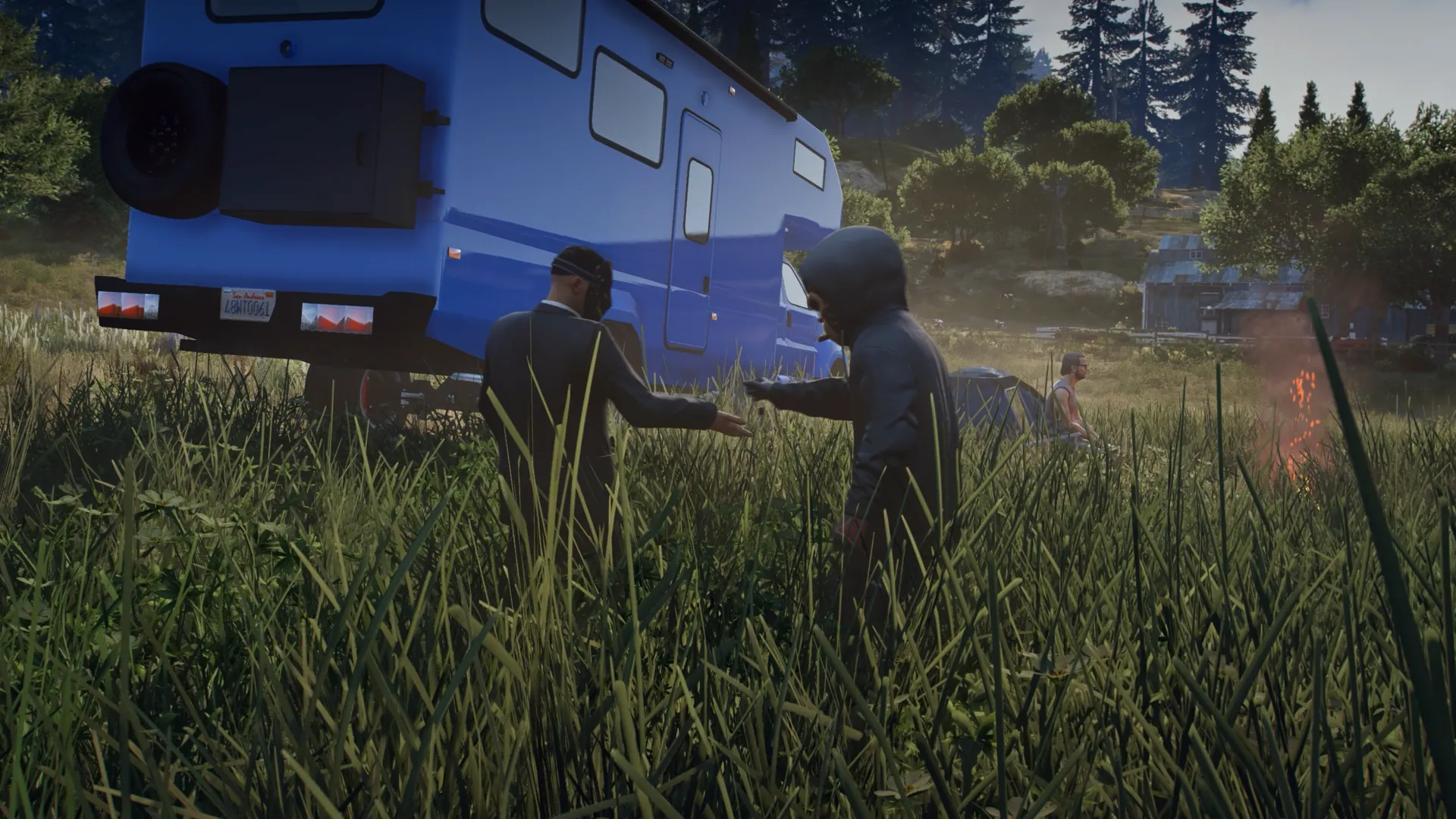
You drag your repair kit into your offer. Bob puts in two gold bars and a Rolex and confirms. You confirm and the swap happens: once it closes, the alerts tell you what went out and what came in.
If someone cancels or walks away, everyone keeps their own.
What comes in and goes out
Every time you get, lose or use something, an alert shows the amount, in green, red or blue. If it repeats, it adds up in the same alert. Each player picks which corner they want it in.